55
0698-651 Operating unit - 04/2021
en
KM
RM
NG
and
or
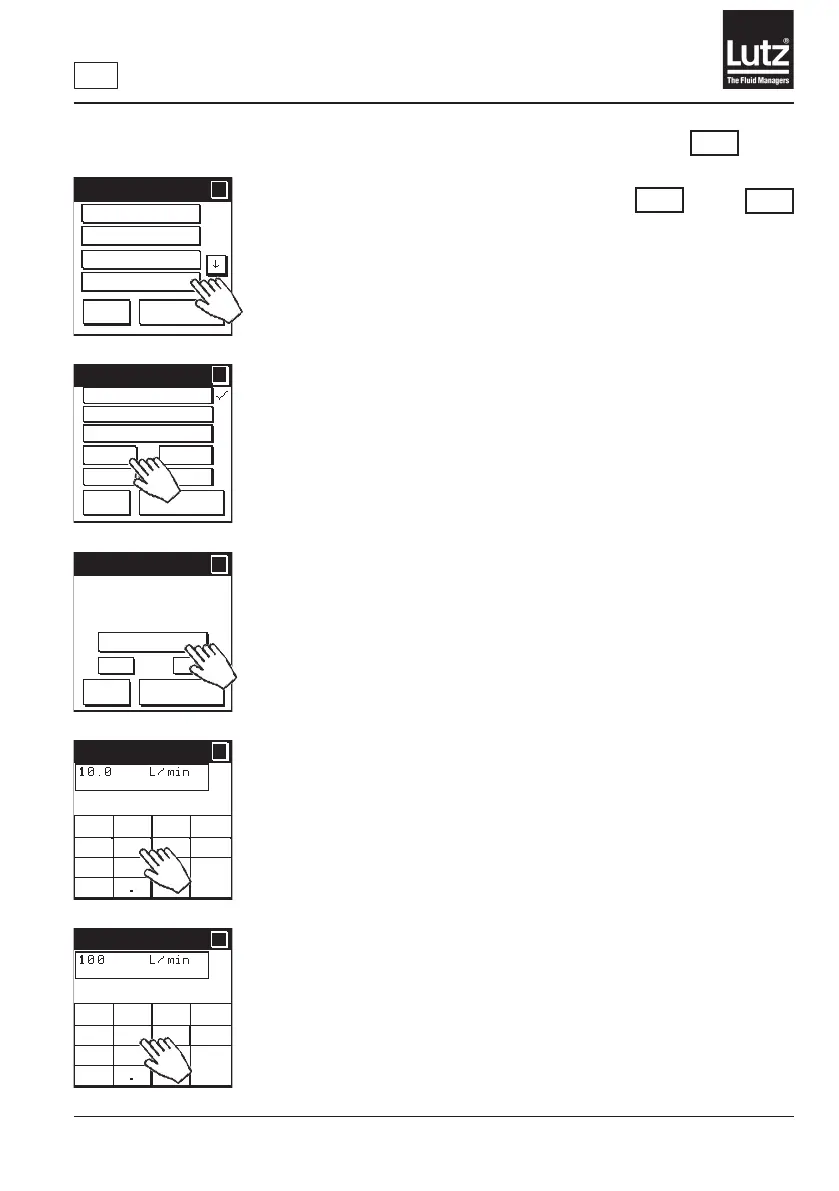
9.22.4 Analog output
Press "O"toswitchtheanalogoutputo.
This is the factory setting.
Press "0-20 mA NAMUR", "4-20 mA NAMUR", "0-20mA",
"4-20mA" or "0-10 V" to set up the analog output for this function.
Press "Change value"toadjusttheanalogsignalinlinewiththeowrate
range of the meter.
Enterthelowestowvalueforthelowestsignallevelandthehighestow
value for the highest signal level.
Press "On" to switch the analog output on.
Press "O"toswitchtheanalogoutputo.
This is the factory setting.
Press "
←← C" to delete the last entry on the display.
Use the buttons "0-9" and "." to enter the value.
Press "Cncl” to cancel the entry and return to the previous screen.
Press "OK"tosavethevalueandnishmakingentries.
Press "
←← C" to delete the last entry on the display.
Use the buttons "0-9" and "." to enter the value.
Press "Cncl" to cancel the entry and return to the previous screen.
Press "OK"tosavethevalueandnishmakingentries.
Communication 1/2
?
?
Digital input
Alarm output
RS 485
Analog output
OK
Cancel
Analog output
?
?
OK
Cancel
Off
0-20 mA NAMUR
4-20 mA NAMUR
0-20mA
4-20mA
0-10 V DC
Analog value
?
?
OK
Cancel
On
Off
Change value
Min. value at
10.0 L/min
Max. value at
100.0 L/min
Min. analog val.
?
?
OK
Cncl
← ←
C
1
2 3
654
7
8 9
0
Max. analog val.
?
?
OK
Cncl
← ←
C
1
2 3
654
7
8 9
0



 To Next Page