18
0698-651 Operating unit - 04/2021
en
8.2 Turning the operating unit / pulse converter / protection cap
NOTICE
►Use the supplied Allen key SW3 for the screws.
►Only tighten the screws hand-tight.
The operating unit, pulse converter and protection cap can be turned
to the required position in 90°-steps.
Mounting steps for operating unit (The assembly of the pulse converter
and the protection cap must be made as follows):
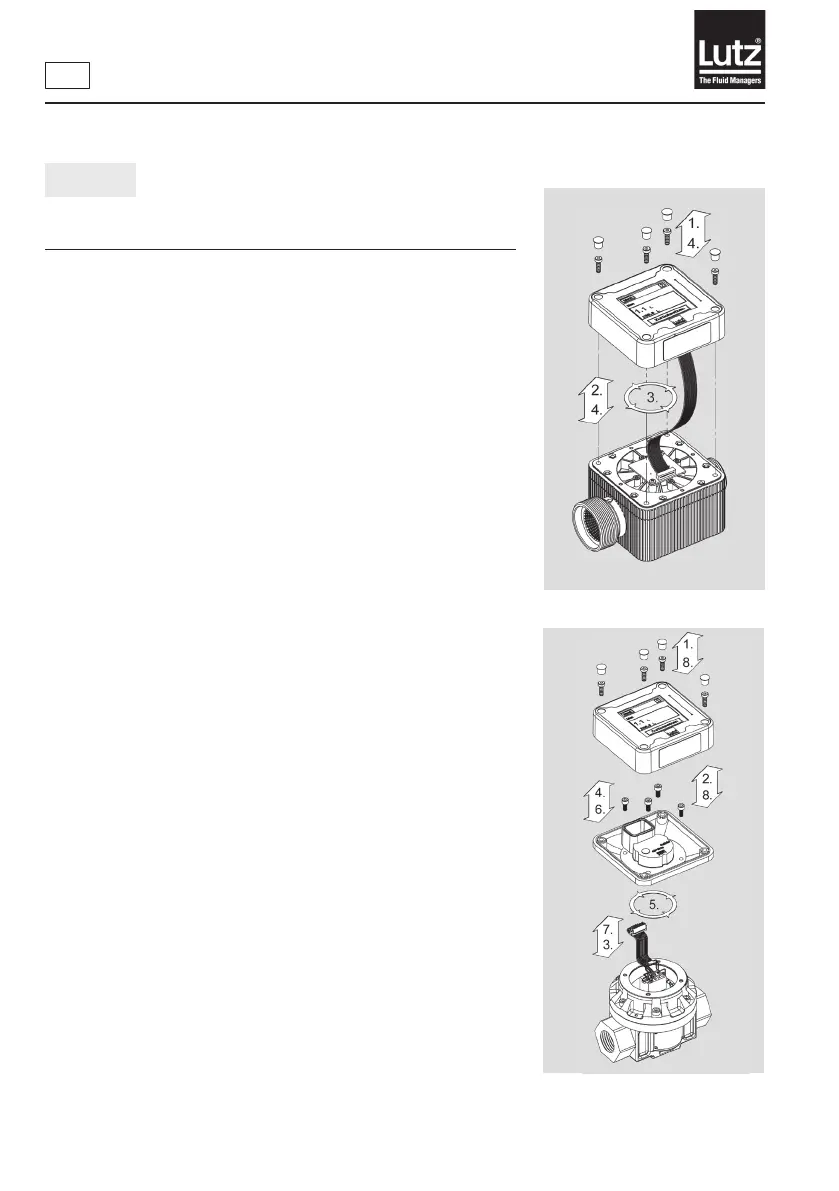
Flow meter system TS (→ Fig. 6a):
1. Remove the caps and release the screws.
2. Carefullylifttheoperatingunit.Payattentiontocablelength!
3. Turn the operating unit to the required position.
4. Attach the operating unit onto the module placed below and mount
the caps.
Fig. 6a - Turning the operating unit
Fig. 6b - Turning the operating unit
Flow meter system HDO (→ Fig. 6b):
1. Remove the caps and release the screws.
2. Carefullylifttheoperatingunit.Payattentiontocablelength!
3. Release the plug.
4. Remove the screws.
5. Turn the intermediate plate into position.
6. Fasten the screws.
7. Connect the plug to the operating unit circuit board.
8. Secure the operating unit in the desired position on the intermedi-
ate plate and mount the caps.



 To Next Page