51
0698-651 Operating unit - 04/2021
en
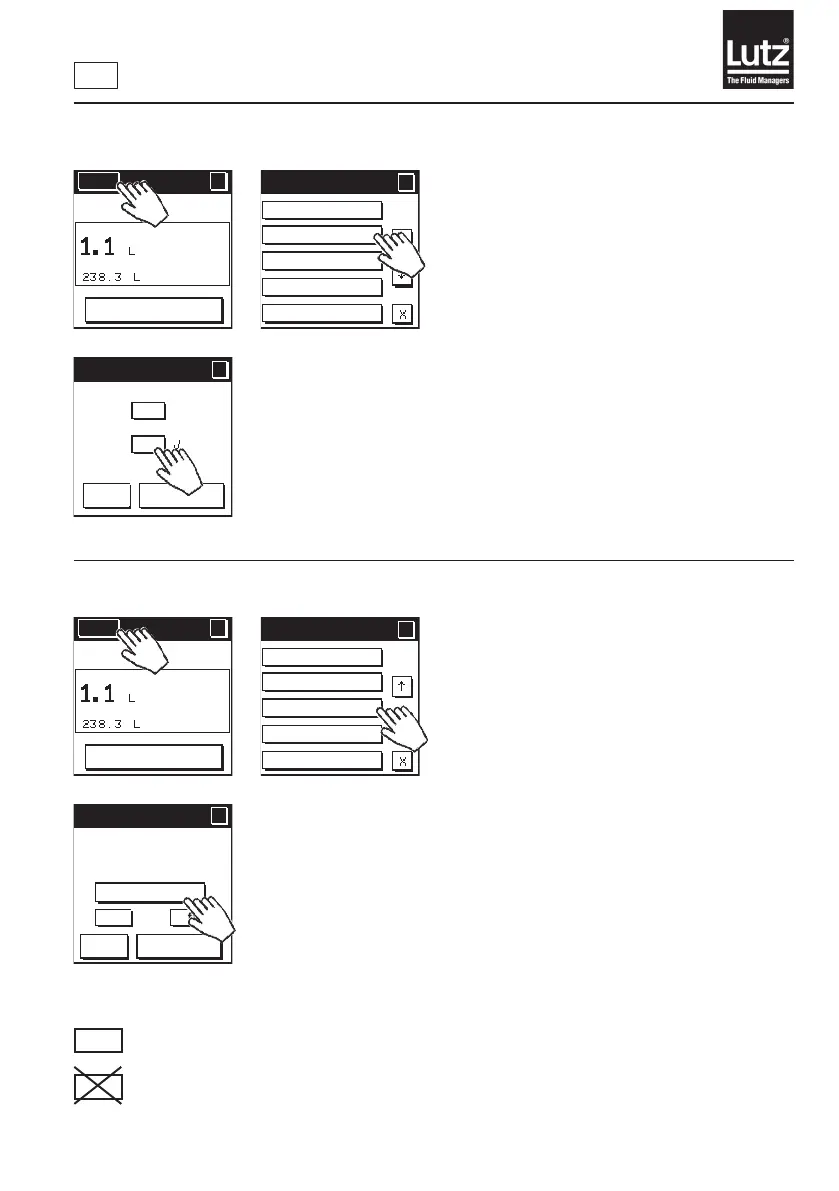
9.20 Safety prompt On/O
Press "On" to switch the safety prompt before the start of volume preselec-
tion on. This is the factory setting.
Press "O" to switch the safety prompt before the start of volume preselec-
tiono.
Press "OK" to save the selection and return to the menu level.
Press "Cancel" to retain the setting and return to the previous menu level.
9.21 Flow monitoring On/O/Change value
Press "Change value"todenethelowerandupperlimitforow
monitoring.
Press "On"toswitchowmonitoringon.
Press "O"toswitchowmonitoringo.
This is the factory setting.
Startupconditionsforowmonitoring:
RM
The counting operation runs longer than the time set under Fault detection/Monitoring time.
RM
The counting operation runs longer than 10 seconds.
Menu
?
RESET
MAN
Menu 4/5
?
?
LCD contrast
Safety prompt
Flow monitoring
Communication
Simulation
Safety prompt
?
?
OK
Cancel
On
Off
Menu
?
RESET
MAN
Menu 4/5
?
?
LCD contrast
Safety prompt
Flow monitoring
Communication
Simulation
Flow monitoring
?
?
OK
Cancel
On
Change value
Off
Lower limit
0 L/min
Upper limit
100 L/min



 To Next Page