HEAT SCREEN 2
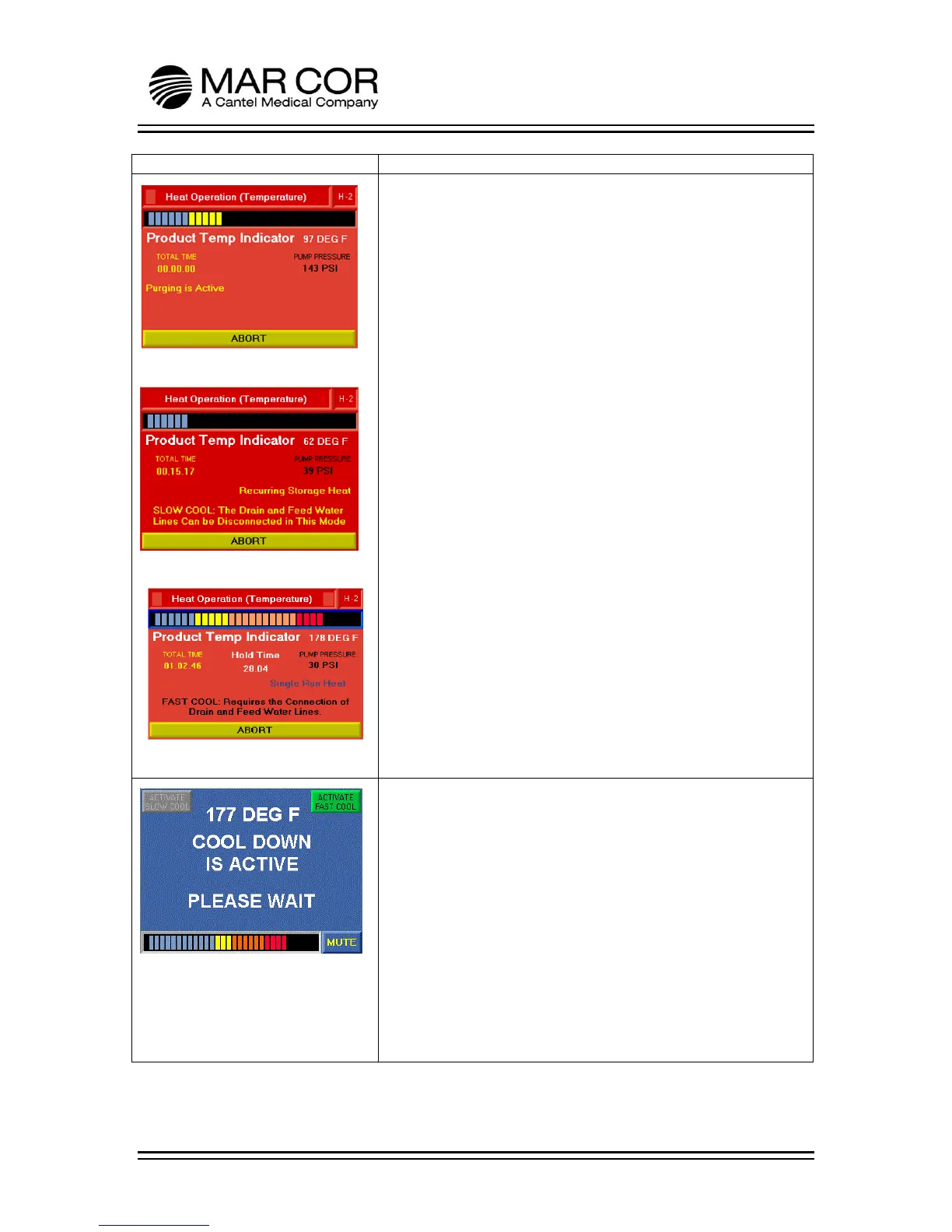
Figure 1 shows the screen while the RO is purging for the heat
process. The Single Heat and Storage Heat purge processes are
identical. Information available is the product temperature
(displayed numerically and graphically), pump pressure, total time
of the process and a message in yellow indicating that purging is
active.
Figure 2 shows the screen while the RO is heating up to target
temperature of 176°F (80°C). The RO indicates the heat process
selected (Recurring Storage Heat) and the cooling method active
(SLOW COOL: The Drain and Feed Water Lines Can be
Disconnected in This Mode). Other information available is the
product temperature (displayed numerically and graphically),
pump pressure and total time of the process. This process is the
same for Storage Heat and Single Heat.
Figure 3 shows the screen while the RO is in heat hold. This is
where the temperature is held at 176°F (80°C) for 30 minutes.
The Hold Time counter counts down from 30 minutes to zero
before exiting the heat screen. The screen shows the heat
process selected (Single Run Heat) and the cooling method active
(FAST COOL: Requires the Connection of Drain and Feed Water
Lines). Other information available is the product temperature
(displayed numerically and graphically), pump pressure and total
time of the process. This process is the same for Storage Heat
and Single Heat
The operator can ABORT the heat process. If the temperature is
above 120°F (49°C), the RO will proceed to the cool down screens.
If below 120°F (49°C), the RO will proceed to the post heat rinse.
COOL DOWN SCREEN
After the hold time is complete during a single heat, the RO will
begin a cool down process. In SLOW COOL, the unit will cool by
convection. In FAST COOL, the inlet solenoid valve (SV1) opens
and closes allowing small amounts of cooler feed water to enter
the machine. The cool down process is active until the product
water temperature falls below 120°F (49°C). If in STORAGE HEAT,
this screen is only displayed if the process is canceled or aborted
and the temperature is above 120°F (49°C).
When Cool Down is active, the operator can toggle between Fast
Cool and Slow Cool. When the ACTIVATE SLOW COOL or
ACTIVATE FAST COOL is gray, that indicates it is in that mode. To
change, press the green button and it will change cooling mode.
Fast Cool requires feed water and drain connections.



 To Next Page