3030226 Rev. D 4-16 Screen Operation And Specifications
Screen Titles: Chem Process
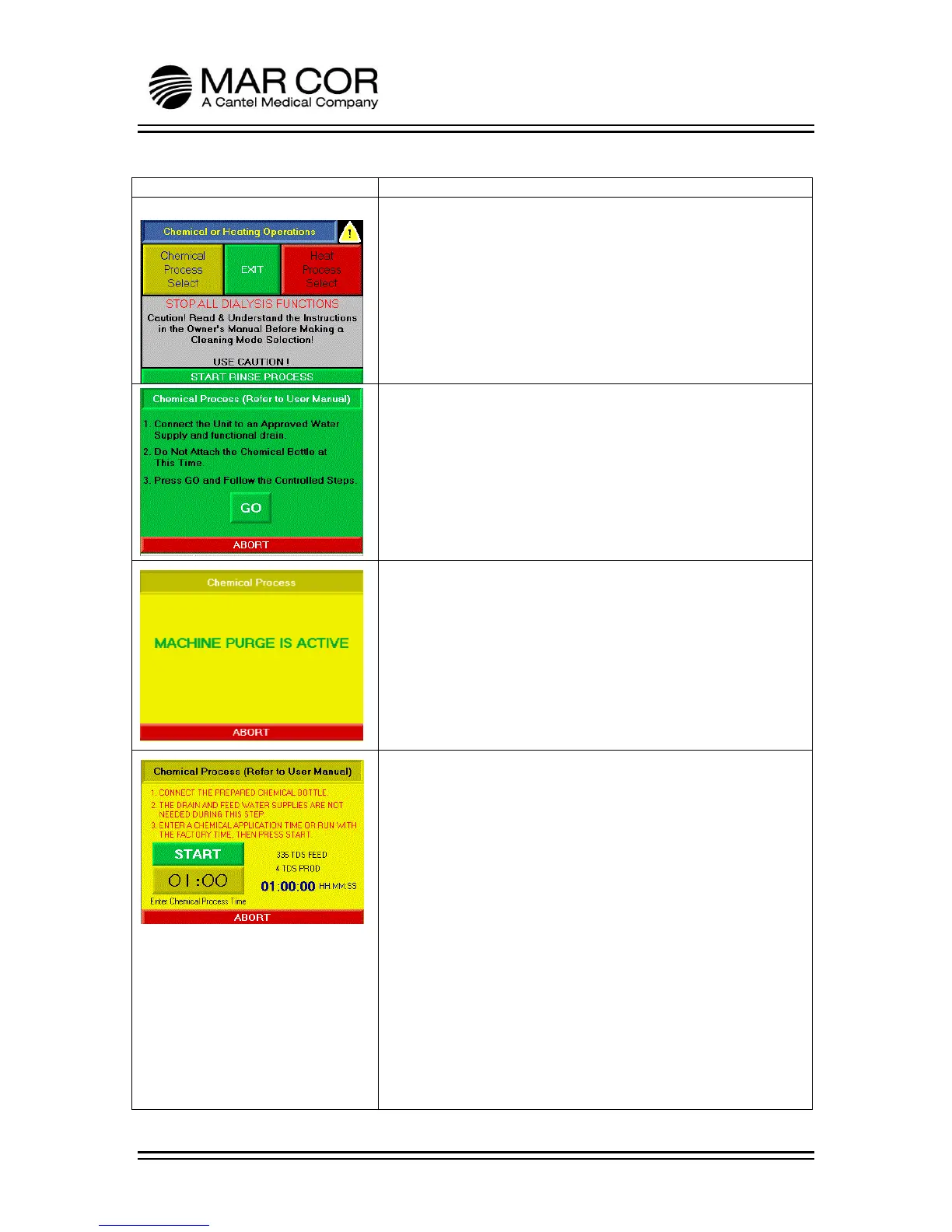
CHEMICAL OR HEATING OPERATIONS SELECTION SCREEN
The operator can only enter the Chemical or Heating Operations
selection screen from the Main Screen. The operator must hold
the banner at the top of the Main Screen for 2 seconds to enter
this screen.
The operator can press the CHEMICAL PROCESS SELECT, EXIT,
HEAT PROCESS SELECT or START RINSE PROCESS. If the operator
presses EXIT, the screen returns to the Main Screen.
CHEM GO SCREEN
This screen provides the operator instructions for getting the RO
ready for a chemical cleaning or sanitization.
Operator presses GO to proceed with purge process.
The operator can press ABORT and return to the Chemical or
Heating Operation selection screen.
CHEM PURGE SCREEN
During the MACHINE PURGE IS ACTIVE screen, the RO is draining
and refilling the internal tank to the correct water level with
product water for the chemical process.
The operator can press ABORT and return to the Chemical or
Heating Operation selection screen.
CHEM START SCREEN
This screen provides the operator instructions for connecting the
chemical bottle and has an adjustable timer for the chemical
process. This timer is settable between 36-60 minutes.
The operator can initiate the chemical process by pressing the
START button. A countdown clock indicates where the RO is in its
process. The feed and product conductivity are displayed to
show that chemical is being introduced into the RO.
If the operator does not connect the chemical bottle or does not
add chemical to the bottle prior to pressing START, the RO will
sound an audible alarm and the ABORT button will flash after a
delay. To clear the alarm, the operator will need to identify the
issue. Once chemical is sensed, the alarm will clear after
approximately a 3 minute delay.
The operator can press ABORT and return to the Chemical or
Heating Operation selection screen.



 To Next Page