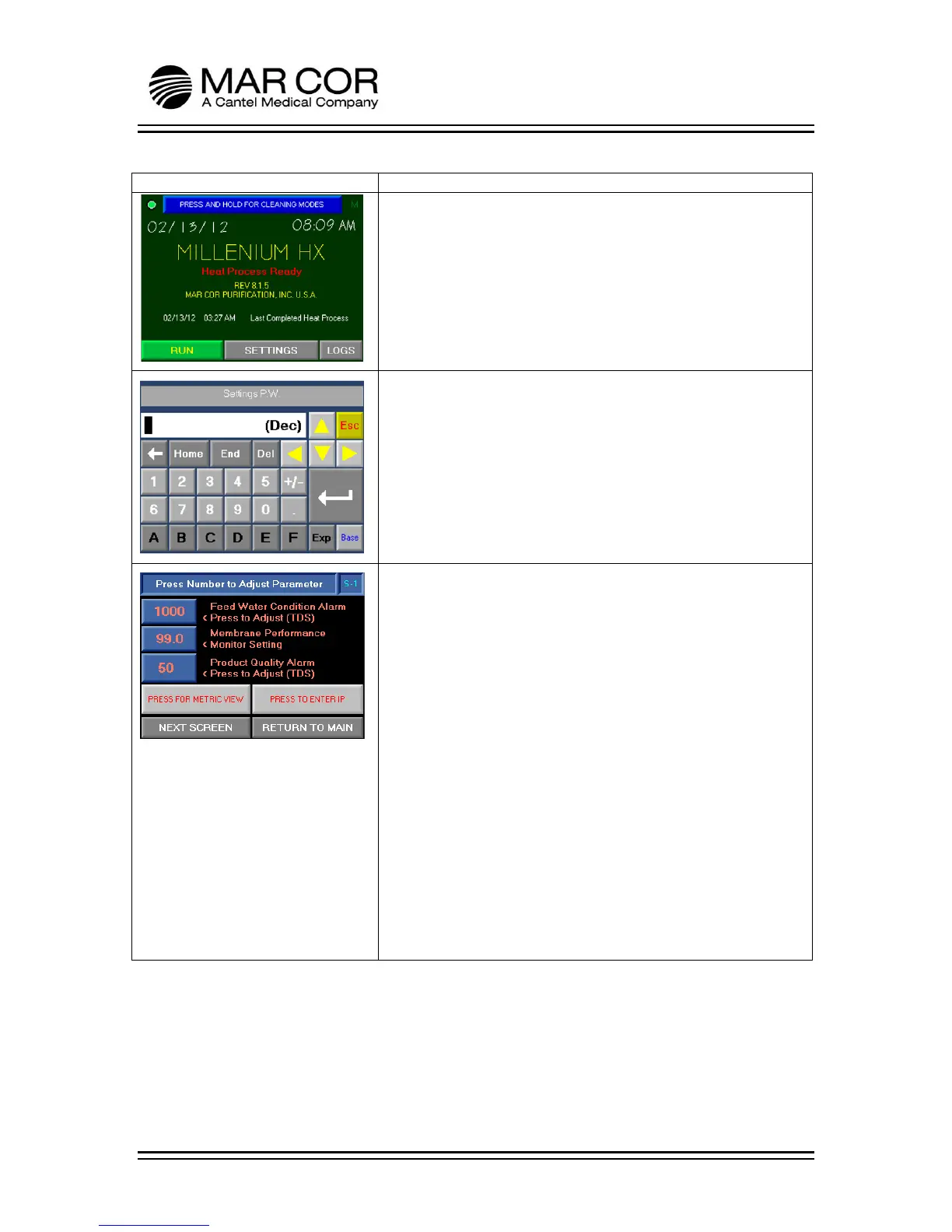
PASSWORD
To enter the settings screen, the operator must enter a pass code.
The passcode is 999.
NOTE: Entering the SETTINGS screen and adjusting any setting
should only be done by properly trained personnel and according
to facility policies and procedures.
SETTINGS S-1
From this screen, the operator can adjust the Feed Water
Condition Alarm, Membrane Performance and the Product
Quality Alarm.
Feed Water Condition Alarm is user adjustable between 50-1000
TDS (100-2000 µS). If incoming RO feed water quality is greater
than 1000 TDS (2000 µS), the alarm can be disabled by setting the
Feed Water Condition alarm to 1001 (2001).
Membrane Performance is user adjustable from 90-99.9%. This
should be set at the time of installation. Refer to the Installation
Guidelines in Chapter 2.
Product Quality Alarm is user adjustable from 1-50 TDS (1-100
µS).
The operator can also toggle between US and metric readings
(PRESS FOR METRIC VIEW), enter IP data (PRESS TO ENTER IP),
advance to NEXT SCREEN or return to the Main Screen by
pressing RETURN TO MAIN.



 To Next Page