EasyManua.ls Logo

Marantz SR-73 - Marantz SR-73 System Operations and Connections; Remote Control System Interconnection; Using PRE OUT Jacks; Listening to the Tuner

Marantz SR-73
108 pages
Print Icon
To Next Page IconTo Next Page
To Previous Page IconTo Previous Page
Loading...
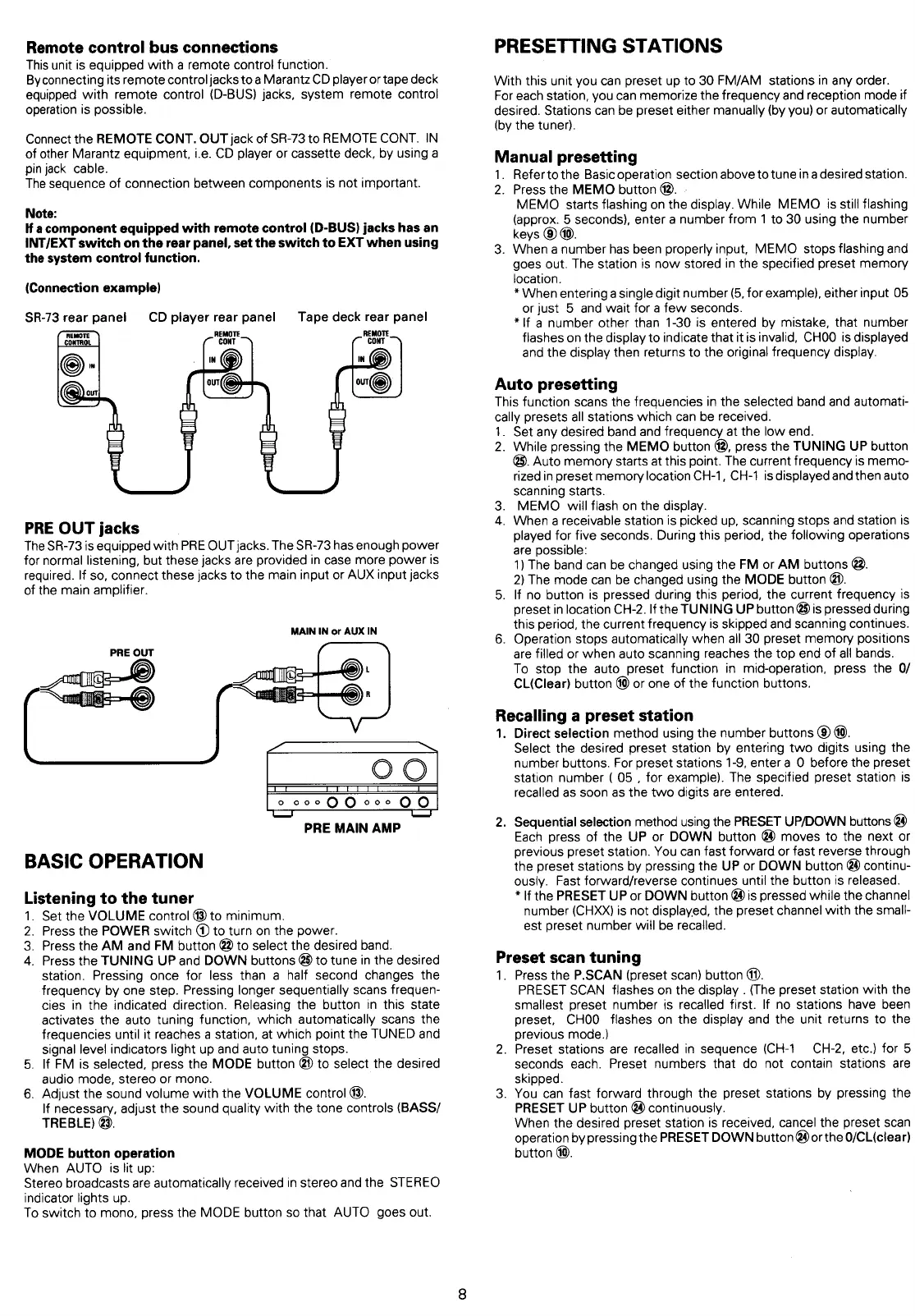
Remote
control
bus
connections
This
unit
is
equipped
with
a
remote
control
function.
Byconnecting
its
remote
control
jacks
to
a
Marantz
CD
player
or
tape
deck
equipped
with
remote
control
(D-BUS)
jacks,
system
remote
control
operation
is
possible.
Connect
the
REMOTE
CONT.
OUT
jack
of
SR-73
to
REMOTE
CONT.
IN
of
other
Marantz
equipment,
i.e.
CD
player
or
cassette
deck,
by
using
a
pin
jack
cable.
The
sequence
of
connection
between
components
is
not
important.
Note:
If
acomponent
equipped
with
remote
control
(D-BUS)
jacks
has an
INT/EXT
switch
on
the
rear
panel,
set
the
switch
to
EXT
when
using
the
system
control
function.
(Connection
example)
SR-73
rear
panel
CD
piayerrear
panel
Tape
deck
rear
panel
PRE
OUT
jacks
The
SR-73
is
equipped
with
PRE
OUT
jacks.
The
SR-73
has
enough
power
for
normal
listening,
but
these
jacks
are
provided
in
case
more
power
is
required.
If
so,
connect
these
jacks
to
the
main
input
or
AUX
input
jacks
of
the
main
amplifier.
MAIN
IN
or
AUX
IN
PRE
OUT
OO
|
A
©
corp
QO
Qr0e
OO
Toe!
PRE
MAIN
AMP
BASIC
OPERATION
Listening
to
the
tuner
.
Set
the
VOLUME
control
4
to
minimum.
.
Press
the
POWER
switch
@
to
turn
on
the
power.
.
Press
the
AM
and
FM
button
@
to
select
the
desired
band.
.
Press
the
TUNING
UP
and
DOWN
buttons
@
to
tune
in
the
desired
station.
Pressing
once
for
less
than
a
half
second
changes
the
frequency
by
one
step.
Pressing
longer
sequentially
scans
frequen-
cies
in
the
indicated
direction.
Releasing
the button
in
this
state
activates
the
auto
tuning
function,
which
automatically
scans
the
frequencies
until
it
reaches
a
station,
at
which
point
the
TUNED
and
signal
level
indicators
light
up and
auto
tuning
stops.
5.
If
FM
is
selected,
press
the
MODE
button
@?
to
select
the
desired
audio
mode,
stereo
or
mono.
6.
Adjust
the
sound
volume
with
the
VOLUME
control
®.
If
necessary,
adjust
the
sound
quality
with
the
tone
controls
(BASS/
TREBLE)
@.
PWN
MODE
button
operation
When
AUTO
is
lit
up:
Stereo
broadcasts
are
automatically
received
in
stereo
and
the
STEREO
indicator
lights
up.
To
switch
to
mono,
press
the
MODE
button
so
that
AUTO
goes
out.
PRESETTING
STATIONS
With
this unit
you
can
preset
up
to
30
FM/AM
stations
in
any
order.
For
each
station,
you
can
memorize
the
frequency
and
reception
mode
if
desired.
Stations
can
be
preset
either
manually
(by
you)
or
automatically
(by
the
tuner).
Manual
presetting
1.
Refertothe
Basic operation
section
above
to
tune
ina
desired
station.
2.
Press
the
MEMO
button
@.
-
MEMO
starts
flashing
on
the
display.
While
MEMO
is
still
flashing
(approx.
5
seconds),
enter
a
number
from
1
to
30
using
the
number
keys
©
@@.
3.
When
a
number
has
been
properly
input,
MEMO
stops
flashing
and
goes
out.
The
station
is
now
stored
in
the
specified
preset
memory
location.
*
When
entering
a
single
digit
number
(5,
for
example),
either
input
05
or
just
5
and
wait
for
a
few
seconds.
*\f
a
number
other
than
1-30
is
entered
by
mistake,
that
number
flashes
on
the
display
to
indicate
that
it
is
invalid,
CHOO
is
displayed
and
the
display
then
returns
to
the
original
frequency
display.
Auto
presetting
This
function
scans
the
frequencies
in
the
selected
band and
automati-
cally
presets
all
stations
which
can
be
received.
1.
Set
any
desired
band
and
frequency
at
the
low
end.
2.
While
pressing
the
MEMO
button
4,
press
the
TUNING
UP
button
@.
Auto
memory
starts
at
this
point.
The
current
frequency
is
memo-
rized
in
preset
memory
location
CH-1,
CH-1
is
displayed
and
then
auto
scanning
starts.
3.
MEMO
will
flash
on
the
display.
4.
When
a
receivable
station
is
picked
up,
scanning
stops
and
station
is
played
for
five
seconds.
During
this
period,
the
following
operations
are
possible:
1)
The
band
can
be
changed
using
the
FM
or
AM
buttons
@.
2)
The
mode
can
be
changed
using
the
MODE
button
@).
5.
If
no
button
is
pressed
during
this
period,
the
current
frequency
is
preset
in
location
CH-2.
If
the
TUNING
UP
button
@
is
pressed
during
this
period,
the
current
frequency
is
skipped
and
scanning
continues.
6.
Operation
stops
automatically
when
all
30
preset
memory
positions
are
filled
or
when
auto
scanning
reaches
the top
end
of
all
bands.
To
stop
the
auto
preset
function
in
mid-operation,
press
the
0/
CL(Clear)
button
or
one
of
the
function
buttons.
Recalling
a
preset
station
1.
Direct
selection
method
using
the
number
buttons
@.
Select
the
desired
preset
station
by
entering
two
digits
using
the
number
buttons.
For
preset
stations
1-9,
enter
a
O
before
the preset
station
number
(
05
,
for
example).
The
specified
preset
station
is
recalled
as
soon
as
the
two
digits
are
entered.
2.
Sequential
selection
method
using
the
PRESET
UP/DOWN
buttons
@
Each
press
of
the
UP
or
DOWN
button
@
moves
to
the
next
or
previous
preset
station.
You
can
fast
forward
or
fast
reverse
through
the
preset
stations
by
pressing
the
UP
or
DOWN
button
@)
continu-
ously.
Fast
forward/reverse
continues
until
the
button
is
released.
*
If
the
PRESET
UP
or
DOWN
button
@
is
pressed
while
the
channel
number
(CHXX)
is
not
displayed,
the preset
channel
with
the
small-
est
preset
number
will
be
recalled.
Preset
scan
tuning
1.
Press
the
P.SCAN
(preset
scan)
button
@.
PRESET
SCAN
flashes
on
the
display
.
(The
preset
station
with
the
smallest
preset
number
is
recalled
first.
If
no
stations
have
been
preset,
CHOO
flashes
on
the
display
and
the
unit
returns
to
the
previous
mode.)
2.
Preset
stations
are
recalled
in
sequence
(CH-1
CH-2,
etc.)
for
5
seconds
each.
Preset
numbers
that
do
not
contain
stations
are
skipped.
3.
You
can
fast
forward through
the
preset
stations
by
pressing
the
PRESET
UP
button
@4
continuously.
When
the
desired
preset
station
is
received,
cancel
the
preset
scan
operation
by
pressing
the
PRESET
DOWN
button
@
or
the
0/CLiclear)
button
@.

Table of Contents

Related product manuals