EasyManua.ls Logo

Marantz SR-73 - Marantz SR-73 Memory, Timer, and Remote Operation; Acoustic Preset Memory Functions; Setting the Sleep Timer; Remote Control Modes and Source Selection

Marantz SR-73
108 pages
Print Icon
To Next Page IconTo Next Page
To Previous Page IconTo Previous Page
Loading...
ACOUSTIC
PRESET
MEMORY
©@
The
acoustic
memory
function
allows the
storage
of
up
to
5
combined
settings
of
surround
mode
with
digital
delay
time,
centre
mode,
and
surround
and
centre
level
volumes,
under
5
presets.
Presetting
method
1.
2.
Select
the
surround
mode
to
be
preset,
set
the
delay
time
and,
on
the
remote
control,
set
the
surround
and
centre
volumes.
Press
the
ACOUSTIC
button ®.
The
ACOUS
indicator
appears
on
the
display,
and
the
indicator
flashes
at
0.2-second
intervals
if
no
acoustic
memory
has
been
preset
yet.
.
Press
the
MEMO
button
@
within
2
seconds
of
the
above.
The
ACOUS
and
MEMO
indicators
will
flash.
.
Select
the
preset
number
to
store
the
set-up
by
pressing
one
of
numeric
buttons
1
to
5.
.
Within
8
seconds
of
the
above,
press
the
MEMO
button
@®.
Presetting
is
now
complete.
Recalling
a
preset
ie
2.
Press
the
ACOUSTIC
button
®.
Press
one
of
numeric
buttons
1
to
5
to
select
the
acoustic
preset
to
be
recalled.
*
Presetting
and
recalling
are
also
possible
using
the
remote
control.
Setting
the
sleep
timer
Set
the
sleep timer
while
the
power
is
turned
on.
1.
2.
3.
Turn
the
power
ON
and
press
the
SLEEP
button
@).
SLEEP
flashes
on
the
display.
Within
8
seconds,
press
the
MEMO
button
@.
SLEEP
10°
is
displayed.
Press
the
SLEEP
button
48)a
number
of
times
to
set
the
desired
sleep
time.
Each
press
of
the
SLEEP
button
changes
the
display
in
the
following
order:
10
+
20
30
40
50
>
60
90
10.
.
Press
the
MEMO
button
42
to
complete
the
setting.
SLEEP
stops
flashing
and
lights
up
steadily.
If
the
MEMO
button
@
is
not
pressed
within
8
seconds,
the
sleep
timer
is
automatically
cancelled.
*While
the
sleep
timer
is
activated,
the
remaining
time
can
be
displayed
for
about
2
seconds
by
pressing
the
SLEEP
button
4.
*
To
cancel
the
sleep
timer,
press
the
SLEEP
button
and
then
press
the
0/CLiclear)
button
@.
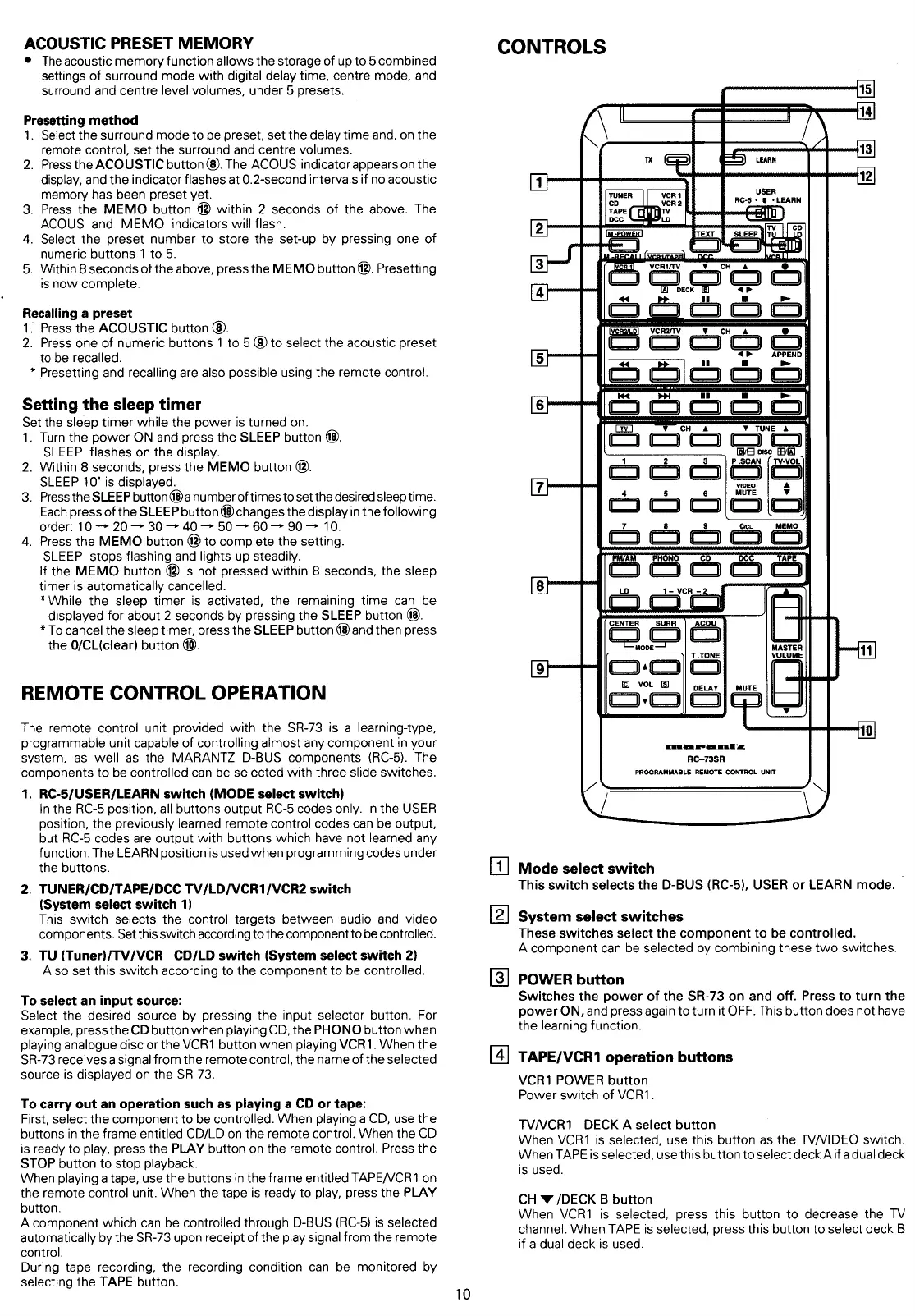
REMOTE
CONTROL
OPERATION
The
remote
control
unit
provided
with
the
SR-73
is
a
learning-type,
programmable
unit
capable
of
controlling
almost
any
component
in
your
system,
as
well
as
the
MARANTZ
D-BUS
components
(RC-5).
The
components
to
be
controlled
can
be
selected
with
three
slide
switches.
1.
RC-5/USER/LEARN
switch
(MODE
select
switch)
In
the
RC-5
position,
all
buttons
output
RC-5
codes
only.
In
the
USER
position,
the
previously
learned
remote
control
codes
can
be
output,
but
RC-5
codes
are
output
with
buttons
which
have
not learned
any
function.
The
LEARN
position
is
used
when
programming
codes
under
the
buttons.
.
TUNER/CD/TAPE/DCC
TV/LD/VCR1/VCR2
switch
(System
select
switch
1)
This
switch
selects
the
control
targets
between
audio
and
video
components.
Set
this
switch
according
to
the
component
to
be
controlled.
.
TU
(Tuner)/TV/VCR
CD/LD
switch
(System
select
switch
2)
Also
set
this
switch
according
to
the
component
to
be
controlled.
To
select
an
input
source:
Select
the
desired
source
by
pressing
the
input
selector
button.
For
example,
press
the
CD
button
when
playing
CD,
the
PHONO
button
when
playing
analogue
disc
or
the
VCR1
button
when
playing
VCR1.
When
the
SR-73
receives
a
signal
from
the
remote
control,
the
name
of
the
selected
source
is
displayed
on
the
SR-73.
To
carry
out
an
operation
such
as
playing
a
CD
or
tape:
First,
select
the
component
to
be
controlled.
When
playing
a
CD,
use
the
buttons
in
the
frame
entitled
CD/LD
on
the
remote
control.
When
the
CD
is
ready
to
play,
press
the
PLAY
button
on
the
remote
control.
Press
the
STOP
button
to
stop
playback.
When
playing
a
tape,
use
the
buttons
in
the
frame
entitled
TAPE/VCR1
on
the
remote
control
unit.
When
the
tape
is
ready
to
play,
press
the
PLAY
button.
A
component
which
can
be
controlled
through
D-BUS
(RC-5)
is
selected
automatically
by
the
SR-73
upon
receipt
of
the
play
signal
from
the
remote
control.
During
tape
recording,
the
recording
condition
can
be
monitored
by
selecting
the
TAPE
button.
10
CONTROLS
USER
RC-5
+
@
+LEARN
6
oan
CENTER
SURR
‘MODE
MASTER
T.TONE
@
vo
oom
meen
meen
ee
RC-73SR
PROGRAMMABLE
REMOTE
CONTROL
UNIT
[4]
Mode
select
switch
This
switch
selects
the
D-BUS
(RC-5),
USER
or
LEARN
mode.
System
select
switches
These
switches
select
the
component
to
be
controlled.
A
component
can
be
selected
by
combining
these
two
switches.
POWER
button
Switches
the
power
of
the
SR-73
on
and
off.
Press
to
turn
the
power
ON,
and
press
again
to
turn
it
OFF.
This
button
does
not
have
the
learning
function.
TAPE/VCR1
operation
buttons
VCR1
POWER
button
Power
switch
of
VCR1.
TVVCR1
DECK
A
select
button
When
VCR1
is
selected,
use
this
button
as
the
TV/VIDEO
switch.
When
TAPE
is
selected,
use
this
button
to
select
deck
A
if
a
dual
deck
is
used.
CH
w
/DECK
B
button
When
VCR1
is
selected,
press
this
button
to
decrease
the
TV
channel.
When
TAPE
is
selected,
press
this
button
to
select
deck B
if
a
dual
deck
is
used.

Table of Contents

Related product manuals