MAXDATA PLATINUM Server Board User’s Manual
26
5. Following the instructions packaged with the applicator, apply thermal grease to the
processor.
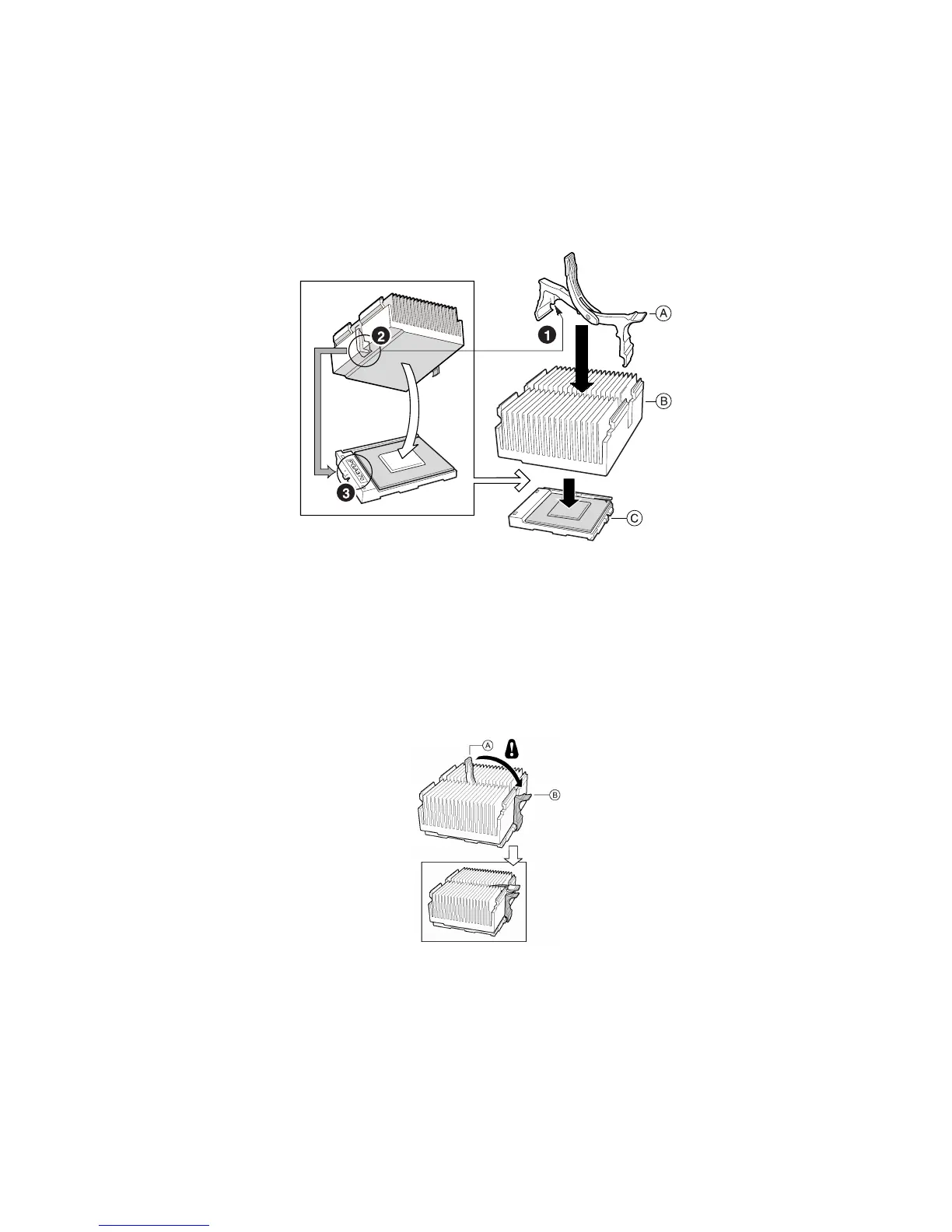
6. Position the heat sink slot (2) above the socket/processor slot (3).
7. Aligning the raised metal surfaces, place the heat sink on top of the processor.
8. Install the heat sink clip with pin (1) inserted into slot (2).
Figure 11. Installing the Heat Sink
A. Heat sink retention clip
B. Heat sink
C. Socket and processor
CAUTION
Use care when closing the locking lever – do it slowly.
9. Slowly close the locking lever (A) until it contacts tab (B).
Figure 12. Closing the Locking Lever
✏ NOTE
When using the boxed Intel
®
Pentium
®
III processor, compatible with the SCB2 server board,
it will come with a fan for the processor heat sink. This fan cannot be used in a 1U server
chassis. If you are integrating a 2U chassis, proceed to the next step.
1. Following the instructions provided with the processor, install the fan on the processor
heat sink.
2. Connect the fan to (A) if it is on the primary processor or to (B) if it is on the secondary
processor.



 To Next Page