MAXDATA PLATINUM Server Board User’s Manual
37
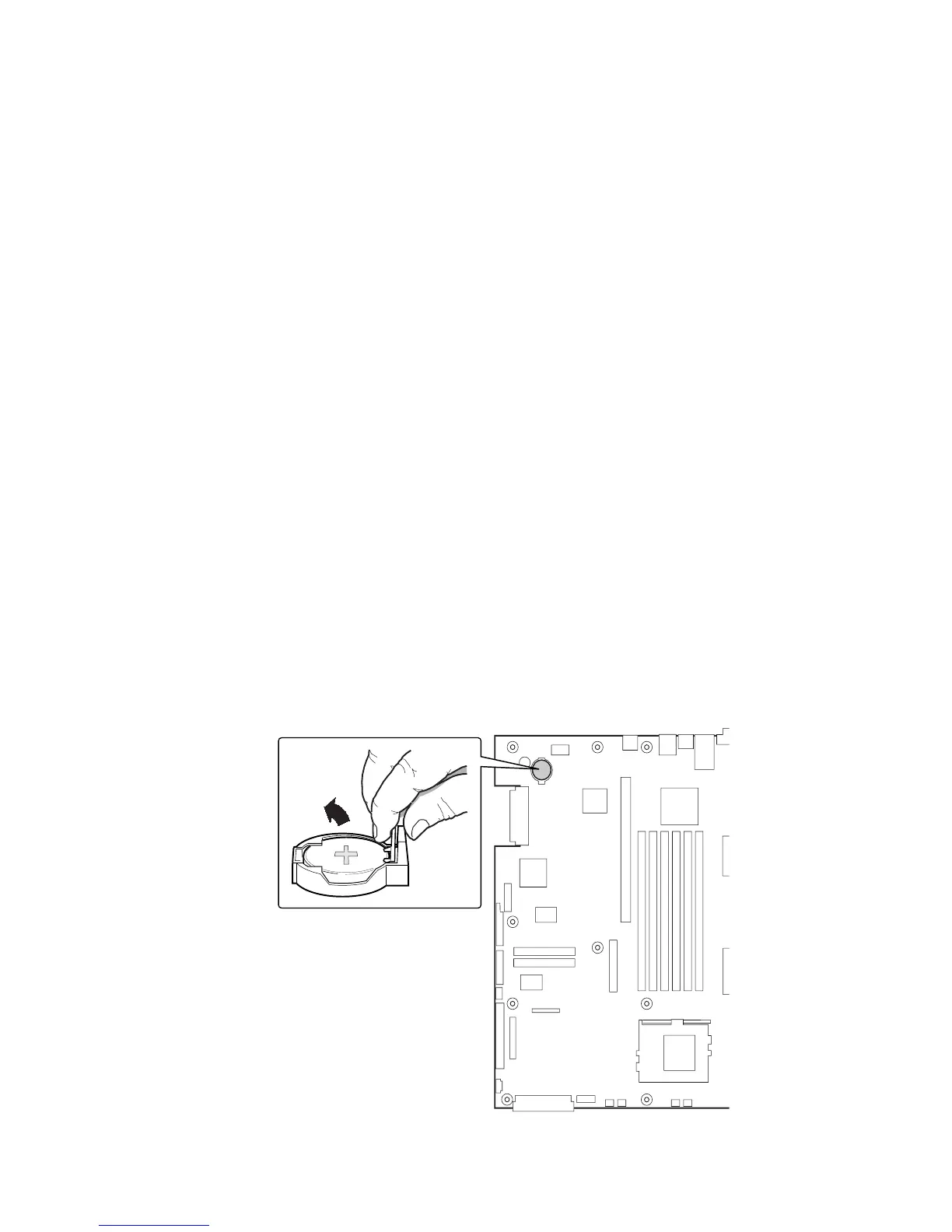
Replacing the Back up Battery
The lithium battery on the server board powers the real time clock (RTC) for up to 10 years in
the absence of power. When the battery starts to weaken, it loses voltage, and the server
settings stored in CMOS RAM in the RTC (for example, the date and time) may be wrong.
Contact your customer service representative or dealer for a list of approved devices.
WARNING
Danger of explosion if battery is incorrectly replaced. Replace only with the same or equiva-
lent type recommended by the equipment manufacturer. Discard used batteries according
to manufacturer’s instructions.
To replace the battery:
1. Before proceeding, record your custom BIOS settings.
2. Observe the safety and ESD precautions at the beginning of this chapter.
3. Open the chassis and locate the battery.
4. Push the upper end of the metal retainer away from the battery – the battery
pops up.
5. Remove the battery from its socket.
6. Dispose of the battery according to local ordinance.
7. Remove the new lithium battery from its package.
8. Being careful to observe the correct polarity, lay the battery in the socket.
9. Push the battery down – the metal retainer locks the battery in the socket.
10. Close the chassis.
11. Run Setup to restore the configuration settings to the RTC.
12. Restore your custom BIOS settings.
Figure 23. Replacing the Back up Battery



 To Next Page