MAXDATA PLATINUM Server Board User’s Manual
36
Removing a Processor
1. Observe the safety and ESD precautions at the beginning of this chapter and the additional
cautions given here.
2. If a heat sink fan is present, unplug it from the server board and remove it from the heat
sink.
3. Disengage the retention clip from the processor socket by slowly opening the locking
lever until it is vertical.
4. Remove the processor from the socket.
5. If you removed the processor from the secondary socket and are not replacing it, you
must install a terminator in its place.
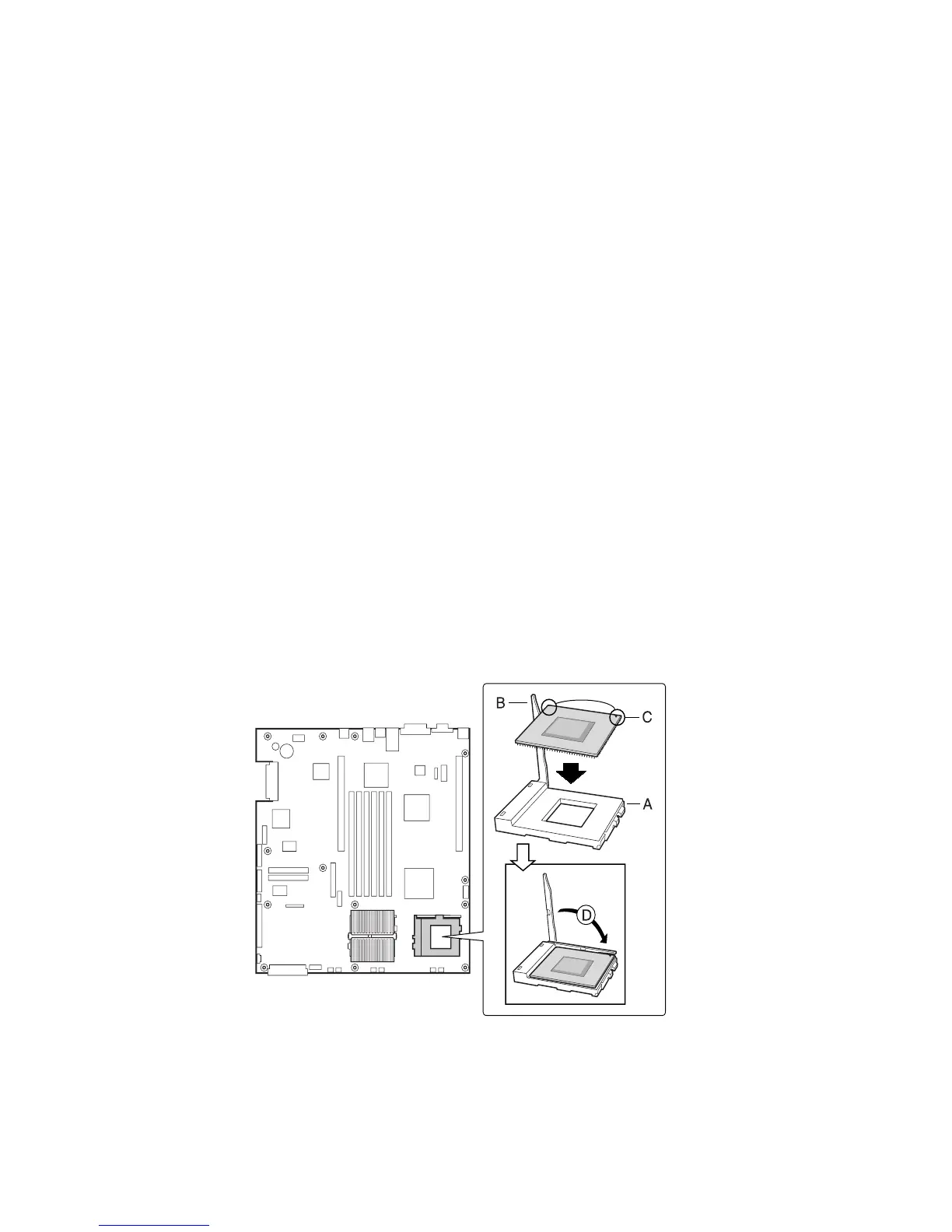
Installing and Removing a Terminator
If you are installing only one processor, you must install a terminator in the secondary pro-
cessor socket (A).
1. Observe the safety and ESD precautions at the beginning of this chapter and the additional
cautions given here.
2. Raise the locking bar on the socket.
3. To install a terminator, align the two corner marks on the terminator with the handle-side
of the socket (C) and then insert the terminator into the socket.
4. To remove a terminator, pull it out of the socket and then replace the it with an other
terminator or install a processor.
5. Lower the locking bar (B) completely.
Figure 22. Installing a Terminator



 To Next Page