MAXDATA PLATINUM Server Board User’s Manual
68
File Menu
The File menu has the following options:
• Save: Allows you to save the configuration immediately.
• Close: Allows you to close the Platform Event Action dialog without saving changes. If
you have made changes, you will be prompted to save changes before closing.
Help Topics Menu
The Help Topics menu has the following options:
• Help Topics: Displays help information.
Enabled Listbox
Contains the active events.
Disabled Listbox
Contains the events that are not active.
Buttons
• >>: Moves all the events from the enabled listbox to the disabled listbox.
• >: Moves the selected event from the enabled listbox to the disabled listbox.
• <: Moves the selected event from the disabled listbox to enabled the listbox.
• <<: Moves all the events from the disabled listbox to the enabled listbox.
• Save: Allows you to save the configuration immediately.
• Close: Allows you to close the Platform Event Action dialog without saving changes. If
you have made changes, you will be prompted to save changes before closing.
• Help: Displays help information.
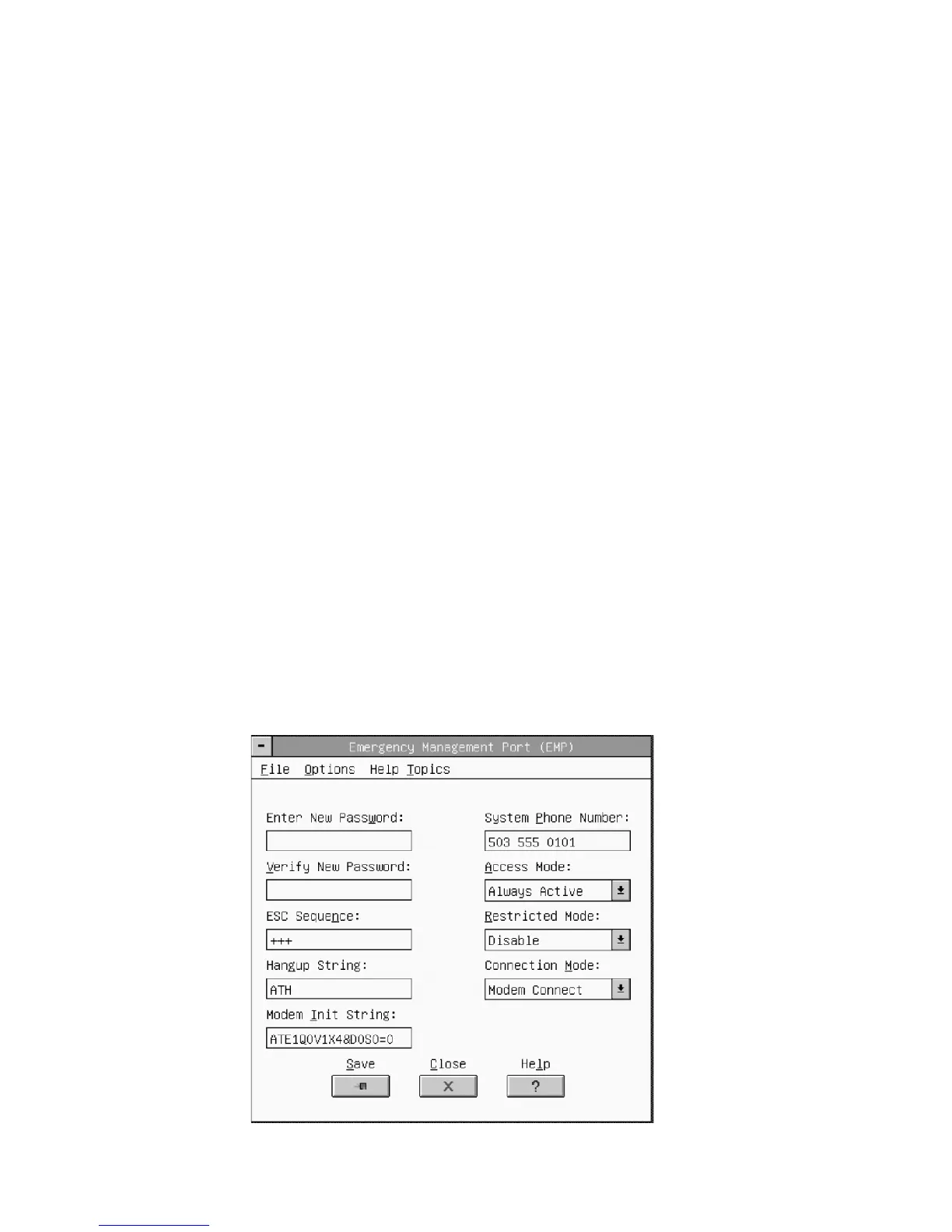
Emergency Management Port
This dialog allows you to configure the Emergency Management Port features. (See Figure 29.)
Figure 29. Emergency Management Port Dialog



 To Next Page