STARTING&DRIVING
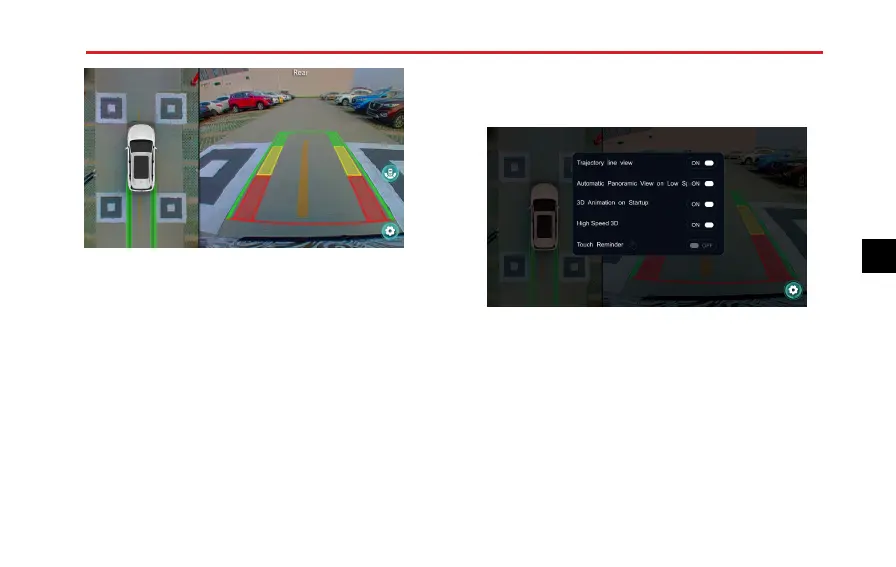
•T ouchorpressthe360°Viewbuttoninthecentre
consoletoenterintothedisplayinterfaceofthe360
aroundviewsystem,youarethenabletotouchbuttons
onthedisplaytocheckimagesfromdifferentangles
ofviewofthevehicletoprovideamuchsaferdriving
environment.
•T ouchtheiconlocatedintheupperRHcornerofthe
screentoswitchbetween2Dand3Dmodes.The3D
modeoffersvariousgraphicaldisplays,the2Dmode
allowsyoutoviewthefront,rear ,leftorrightofthe
vehicle.T ouchtheiconintherightofthescreento
togglebetweenwheelside,forwardwideandrearward
wideangleviewsfromthevehicle.
T ouchthesettingsiconinthelowerrightcornertoenter
thesettinginterface:
•T rajectoryLineView:Thisallowstheprojected
trajectorylinedisplaytobeswitchedONorOFF .
•AutomaticPanoramicViewonLowSpeed:Whenthe
vehicleistravellingatlessthan13mphthesystemcan
beconguredtoautomaticallyopenthe360around
viewinterfacewhentheindicatorsareactivatedandexit
whentheindicatorsarecancelled.Thisfunctioncanbe
switchedON/OFF .
•3DAnimationonStartup:Thefunctionofstartingthe
3DviewuponbootingcanbeswitchedON/OFF .
209
4



 To Next Page