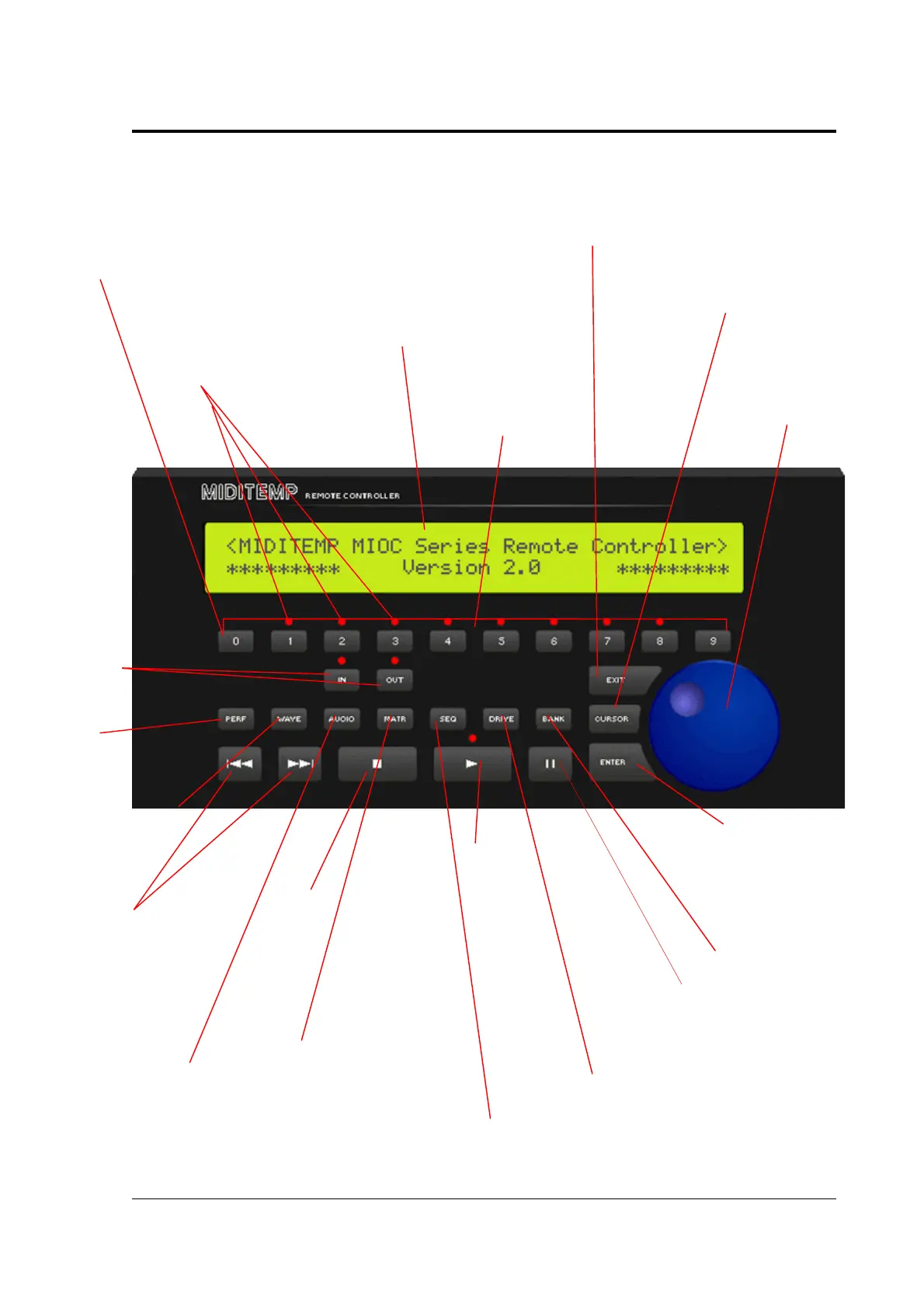
MIDITEMP MP 22-W, MP 22-CD, MP 88-W, MP 88-CD, PMM 88-E, MT 16-X
MIDITEMP MP 22-W, MP 22-CD, MP 88-W, MP 88-CD, PMM 88-E, MT 16-XMIDITEMP MP 22-W, MP 22-CD, MP 88-W, MP 88-CD, PMM 88-E, MT 16-X
MIDITEMP MP 22-W, MP 22-CD, MP 88-W, MP 88-CD, PMM 88-E, MT 16-X
11
1. Buttons and controls
•
While entering numbers: figure 0
•
After changing disks: refreshing the display
•
Display of all files of the current directory (*.*)
•
All other cases: panic-function »Transparent Midi reset« (TMR)
The LEDs light up for functions
regarding the inputs
inputsinputs
inputs and outputs
outputsoutputs
outputs
Backlighted display
with 2 x 40 characters
•
Numeric keys
•
Soft-key function
number entr
•
aborting functions
•
In dialogs: “NO”
In dialogs: “NO”In dialogs: “NO”
In dialogs: “NO”
•
Disk directories:: »close«,
(bringing you one structure level
hi
her
•
Pressing shortly: Cursor jumps one
position further
•
Pressing and holding in some displays:
quick value-change
Data wheel
Data wheelData wheel
Data wheel
•
Chossing functions
•
Change parameters in
steps of +/- 1
ENTER
ENTERENTER
ENTER
•
Opposite of “EXIT”
•
Selecting function in the
different modes MATRIX,
SEQUENCER und WAVE.
•
Entering values
•
in dialogs: “YES”
in dialogs: “YES”in dialogs: “YES”
in dialogs: “YES”
•
Disk directories:: »open«
Bank
BankBank
Bank select level
Pause-/Continue
Pause-/ContinuePause-/Continue
Pause-/Continue
•
Stops the running song
•
Continues the stopped song
at the current position
DRIVE
DRIVEDRIVE
DRIVE
•
Access to the storage devices
•
double click: reload of the displayed
song or Wave
•
clicking while a file list is shown:
changing the drive
PLAY
PLAYPLAY
PLAY
•
Start at the current
song position
During song playback the
LED flashes in the current
tempo
•
once: MATR
MATRMATR
MATRix mode
•
double click: entering the
»device configuration menue«
STOP
STOPSTOP
STOP
•
once: song stops
•
double click: Song
returns to the start
osition
Audio
udioAudio
udio-settings
•
once: WAVE
WAVE WAVE
WAVE mode
•
Double-click: switching into
the global wave settings
SKIP
SKIPSKIP
SKIP
•
left key
left keyleft key
left key switches to the
previous song
•
right key
right keyright key
right key switches to the
next song
both keys are locked if
a song is running
Entering the
PERF
PERFPERF
PERFormance
mode
ccess to
the Midi in
and out of
the system
•
once: SEQ
SEQSEQ
SEQuencer mode
•
double click: entering the
»device configuration menue«



 To Next Page