OM-278174 Page 36
F
Complete Parts List is available at www.MillerWelds.com
SECTION 6 – OPERATION
6-1. Controls
277656-C
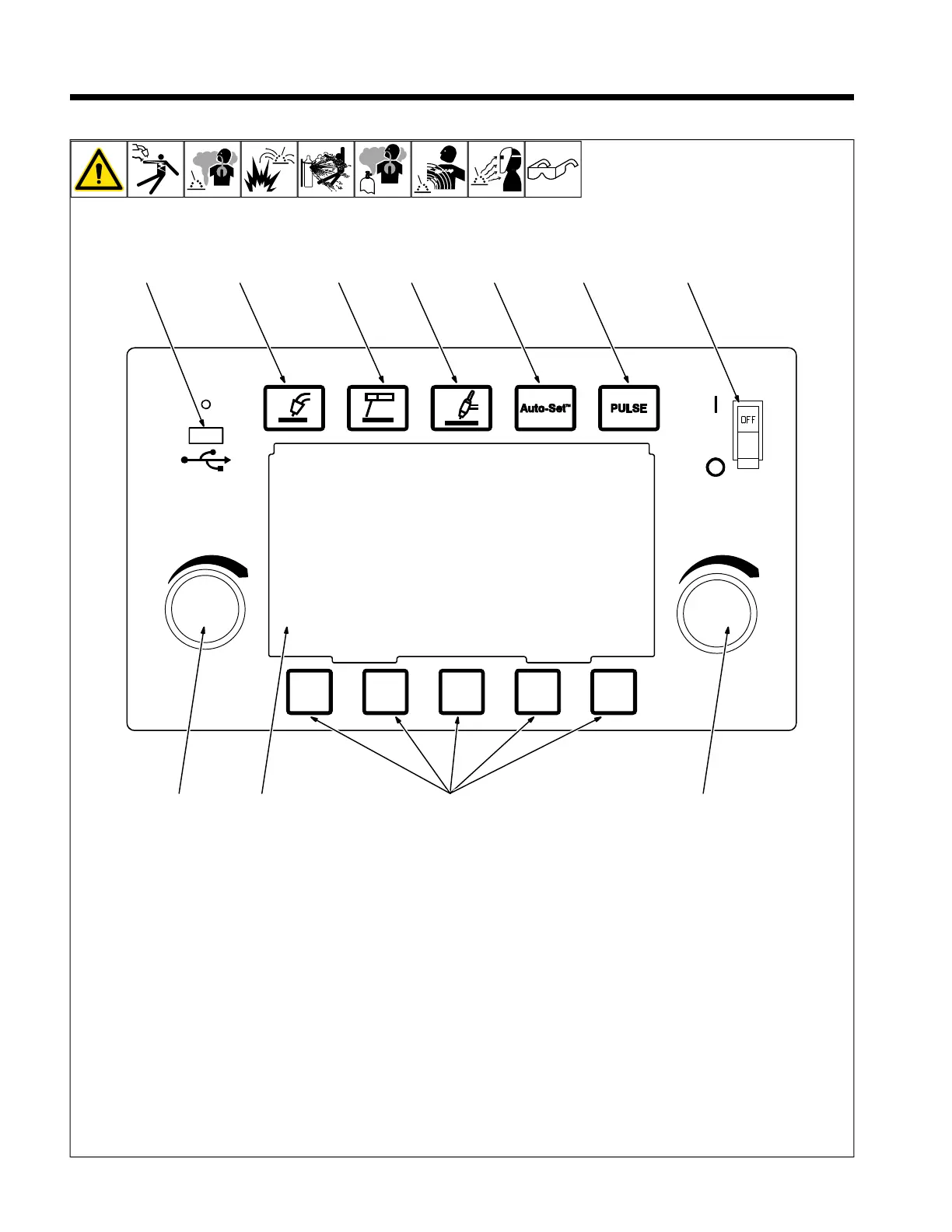
1 2 3 4 76
5
9 8 11 10
1 MIG Button
Press to select MIG process.
2 Stick Button
Press to select Stick process.
3 TIG Button
Press to select TIG process.
4 Auto-Set Button
Press to turn Auto-Set On or Off.
5 Pulse Button
Press to turn Pulse On or Off for MIG or TIG
process.
6 USB Port
Use for software upgrades and collecting er-
ror codes.
The USB port can be used to charge cell
phones and similar devices.
7 Power Switch
Use switch to turn unit On or Off.
8 Color LCD Display
9 Left Knob
Use left knob to adjust voltage in MIG mode,
Arc length in Pulsed MIG mode, pulse fre-
quency in Pulsed TIG mode or change pa-
rameter values in Set-up mode.
10 Right Knob
Use right knob to adjust wire feed speed in
MIG mode, amperage in Stick or TIG mode,
or change parameter values in Set-up
mode.
11 Soft Keys
Multiple functions depending on which
screen is being displayed.












 To Next Page