OM-278174 Page 42
F
Complete Parts List is available at www.MillerWelds.com
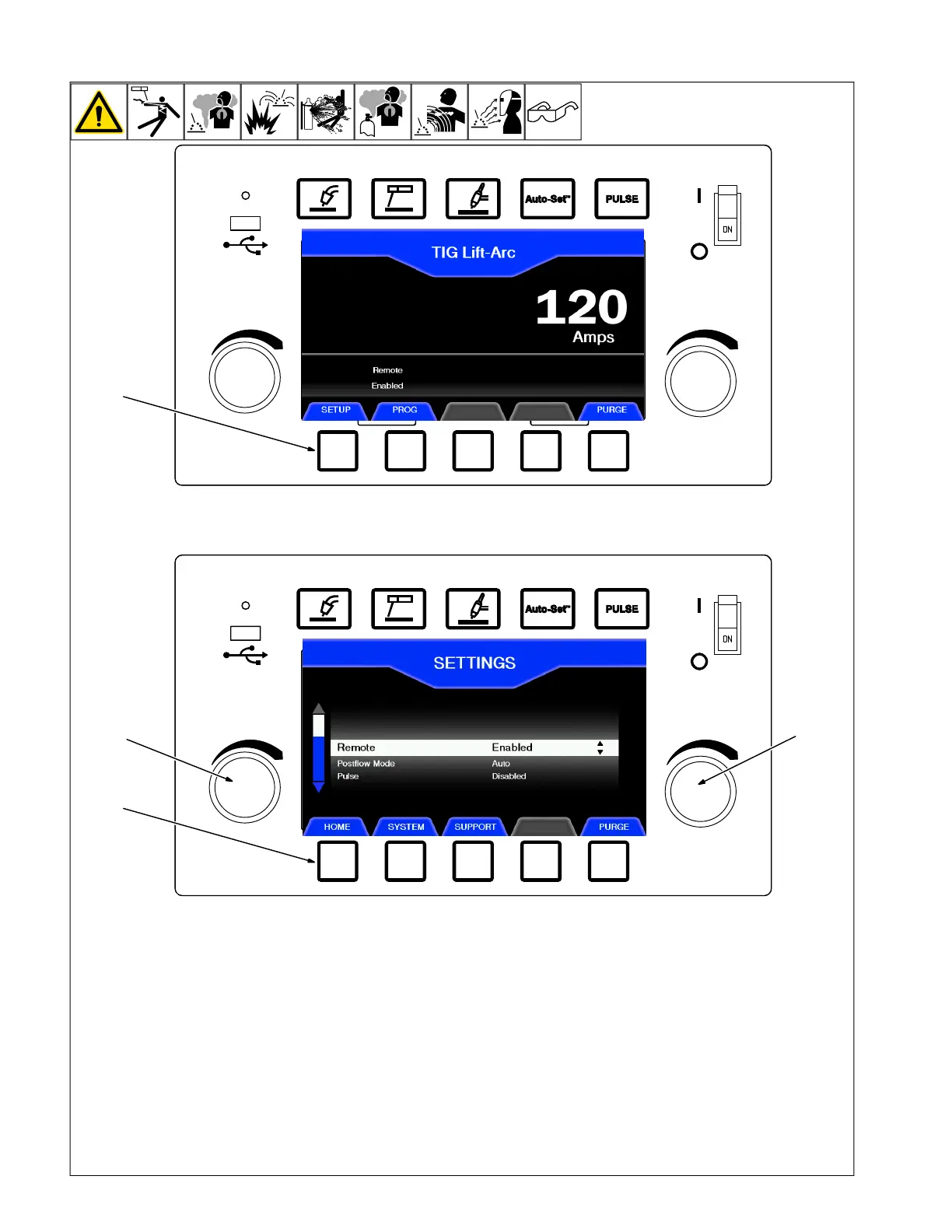
6-7. Manual TIG Set-Up Mode
1 Set-Up Button
2 Left Knob
3 Right Knob
4 Home Button
To enter the Setup menu from the Manual
Mode home screen, press Setup.
Once in the Setup menu, rotate the left knob
to find a particular item, and rotate the right
knob to change setting or status.
Press Home to save settings and return to
welding mode.
Items that can be adjusted from this menu
are:
Remote:
Enabled: When using a fingertip control or
foot pedal to activate and control welder
output.
Disabled: Output of welder is always on.
Output of machine is set by right knob.
Postflow: :The amount of time the shielding
gas will flow after the arc has been shut off.
Postflow setting range is from Disabled to
10 seconds.
In the Auto Postflow setting, gas will flow for
one second for each 10 welding amps, up to
10 seconds.
Pulse: Reduces heat input to minimize dis-
tortion and increase travel speed. A low
speed pulse (up to 10 pulses per second)
can be used to time the addition of filler ma-
terial, resulting in a distinct ripple pattern. A
high speed pulse (over 100 pulses per sec-
ond) can increase the travel speed while in-
creasing penetration. Pulse setting range is
0.1 to 150 pulses per second.












 To Next Page