OM-278174 Page 43
F
Complete Parts List is available at www.MillerWelds.com
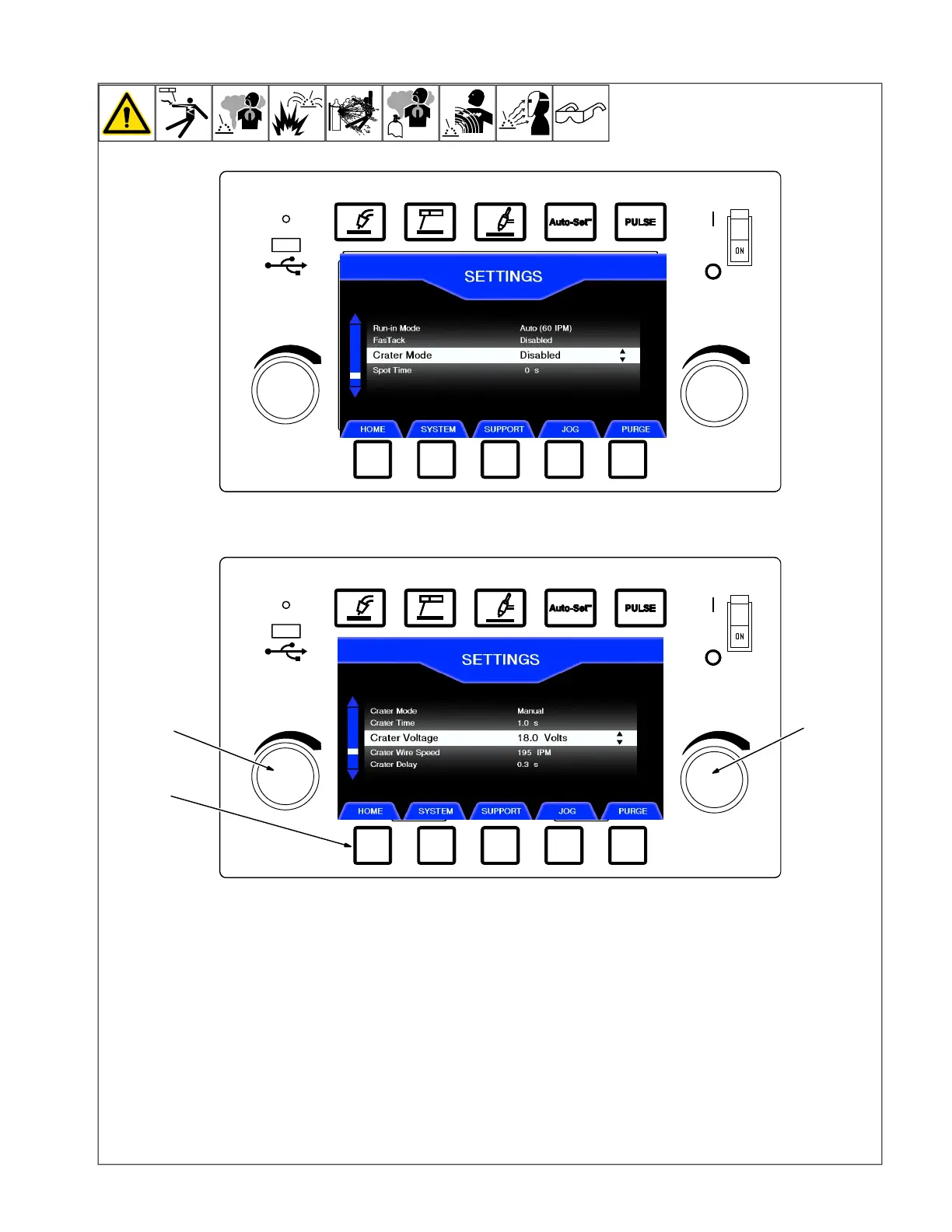
6-8. Setting Crater Time
1 Left Knob
2 Right Knob
3 Home Button
The crater setting is the amount of time the
welding arc stays on after the welding gun
trigger is released. This feature is used to fill
the void or "crater" at the end of the weld.
In the Setup menu, rotate the left knob to
highlight Crater, and rotate the right knob to
select Manual.
The following Crater variables can be
adjusted:
Crater Time: Time range is 0.1 to 5
seconds.
Crater Voltage (MIG settings) or Arc
Length (Pulse settings): Voltage range is 10
to 32 volts. Arc length range is 0 to 99.
Crater Wire Feed Speed: Wire feed speed
range is 50 to 800 ipm.
Crater Delay: This setting is for spot or
stitch welding without crater fill if the arc time
is less than the set time. Time range is 0 to 5
seconds. (If crater delay is set for 2 seconds,
weld operation will not go into crater if gun
trigger is released before 2 seconds.)












 To Next Page