OM-278174 Page 46
F
Complete Parts List is available at www.MillerWelds.com
6-11. Pulsed MIG Auto-Set
™
Mode
Pulsed MIG is a spray transfer that produces
less heat input than conventional spray
transfer, resulting in less warping, distortion,
and spatter. Pulsed MIG is often used for
MIG welding aluminum.
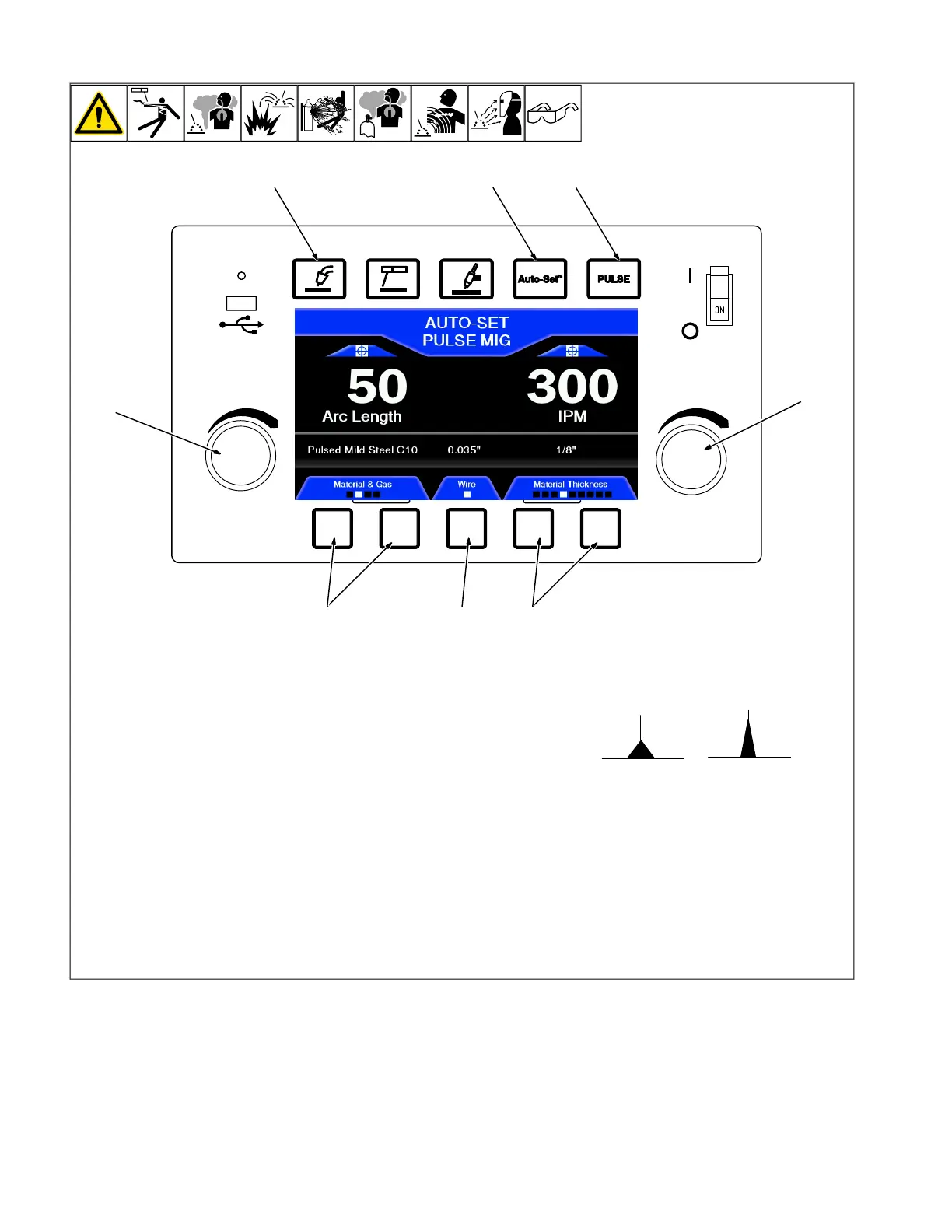
1 MIG Process Button
2 Auto-Set Button
3 Pulse Button
Press MIG Process, Auto-Set and Pulse
buttons.
4 Wire and Gas Buttons
Use soft keys to select wire and gas for
Pulsed MIG.
5 Wire Diameter
Use soft key to select wire diameter.
6 Material Thickness
Use soft keys to move cursor to left or right
to select material thickness.
7 Left Knob
Use left knob to fine tune arc length. Arc
length defaults to 50.
8 Right Knob
Use right knob to fine tune wire feed speed.
Arc Length
Arc length can be adjusted from 0-99. All
Pulse MIG programs are set with a value of
50. Adjusting the Arc Length will vary the
length of the welding arc cone.
High Setting
Low Setting
(0 Setting)
(99 Setting)
If a gas is used other than what is listed on
the Pulse MIG welding program chart, the
Arc Length can be adjusted to help custom-
ize your arc to the gas being used.












 To Next Page