OM-278174 Page 39
F
Complete Parts List is available at www.MillerWelds.com
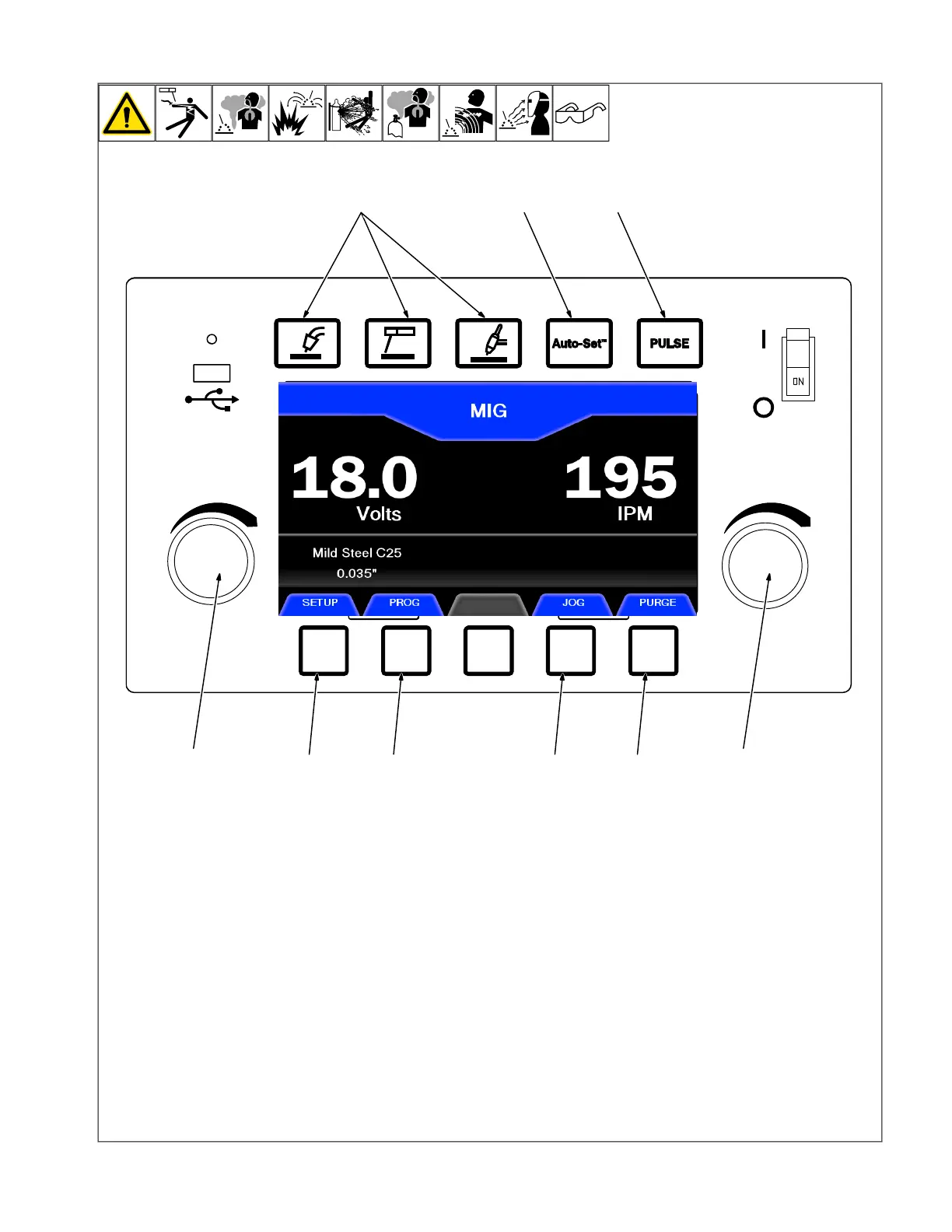
6-4. Using Manual Mode
1 Process Button
Use to select desire welding process.
2 Auto-Set Button
Press to turn Auto-Set On or Off.
3 Pulse Button
Press to turn Pulse On or Off for MIG or TIG
process.
4 Set-Up Button
Press Setup to optimize arc performance or
to add timers to weld sequence. See sec-
tions 6-5,thru 6-7 .
5 Program Button
Press Program to save favorite weld pro-
grams, up to four programs per weld proc-
ess. See Section 6-9 .
6 Jog Button
Only illuminated in MIG mode. Feed wire
without turning on weld output and energiz-
ing gas solenoid. Jog mode is only active to
feed 16 feet of wire.
7 Purge Button
Only illuminated in MIG and TIG mode. En-
ergizes gas solenoid without turning on weld
output or feeding wire.
8 Left Knob
Use left knob to adjust voltage in MIG mode,
arc length in Pulsed MIG mode and pulse
frequency in Pulsed TIG mode.
9 Right Knob
Use right knob to adjust wire feed speed in
MIG mode and amperage in Stick or TIG
mode.
F
When using a spoolgun or push-pull
gun, wire feed speed is controlled at
the gun and the right knob is
deactivated.












 To Next Page