System Menu
4-21
4.5 Selection Setup
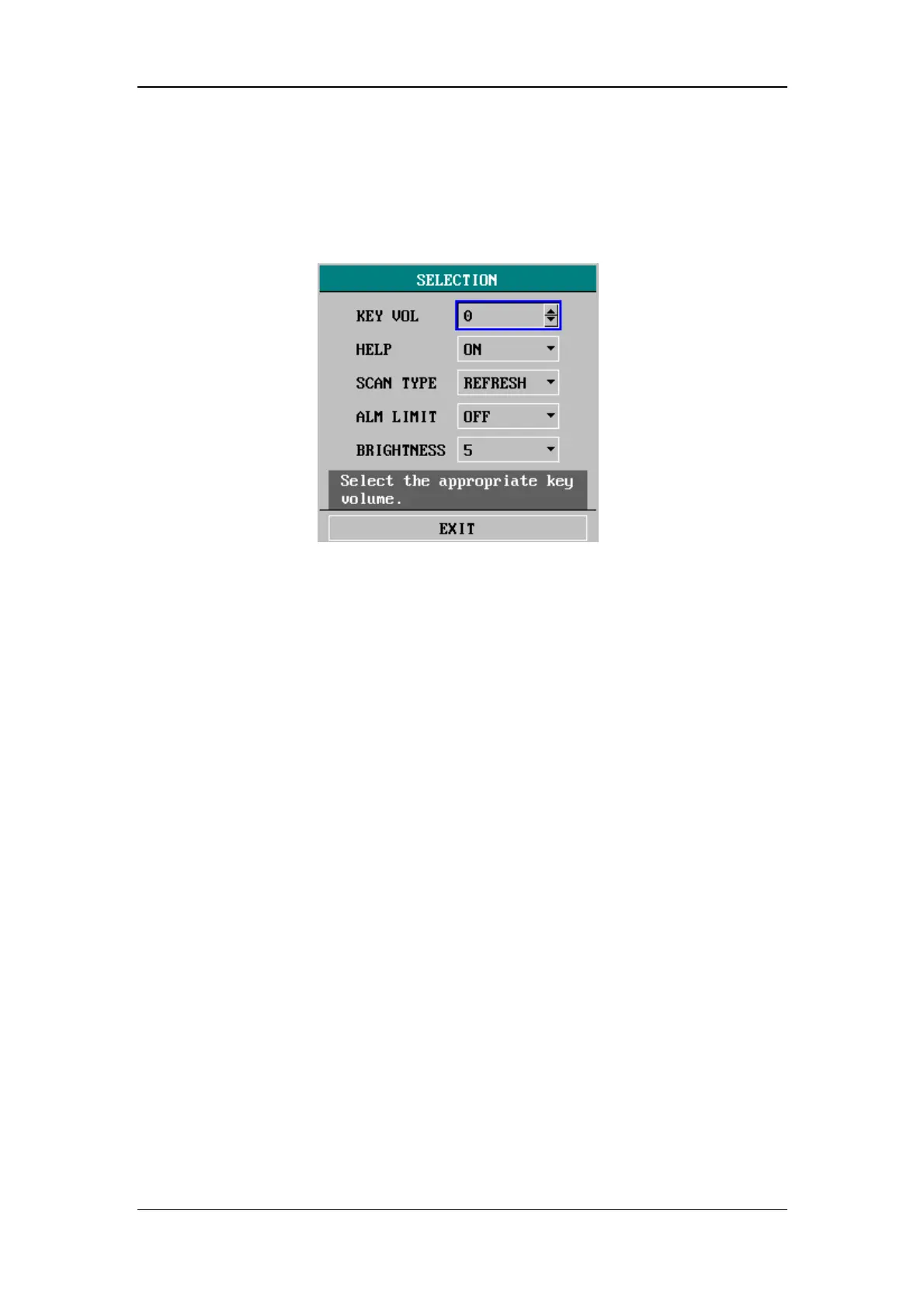
Select SELECTION>> in SYSTEM MENU. The following menu appears.
Figure 4-17 Selection Setup
You can perform the following settings in this menu:
KEY VOL
Key volume
The volume can be set between 0 and 10. 0 indicates the
volume is off and 10 indicates the maximum volume.
HELP
Online help
ON: Indicates the online help is enabled and the help
information will be displayed;
OFF: Indicates the online help function is disabled and the
help information will not be displayed.
SCAN TYPE
Scan type
REFRESH: The waveform keeps stationary, with real-time
refreshing from the left to the right by a moving "erase bar";
SCROLL: The waveform moves from the right to the left
with time passing by.
ALM LIMIT
Alarm limit
ON: The alarm limits of parameters are displayed aside the
parameter value;
OFF: The alarm limits of parameters are not displayed aside.
BRIGHTNESS
The brightness can be set between 1 and 10. 1 indicates the
lowest brightness and 10 indicates the highest brightness.






 To Next Page