System Menu
4-14
4.4.4 Recorder Setup
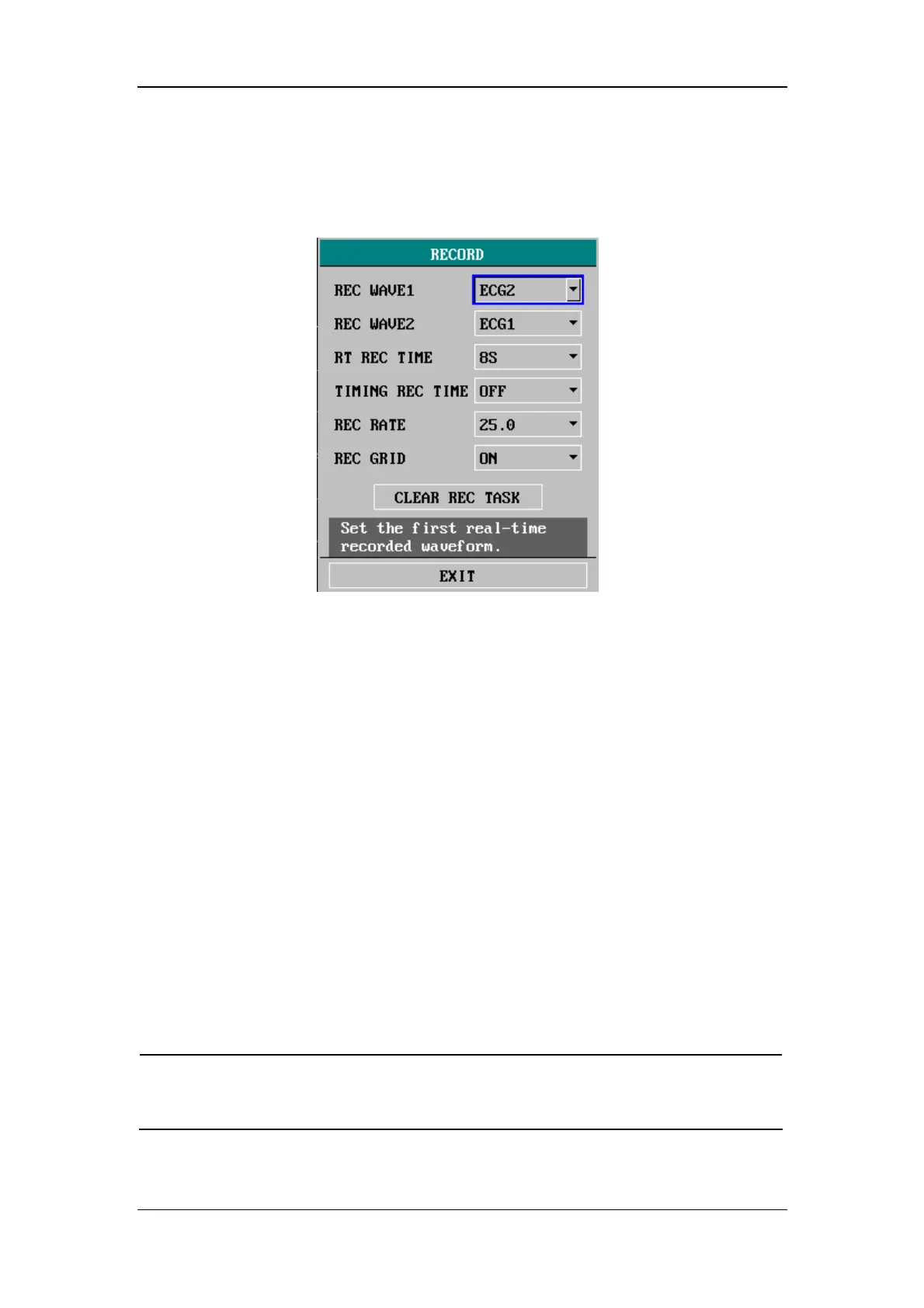
Select RECORD>> in SYSTEM SETUP menu. The following menu appears.
Figure 4-10 Recorder Setup
REC WAVE1
Recorded waveform1
Options: ECG1, ECG2, SPO2, IBP1, IBP2, CO2, RESP,
N2O, O2, AA and OFF.
In MULTI-LEADS DISPLAY mode or HALF-SCREEN MULTI-LEADS display
mode, the ECG3, ECG4, ECG5 and ECG6 options are also available. When OFF is
selected, waveform 1 will not be recorded.
REC WAVE2 Recorded waveform 2
Recorded waveform 2 has the same options as waveform 1, but the selected
waveform 2 cannot be identical to waveform 1. Otherwise, the system will
automatically change one of the waveforms to a different parameter.
NOTE
z If a parameter is not displayed on the screen, this parameter will be
unavailable in the REC WAVE 1 and the REC WAVE 2 options.






 To Next Page