EasyManua.ls Logo

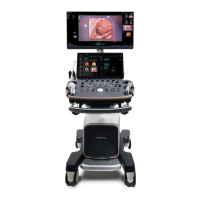
Mindray Resona 7T - User Manual

Mindray Resona 7T
359 pages
Print Icon
To Next Page IconTo Next Page
Loading...
Resona R9/Resona R9 Elite/Resona R9 Exp/Resona R9 Pro/Resona
R9 Plus/Resona R9 Super/Resona R Lumi/Resona R Elite/Resona R
MV/Crius R9/Anesus R9/Resona R9S/Resona R9T/Resona
R9W/Resona R9Q/Resona R9G/Resona R Swan/Resona R
Super/Resona R MS/Crius R9S/Anesus R9S/Nuewa R9/Nuewa R9
Elite/Nuewa R9 Exp/Nuewa R9 Pro/Nuewa R9 Plus/Nuewa R9
Super/Nuewa R Lumi/Nuewa R Elite/Nuewa R MV/Imagyn R9/Imagyn
R9 Elite/Imagyn R9 Exp/Imagyn R9 Pro/Imagyn R9 Plus/Imagyn R9
Super/Imagyn R Lumi/Imagyn R Elite/Imagyn R MV/Nuewa
R9S/Nuewa R9T/Nuewa R9W/Nuewa R9Q/Nuewa R9G/Nuewa R
Swan/Nuewa R Super/Nuewa R MS/Imagyn R9S/Imagyn R9T/Imagyn
R9W/Imagyn R9Q/Imagyn R9G/Imagyn R Swan/Imagyn R
Super/Imagyn R MS/Eagus R9/Eagus R9 Elite/Eagus R9 Exp/Eagus
R9 Pro/Eagus R9 Plus/Eagus R9S/Eagus R9T/Eagus R9W/Eagus R
Lumi/Eagus R Swan/Eagus R Elite/Resona Y/Resona Y xa/Resona Y
xv/Nuewa Y/Nuewa Y xa/Nuewa Y xv/Eagus Y/Eagus Y xa/Eagus Y
xv/Resona 7/Resona 7CV/Resona 7EXP/Resona 7OB/Resona
7S/Resona 7PRO/Imagyn 7/Resona 7T/Resona 7W/Resona
7Super/Resona 7Elite/Resona 8/Resona 8T/Resona 8W/Resona
8S/Resona 8EXP/Resona 8PRO/Resona 8Super/Resona 8Elite
Diagnostic Ultrasound System
Service Manual
Revision 7.0

Table of Contents

Questions and Answers

  • Z
    Zachary ContrerasAug 18, 2025
    How to improve image quality on Mindray Medical Equipment?
    • R
      rfranklinAug 18, 2025
      To resolve degraded image quality on your Mindray Medical Equipment, first, select the correct exam mode. If the issue persists, adjust the image post-processing settings or revert to the default values. You may also need to reset the factory default presets.
  • V
    vargastonyAug 20, 2025
    What to do if my Mindray Resona 7T Medical Equipment displays characters but no images?
    • B
      Brad WilkinsAug 20, 2025
      If your Mindray Medical Equipment monitor shows characters and menus but no images, adjust the transmission power, gain, or TGC control. Also, check the probe connection to ensure it is properly connected. Finally, unfreeze the image if the system is in a frozen state.
  • L
    larryjonesAug 23, 2025
    Why is the power indicator not lighting up on my Mindray Medical Equipment?
    • T
      Travis ThompsonAug 23, 2025
      If the power indicator on your Mindray Medical Equipment doesn't light up after connecting the AC power, check if the system is properly plugged in. Also, ensure the system circuit breaker is in the Up position and that the plug is securely connected to the back of the system.
  • P
    Paul ReynoldsAug 26, 2025
    What to do if the Mindray Resona 7T monitor is on but the image is blank?
    • A
      Andrew RussellAug 26, 2025
      If the power indicator is on but the screen is blank on your Mindray Medical Equipment, turn off the system and wait at least one minute before restarting it. If the problem continues, adjust the monitor's brightness and contrast settings back to their factory defaults.
  • L
    Linda DavisAug 28, 2025
    How to fix a Mindray Resona 7T system that cannot power on?
    • J
      James NicholsAug 28, 2025
      If your Mindray Medical Equipment system fails to power on, the issue might stem from several causes. It could be due to an AC power supply assembly error or a 5V board assembly error, in which case you should replace the AC power supply assembly or the 5V board assembly. Other potential causes include: no AC input (check the AC connection), the beaker not being closed (close the breaker), a PC carrier board error (replace the PC carrier board), the CPU module assembly failing to send an invalid signal (replace the CPU module), no 12V output from the AC power assembly (replace the AC power assembly), or no 3.3V or 5V output from the DC box assembly (replace the DC box assembly).
  • C
    cannondianaAug 30, 2025
    What to do if Mindray Resona 7T system cannot start?
    • R
      Ronald HamptonAug 30, 2025
      If your Mindray Medical Equipment system fails to start, it could be due to a CPU module failure, which requires replacing the CPU module. Alternatively, the loading operation might be failing because the hard disk or root directory of the SSD disk in the operating system is corrupted. In this case, try restoring the operating system. If that doesn't work, replace the SSD disk. Another potential cause is a corrupted system directory on the SSD disk, or a failure to load the system software due to corruption in the SSD disk or system software. In both of these scenarios, attempt to restore the operating system first, and if the problem persists, replace the SSD disk.
  • A
    Andre JohnsonSep 9, 2025
    What to do if Mindray Resona 7T Medical Equipment shows Probe Socket System Malfunction?
    • A
      Amanda MontgomerySep 9, 2025
      If your Mindray Medical Equipment is showing a Probe Socket System Malfunction, the issue likely lies with either the probe itself or the probe board. If the probe is malfunctioning, replace it. If the probe board is malfunctioning, replace the probe board assembly.
  • T
    Thomas SmithSep 12, 2025
    Why does the Mindray Resona 7T ECG Module fail?
    • X
      xmarquezSep 12, 2025
      If the ECG module on your Mindray Medical Equipment fails, it is likely due to an ECG error. Replace the ECG module.
  • E
    Emily VasquezSep 14, 2025
    How to troubleshoot 4D Drive issues on Mindray Resona 7T Medical Equipment?
    • C
      Casey HowardSep 14, 2025
      To troubleshoot 4D Drive issues on Mindray Medical Equipment, consider these steps: If there is an abnormal drive or drive output failure, or an abnormal probe mechanism, replace the 4D module material package or the 4D probe. If the probe has an internal error and cannot detect the central area, replace the 4D probe.
  • J
    Jennifer WoodsDec 3, 2025
    Why is the LCD display failing on my Mindray Resona 7T?

    Mindray Resona 7T Specifications

    General IconGeneral
    Transducer TypesPhased array, linear, convex, volume
    Transducer Ports4
    Imaging ModesB-mode, M-mode, Color Doppler, Power Doppler, Pulsed Wave Doppler, Continuous Wave Doppler, Tissue Doppler
    PortsEthernet, USB, HDMI
    Power Supply100-240V AC, 50/60Hz
    ApplicationsObstetrics/Gynecology, Vascular, Musculoskeletal, Pediatrics, Urology
    TypePremium Ultrasound System

    Related product manuals