A standard USB joystick can drastically improve vPTZ operation for the user – in the browser,
in MxEasy, and in the MxControlCenter (however, MxCC is also equipped with a virtual
joystick that can be operated using the mouse). Please first install the joystick on the PC
according to the manufacturer's instructions.
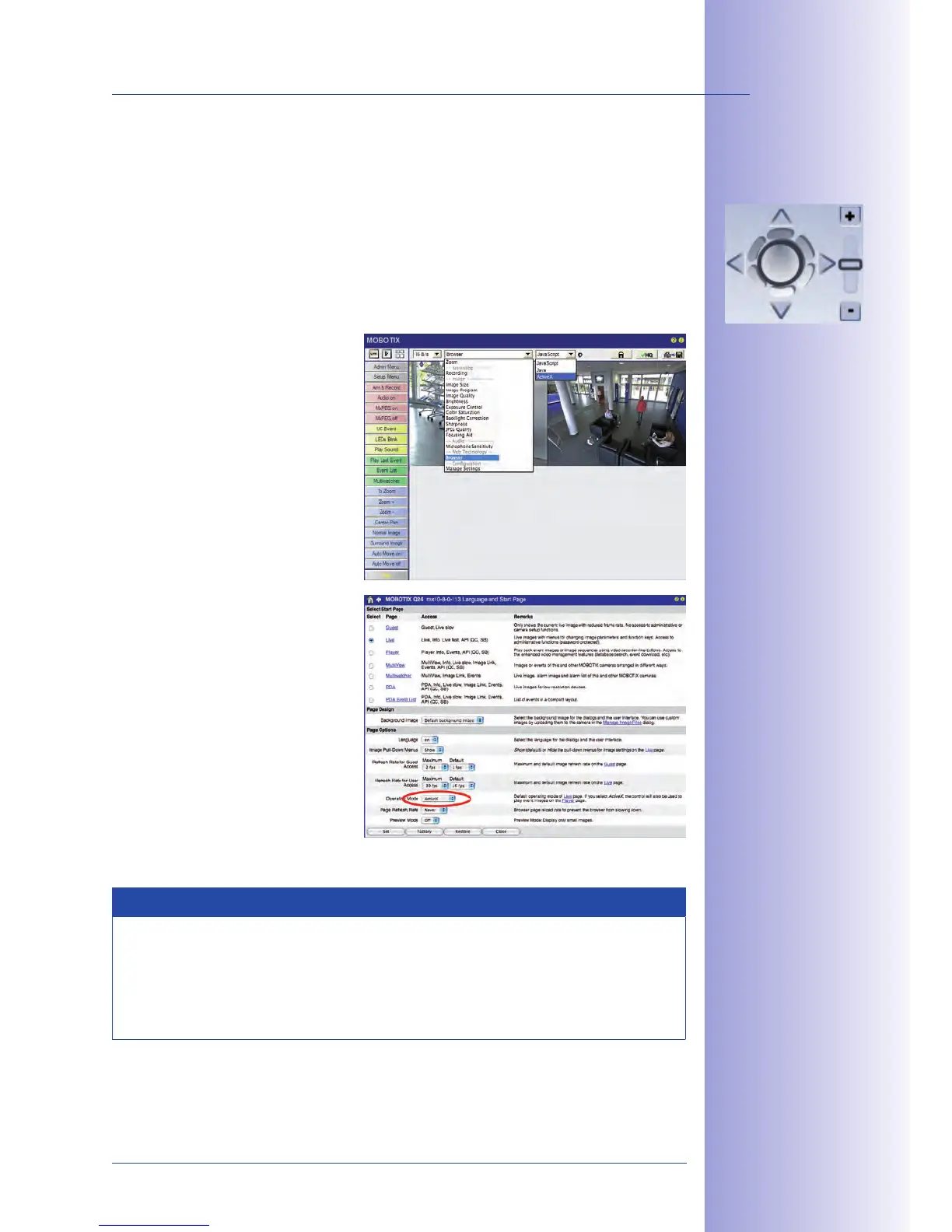
In order to use a USB joystick in the browser, make sure that you have a PC with a Windows
operating system and the latest version of Internet Explorer and that the
Switch to
• Browser in the Quick
Control.
Under
• Browser, select the
option ActiveX in the field to
the right. The USB joystick can
then be used until the browser
is closed.
To store the setting permanently,
•
ActiveX must be activated in the
Admin Menu. To do so, use
Language and Start Page in
the Admin Menu.
Under the page options, select
•
the ActiveX operating mode.
Store the settings permanently
•
by clicking on Set and Close in
the Admin Menu.
The joystick can now be used.
•
Notes
For more information and details regarding vPTZ, see the ,
the manual for and the manual for MxControlCenter.
The latest versions of all manuals are available at www.mobotix.com under the
main menu item Support in the bar on the left-hand side (“Manuals”).
Virtual joystick in
MxControlCenter



 To Next Page