Dansensor A/S COPYRIGHT © P/N 330654-E 01/2018
Lippke 4000/4500 EN User Guide 53
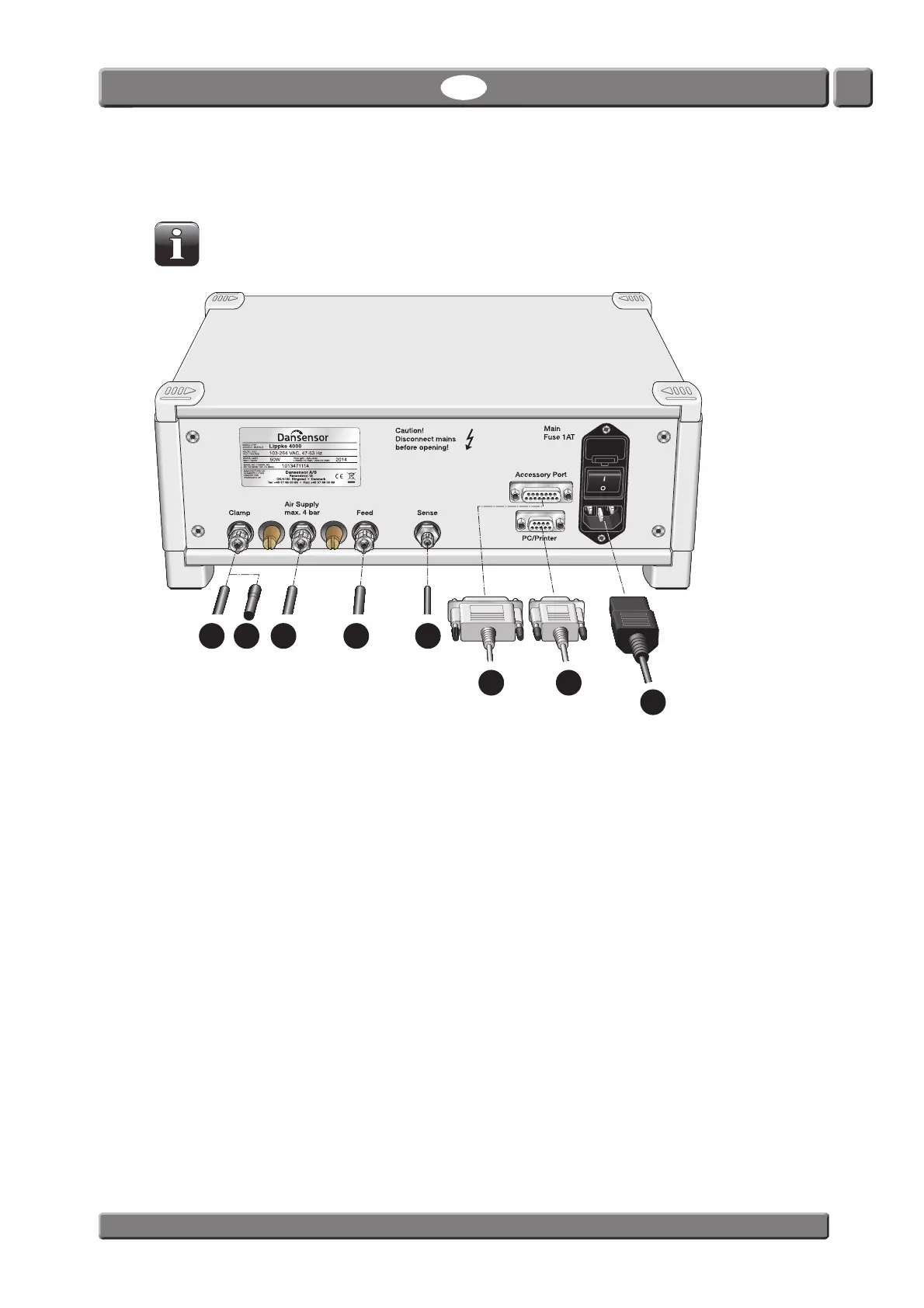
Connecting hoses and cables
NOTE! The Lippke 4000/4500 device and the various accessories must be placed on an
even and steady surface with sufficient working area for the type of packages to be tested.
1. You have 3 connection possibilities for the “Clamp” connector:
- If you are using the device together with a PPC 300 II unit and you want the device to control the
lower clamp bar of the PPC 300 II, connect a hose
from the “Clamp” outlet to the “Control
Lower Bar” inlet on the PPC 300 II.
- If you are using the device as a part of the MultiCheck system, connect a hose
from the
“Clamp” outlet to the MultiCheck test head.
- If the “Clamp” outlet is not to be used, it must be plugged using the special rubber plug
that
comes with the device.
2. Connect the compressed air supply
to the “Air Supply” inlet connector - see "Compressed air
supply requirements" on page 51 for details.
3. Connect the hose from the “Feed” outlet connector
to the appropriate accessory air supply
connector.
4. Connect the hose from the “Sense” inlet connector
to the appropriate accessory pressure
measurement outlet connector.
5. The “Accessory Port” connector has 2 functions:
- If you are using the device as a part of the MultiCheck system, connect the 15-pin Sub-D
communication cable
from the PacCheck 3XX to the “Accessory Port” connector.
- If you want to start and stop the device from an external source (ex. a foot switch) connect the
15-pin Sub-D cable
between the “Accessory Port” connector and the control device.
See "Connection of external control device" on page 54 for details.



 To Next Page