46 | P a g e
6.2.7 End Rinse Option
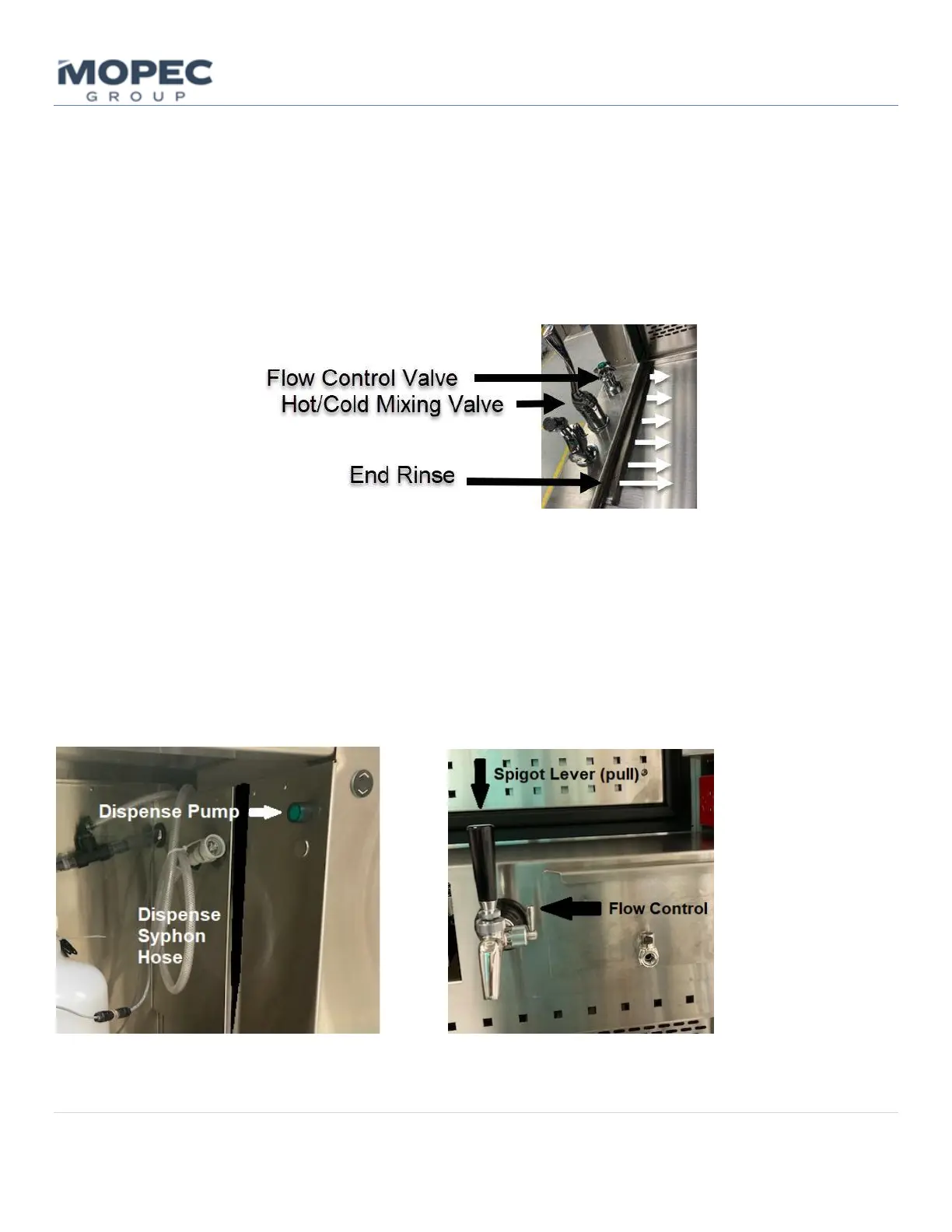
The End Rinse option is installed opposite the sink and utilizes the hand spray hot/cold mixing valve but has a separate
flow control valve.
• Adjust the hot/cold Mixing Valve to the desired mixture. It is recommended to open the mixing valve up all the
way. Flow can be adjusted separately at both the hand spray and end rinse control knob.
• Adjust the End Rinse Control Knob to the desired flow.
• Use the Mixing valve lever to turn the end rinse on and off.
6.2.8 Formalin Dispensing Option
The Formalin Dispense system on a Maestro utilizes a siphon hose and a transfer pump to fill up a reservoir tank located
in the hood of the unit. This enables a very controllable gravity-fed dispense from a simple lever pull on the spigot.
• The Syphon Hose is intended to be connected to your formalin supply container (cut factory zip tie to uncoil the
hose). Mopec cubitainers utilize a quick disconnect. Insert the connector and pull to make sure it is latched.
o If you are pumping from a formalin barrel remove the supplied quick disconnect fitting and directly
insert the end of the siphon hose into the barrel. Watch for bag liners, do not suck them up in the hose.
• To start pumping simply hold down the green Dispense Pump button located just inside the knee panel. The
HMI screen will show the Formalin Level Screen as it’s being filled and shows the status of the tank level. The



 To Next Page