55 | P a g e
The GFCI will only reset if power is supplied to the station. Check that your Main Power switch is on and
that your facility’s circuit breaker is not tripped.
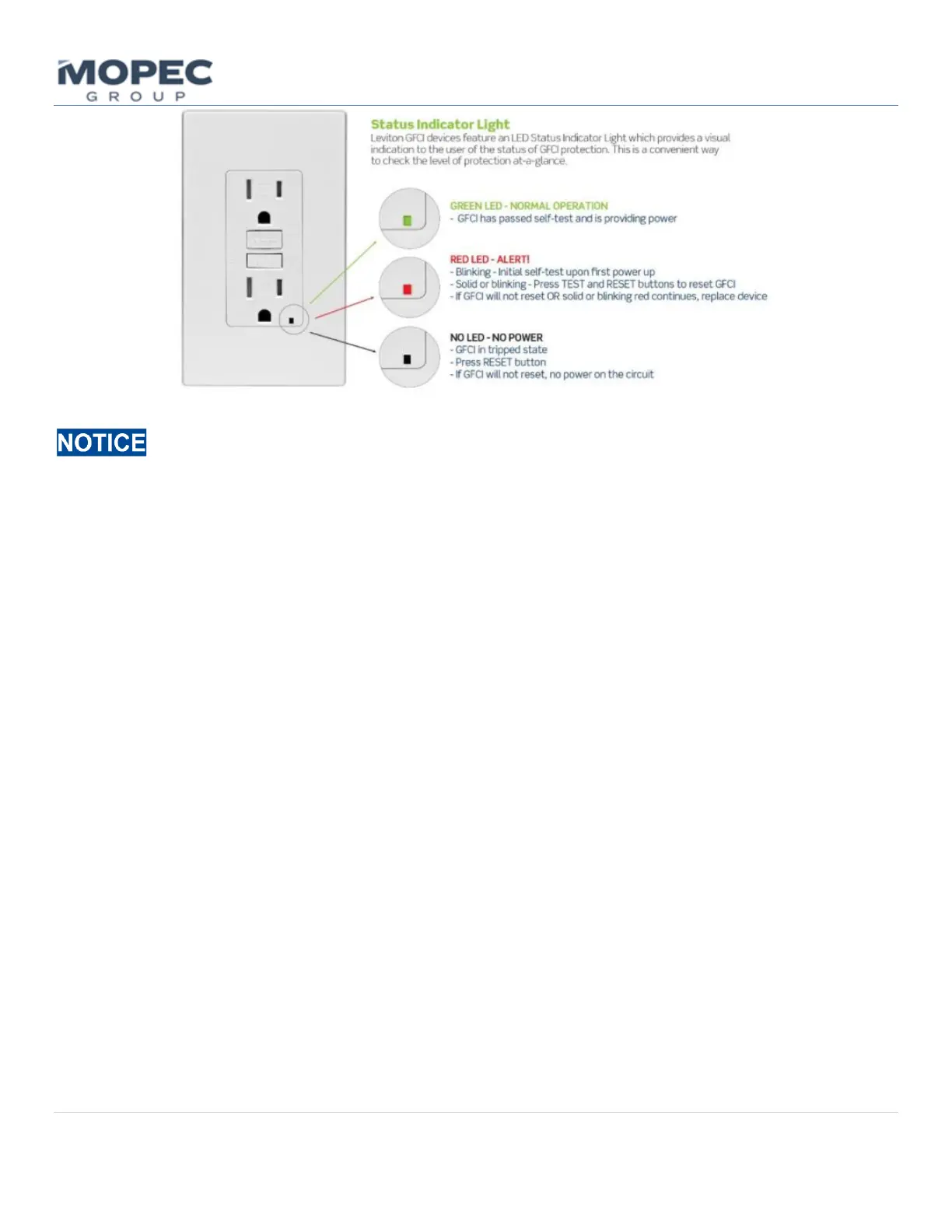
• Press the TEST and RESET buttons on the GFCI and confirm operation or status lights per the diagram above.
• If the GFCI has reset and shows a green light the unit is ready to operate.
• If the GFCI fails, there may still be a ground fault in the system or the GFCI unit may need to be replaced. See
the section on Troubleshooting (8.0) or call Mopec Service (7.3)
7.1.7 Resetting the Auxiliary GFCI
The Maestro is equipped with an auxiliary 15amp GFCI power outlet for uninterrupted supply on a computer system or
other auxiliary devices plugged into the side panel. For this, the unit only needs power supplied to the unit from the
facility and operates independently from the Main power switch. The reset procedure is the same as in section 7.1.3
above.
7.2 Stainless Steel Maintenance & Cleaning
7.2.1 Disinfecting Stainless steel
All stainless steel surfaces can be cleaned with soap and water to remove tissue and debris. The unit is to unit is to ONLY
BE WIPED DOWN & not Sprayed(worksurface/sink is only part of station that can be sprayed). The stainless steel
surfaces can be disinfected with a non-caustic disinfectant.
• Always wipe in the direction of the stainless steel grain.
o We suggest using BE045 Path Cloud or BE047 Bench Wipe for cleaning purposes.
• Most disinfectants must be followed up with a water rinse to remove the salts that remain after these products
dry. Always follow up a disinfection cleaning with a thorough rinse of water.



 To Next Page