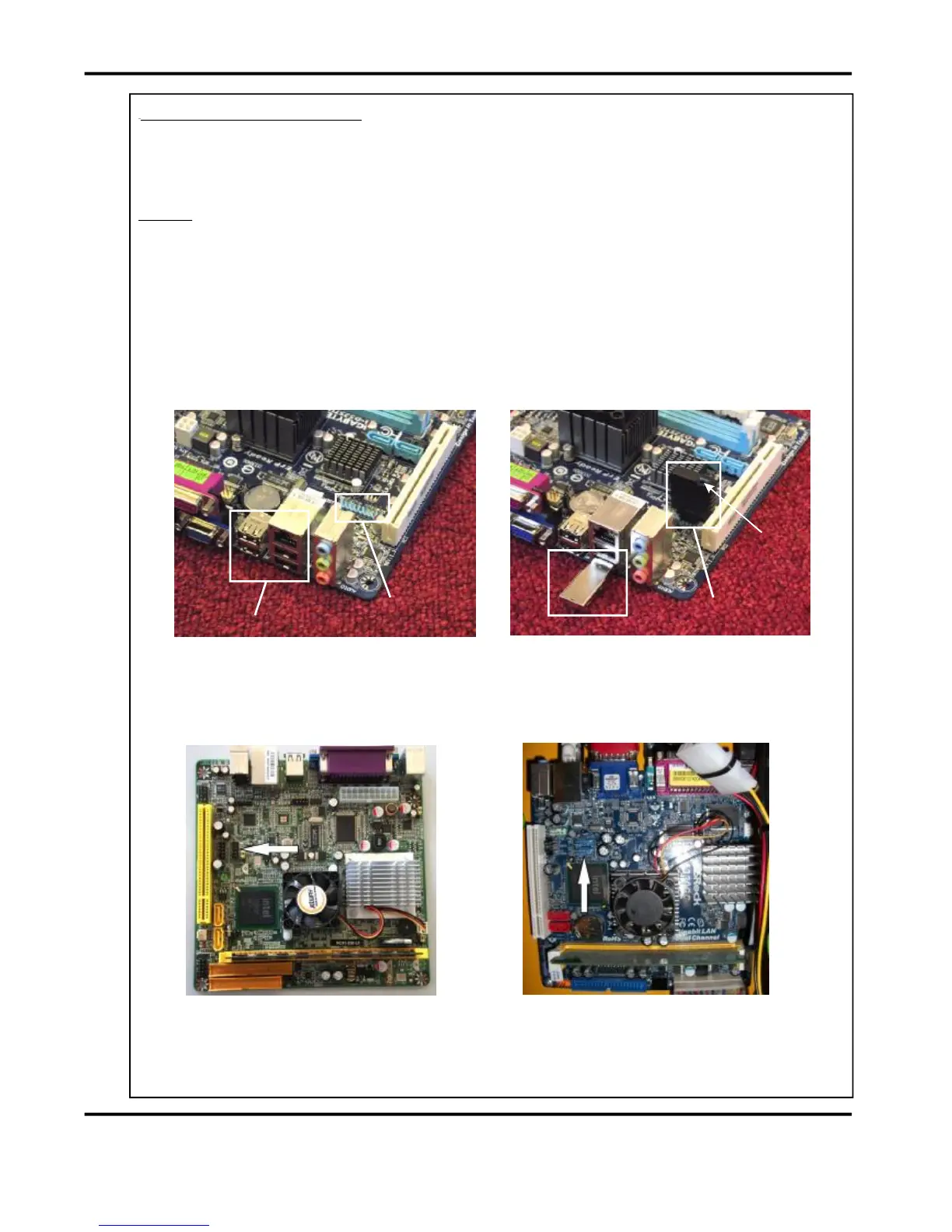
ExternalUSBSockets
InternalUSBHeaders
InstallationProcedure.
1.Notethecurrentmachinecalibrationsettings.
2.Powerdownthemachineandremovethepowercord.
3.ChangetheUSBFlashDrive(RedorGreendependingonwhatiscurrentlyfitted).
Itisimportanttochoosetherightcolourinaccordancewiththemachineyouare
upgrading.SeeTB2705forfurtherinformationonwhentouseRedorGreenUSBFlash
Drives.Asageneralrulereplacelikeforlike(i.e.GreenforGreenandRedforRed).
4.Powerthemachineup.
5.Toaccessthemachinemenu,openthecalculatorandtype608888;thenpressXtoexit
thecalculatorscreen.
6.Choosethemachinetypefromthelistandperformapowercyclewhenprompted.
7.Re-enterthecalibrationsettings.
NOTE.
FIG.1andFIG.2aboveshowtheInternalUSBFlashDrivepositionforthecurrent
GigabyteATXmotherboard.FIG.3andFIG.4belowshowtheInternalUSBFlashDrive
positionsforthepreviouslyusedJetwayandAsrockATXmotherboards.
FIG.1 FIG.2
FIG.3 FIG.4
AsrockATXMotherBoard
JetwayATXMotherBoard
ExternalUSBFlashDrive
InternalUSBFlashDrive
Lock
Recess



 To Next Page