Chapter 2 – Getting Started
Multi-Tech Systems, Inc. MultiModem® iSMS User Guide for Administrators 19
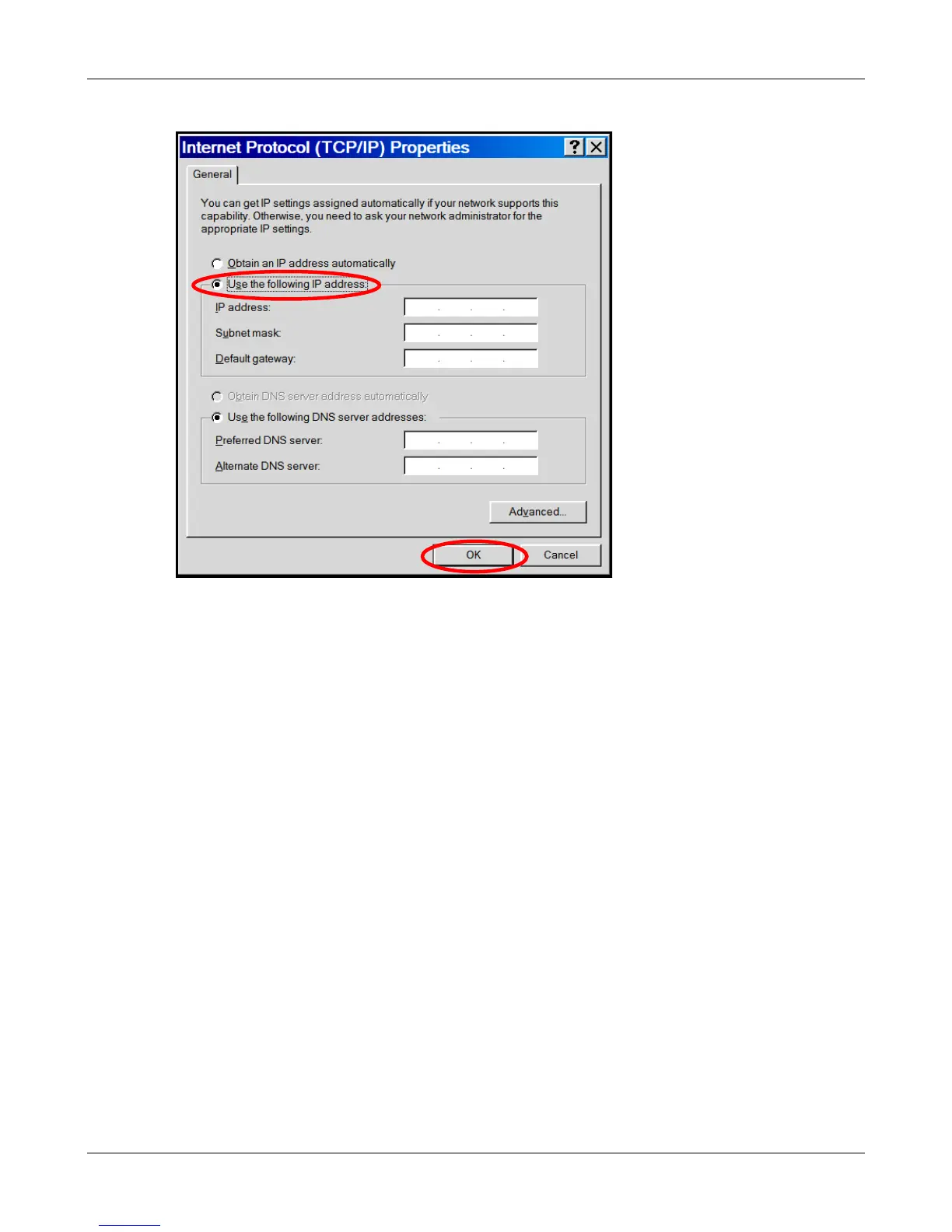
5. The Internet Protocol (TCP/IP) Properties screen.
Important Note: If this screen opens and displays your current IP configuration, we suggest you
record this information for future reference (i.e., after the MultiModem iSMS is configured, you
may wish to return this PC to its original settings).
• To set a Fixed IP Address for the workstation, select Use the following IP address.
∗ Enter the workstation IP Address. Example: 192.168.2.x.
Note: The x in the address cannot be the number 0, 1, 255 or any number already in use
by a computer or device on this network.
∗ Enter the workstation Subnet Mask 255.255.255.0
∗ Enter the workstation Default Gateway. This can be left blank when the MultiModem
iSMS is on the same network and subnet.
Note: The workstation settings must be in the same subnet range as the MultiModem
iSMS.
The factory default settings for the MultiModem iSMS are:
IP Address: 192.168.2.1
Subnet Mask: 255.255.255.0
Default Gateway: 192.168.2.2
• Use the following DNS server addresses.
∗ For initial communication with the MultiModem iSMS, DNS information is not needed.
These settings can be left as is.
∗ Click OK.
• Close the Local Area Properties screen by clicking OK.
• Close the Control Panel.
Downloaded from Elcodis.com electronic components distributor



 To Next Page