Chapter 4 – Using the Web Interface
Multi-Tech Systems, Inc. MultiModem® iSMS User Guide for Administrators 57
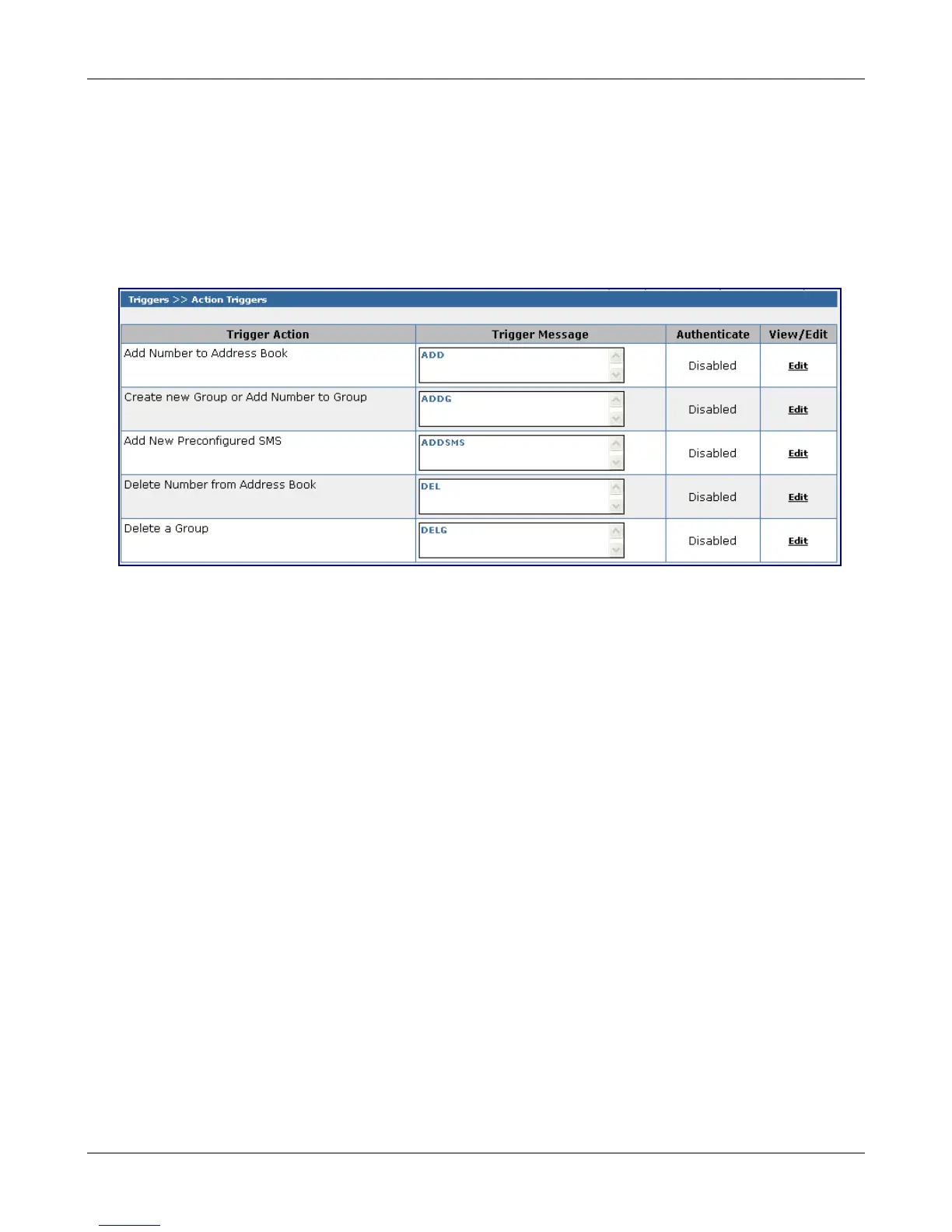
Triggers > Action Triggers
Triggers > Action Triggers
Action Triggers are the codes or words sent from a remote cell phone and received by the MultiModem
iSMS – the trigger will execute the action associated with it. This is a setup screen; no messages are sent
from this screen.
The trigger codes or words along with the authentication function may be configured for each trigger
action. If authentication is enabled, only the trigger code or word received from an authenticated user can
trigger the action.
Trigger Action – The action is executed when a properly formatted Trigger Message is received.
Trigger Message (Codes or Words) – The above screen shows the default Trigger Message for each Trigger
Action. The code or word (Trigger Message) used to invoke the specific action can be changed by clicking
on the Edit option for each Trigger Action. See the table on the next page for an explanation of how the
trigger codes and their associated actions are used.
Authenticate – If the authenticate option is enabled, only the message received from the configured
authenticated user can trigger the action. The authenticated users are set up on the Triggers > Authentic
List screen.
Enable Authentication
To enable authentication click Edit. The Authenticate column then displays a check box, and the
View/Edit column displays the words Save and Cancel.
Click the check box to enable Authentication for this action and then click Save. If you want to disable
Authentication for this action, simply click Cancel.
Downloaded from Elcodis.com electronic components distributor



 To Next Page