Chapter 4 – Using the Web Interface
Multi-Tech Systems, Inc. MultiModem® iSMS User Guide for Administrators 47
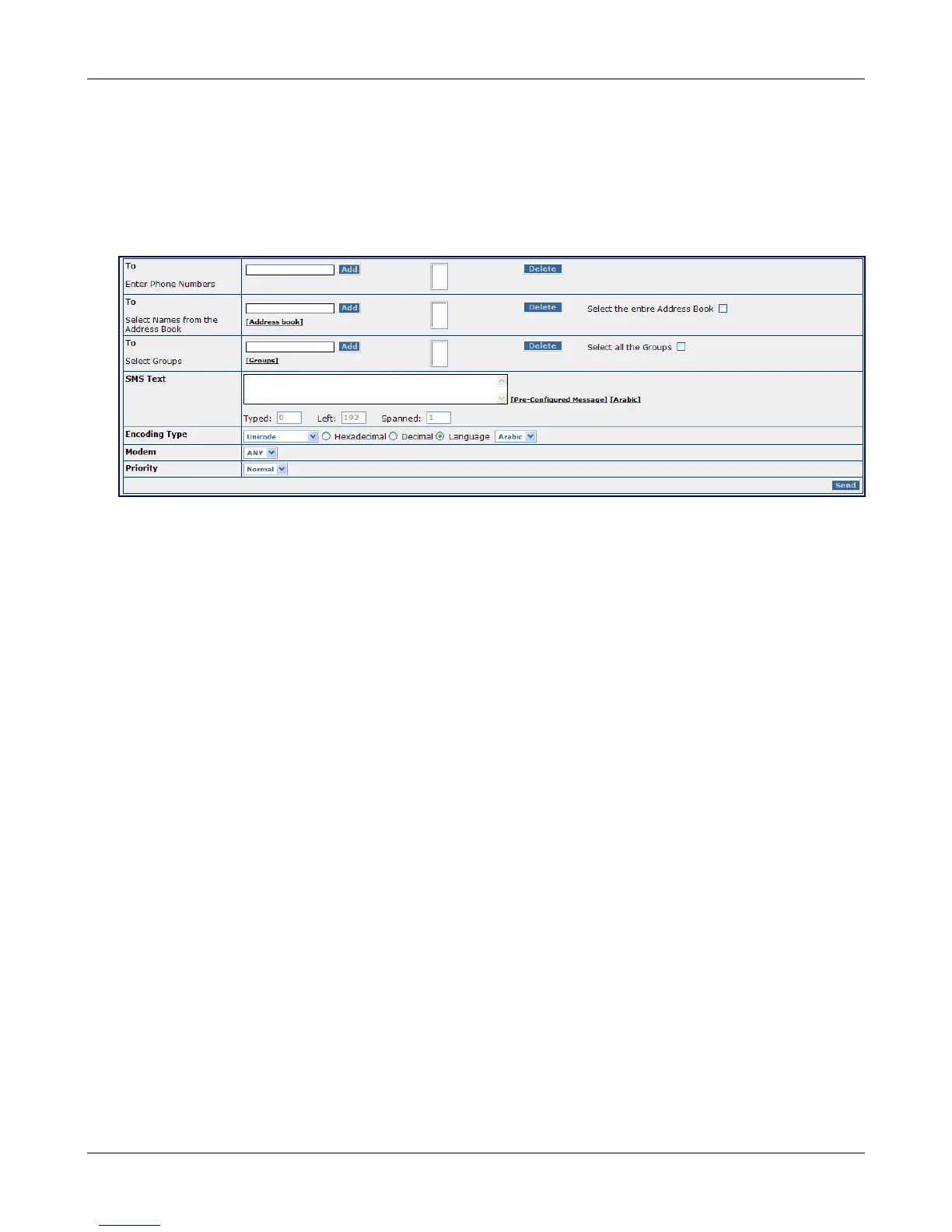
SMS Services > Send SMS
SMS Services > Send SMS
Use this menu to generate a message and then send it to a specific phone number(s) or Address Book
contact(s) or Group(s).
Notes about User Limitations
• This screen and their Outbox screen are the only screens available to non-administrative users.
To
Enter Phone Numbers
Enter the mobile phone numbers to which a new message will be sent. Click the Add button after each
entry. The phone number will display in the box. If you change your mind about a phone number,
highlight the number and press the Delete button.
-and/or-
Select Names from the Address Book
Click Address Book to display all names. Select the names of the individuals to whom a new message
will be sent. Click the Add button after each name. If you change your mind about a name, highlight
the name and press the Delete button or check Select the entire Address Book, press the Delete
button and all the names will be deleted.
-and/or-
Select Group
Click Groups to display all group names. Select the Groups to which a new message will be sent. Click
the Add button after each selection. The group name will display in the box. If you change your mind
about a group, highlight the group name and press the Delete button or check the Select all the
Groups, and press the Delete button and all groups will be deleted.
Downloaded from Elcodis.com electronic components distributor



 To Next Page