Chapter 1 – Safety Information and Product Description
Multi-Tech Systems, Inc. MultiModem® iSMS User Guide for Administrators 9
SF 400/800 SIM Card Installation
SIM (Subscriber Identity Module) cards are required for the MultiModem iSMS to operate on a GPRS
network. To install the SIM cards:
1. Power off the unit and unplug the power cord.
Do not
under any circumstances remove protective
power supply cover. Harmful voltages may be exposed if cover is removed, and can lead to electrical
shock and or death.
2. Electrostatic discharge (ESD) is the release of stored static electricity that can
damage electrical
circuitry or components
Perform the procedure below (removal of chassis cover) described in this section only at an ESD
workstation using an antistatic wrist strap. If such a station is not available, you can provide some ESD
protection by wearing an antistatic wrist strap and attaching it to a metal ground screw (lug) next to
power switch of MultiModem iSMS chassis.
. Static electricity is often stored in your body, and discharged when you come
in contact with an object of a different potential.
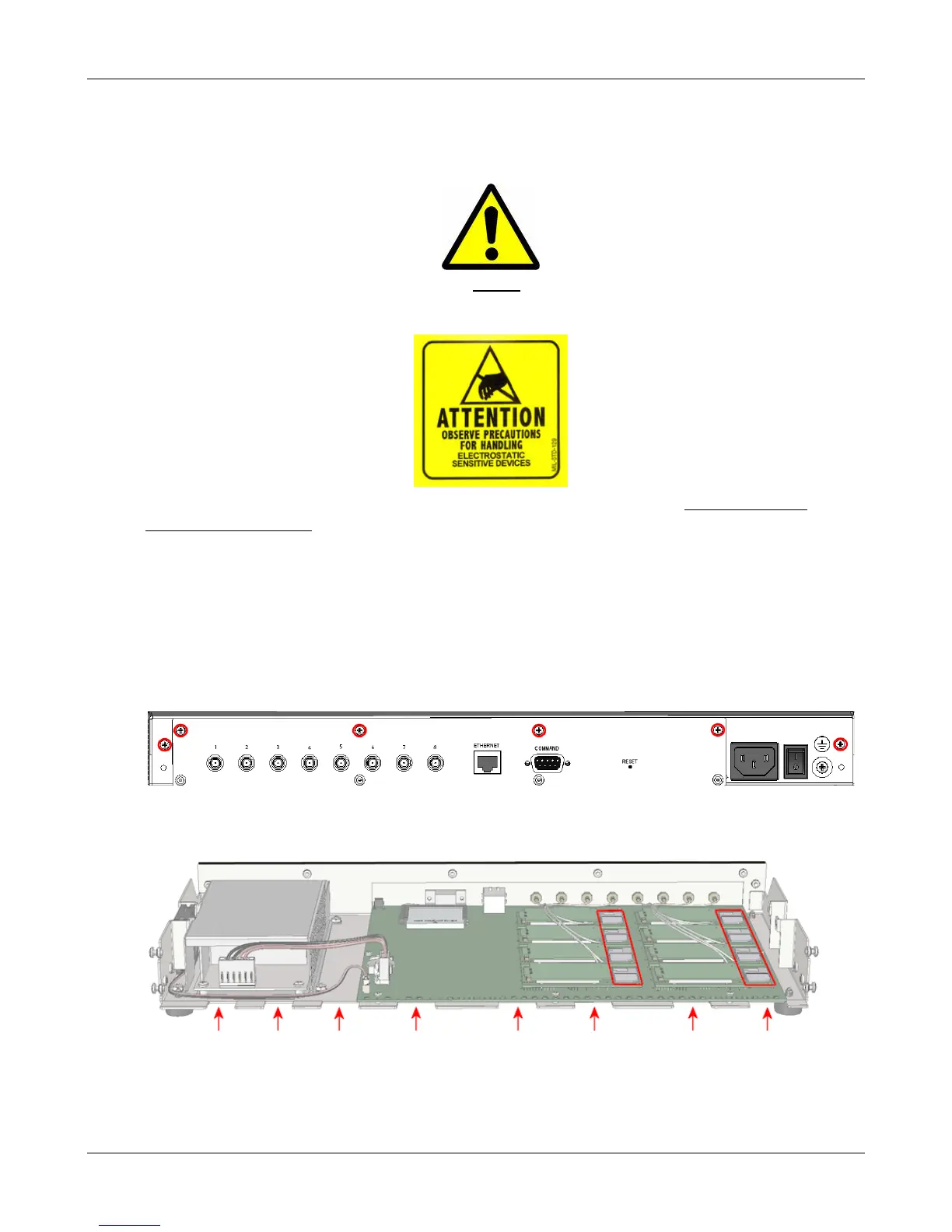
3. Use a small screwdriver to remove the six (6) screws on the back of the MultiModem iSMS as shown by
the red circles below. Then lift the top cover from the back of the unit and then slide towards the front
to remove.
4. Insert the SIM cards into the SIM card slots on the internal wireless modems. Each modem has a
graphic line depicting the correct SIM card orientation. These receptacles are highlighted by the two
red boxes in the illustration below (SF 800 model shown).
5. To re-attach the cover, start with the cover tilted up and align the “teeth” with the gaps between
those on the bottom of the chassis as shown by the red arrows in the illustration above.
6. Rotate the cover down and push towards the rear of the unit until it is flush.
7. Insert the six (6) screws back in to the unit and tighten.
Downloaded from Elcodis.com electronic components distributor



 To Next Page