Maintenance Manual – SC Cutting Plotter
11 AP-74030, Rev / B
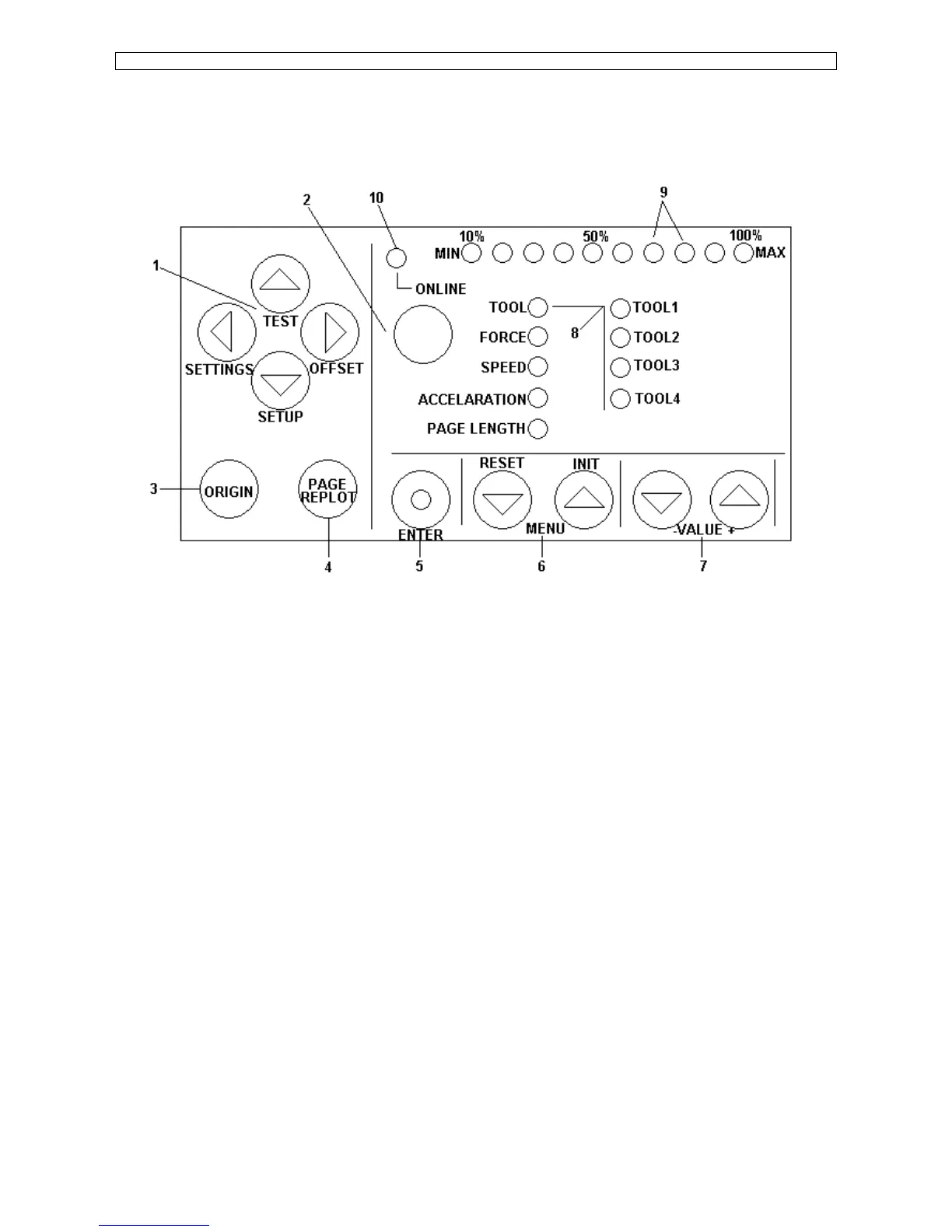
1.3. Function keys.
Using the control panel, you can access different modes and alter several settings, in order to fine-tune the
cutter to match all your needs.
1)
JOG – keys
: Keys for manual movement of the tool head.
2)
ON-LINE
: Key to switch between OFF-LINE and ON-LINE mode.
3)
ORIGIN
: When this key is pressed, a new origin is set at the present location of
the tool head. Using the ORIGIN key, you can also activate the
alignment function.
4)
PAGE
: Performs media pre-feed cycle and gives access to the replot / copy
function and starts the automatic sheet-off function.
5)
ENTER
: To confirm changes and accept settings. The enter key, marked with a
blue dot, also gives access to special functions indicated by the blue text
on the control panel.
6)
MENU Selection Keys
: To select the parameter you want to alter.
7)
Value + & - Keys
: To change a parameter’s value or setting.
8)
LED indicator for plotter parameters and tool selection indication.
9)
LED bar for value indicators, error messages and function confirmation.
10)
ONLINE-LED indicator









 To Next Page