Maintenance Manual – SC Cutting Plotter
53 AP-74030, Rev / B
6.2.6. Cutting head : Removal and installation.
Step 1 : Remove the transparent cover (Please refer to 6.2.2. transparent cover).
Step 2 : Remove the Y-rail cover (Please refer to 6.2.4. Y-rail cover).
Step 3 : Remove the head cover by removing the screw in the middle of the cover and unscrew the
bottom screw a few turns.
The head cover can be removed by sliding upwards.
Step 4 : Open the 2 white connectors by sliding them to the front and pull away the 2 flex cables from the
connectors.
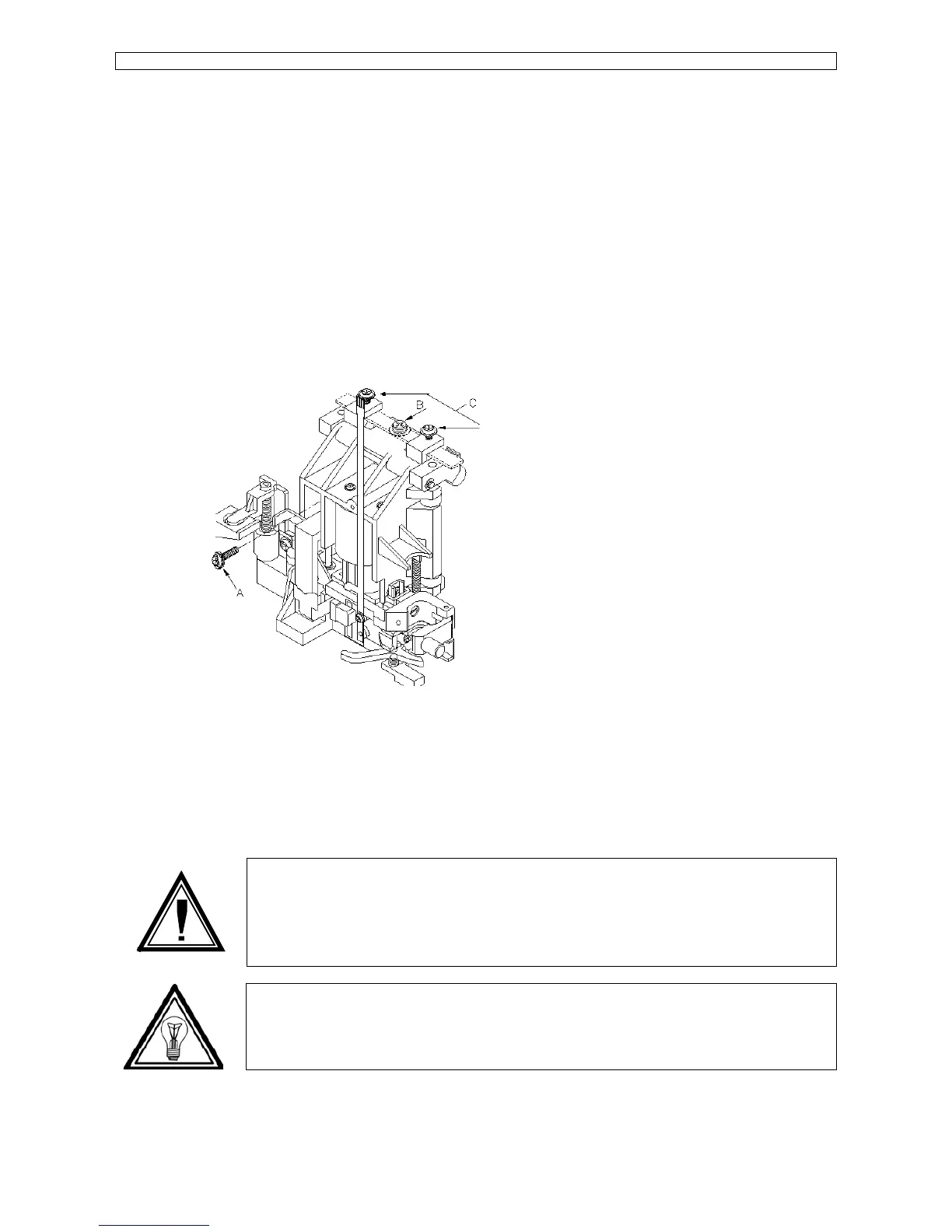
Remove the head PCB on top of the head by 2 screws ‘C’ (Please refer to picture mentioned
below) and lay it somewhere on the Y-rail where the flex cable cannot be damaged.
Step 5 : Remove the ‘A’ that fix the cutting head to the drive belt.
It is strongly recommended to use a magnetised –screwdriver in order not to drop the screw
inside the head.
Step 6 : Remove the screw ‘B’ on the top of the head and slide away the blade spring.
Step 7 : Move the head manually to the utmost right position, turn over the top rollers to the front, lower
the head a little and remove it in the front direction.
Caution :
It is really important to move the head to the utmost right position as on another position
it is impossible to remove the head from the Y-rail.
Note :
To reinstall the cutting head perform above steps in reversed order.









 To Next Page