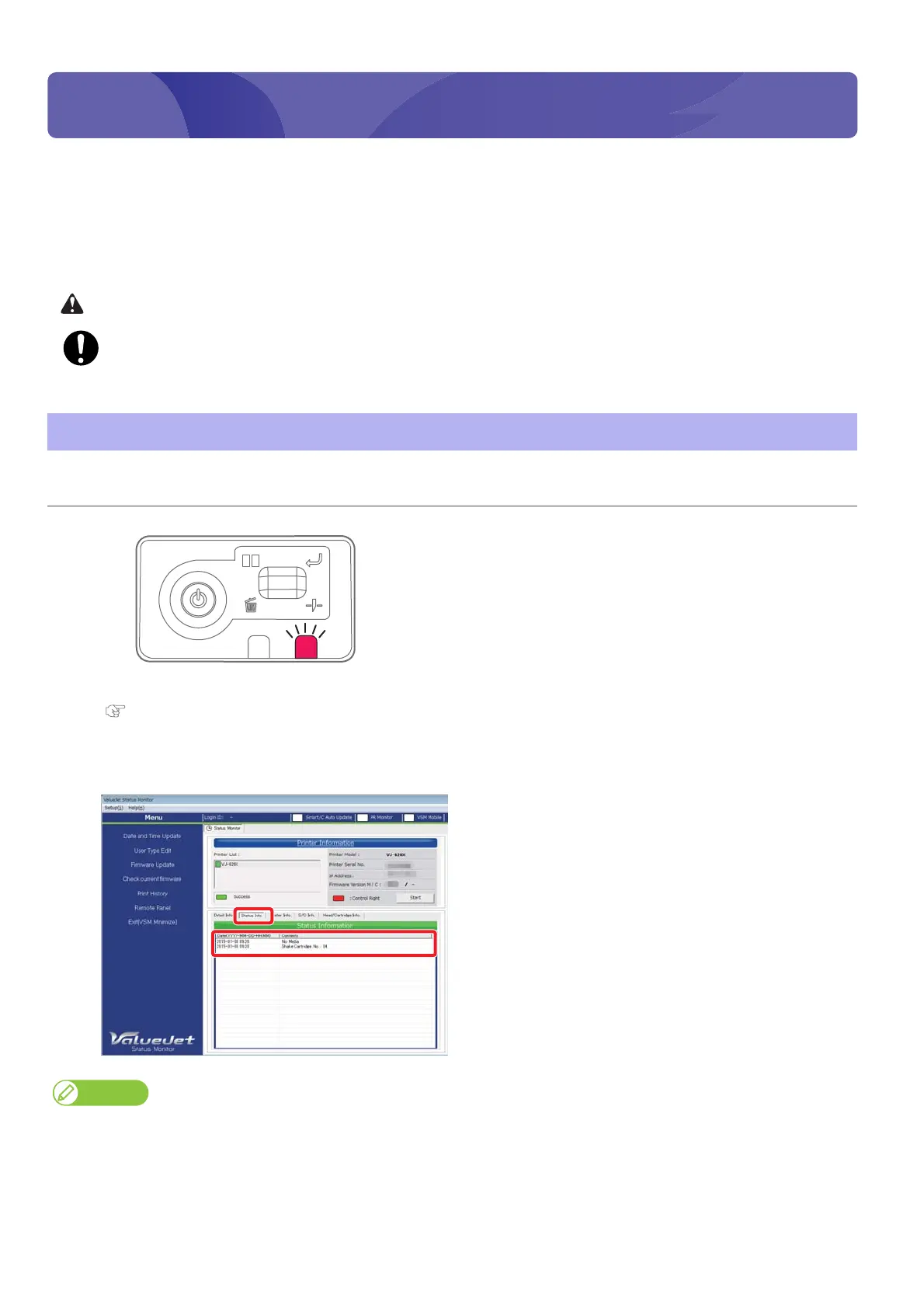
How to check the message 55
3 Agitating ink cartridges
Agitate the ink cartridges in the following cases to avoid ink settlement or coagulation.
• Before and after daily operations
• When the error lamp on the operation panel turns on and the following message is displayed on the “Status Information”
of VSM.
“Shake the cartridges No. **” (** indicates the cartridge slot number)
Be cautious that ink does not get into your eye or make a contact with your skin. Wear groves.
When ink gets into your eye or make a contact with your skin, wash with water immediately. If left as it is, it may
cause red eye or light inflammation. If it is necessary, please see your doctor immediately.
How to check the message
Procedure
[1]
Check that the error lamp on the operation panel is on.
[2]
Launch VSM.
"Launching VSM" on page 13
[3]
Check the [Status Information].
• For instance, if the message “Shake Cartridge. No. 34” is displayed, agitate the ink cartridges number 3 and 4.
• You can check the slot numbers with the ink color display label on the rear side of the printer.
• When you have launched the VSM remote panel, you can also check from [Printer Status] - [Status Information].















 To Next Page