X GEM-X255 Programming Instructions
L NAPCO Security Systems
Page 42
WI1092E 10/05
ACM OPTIONS
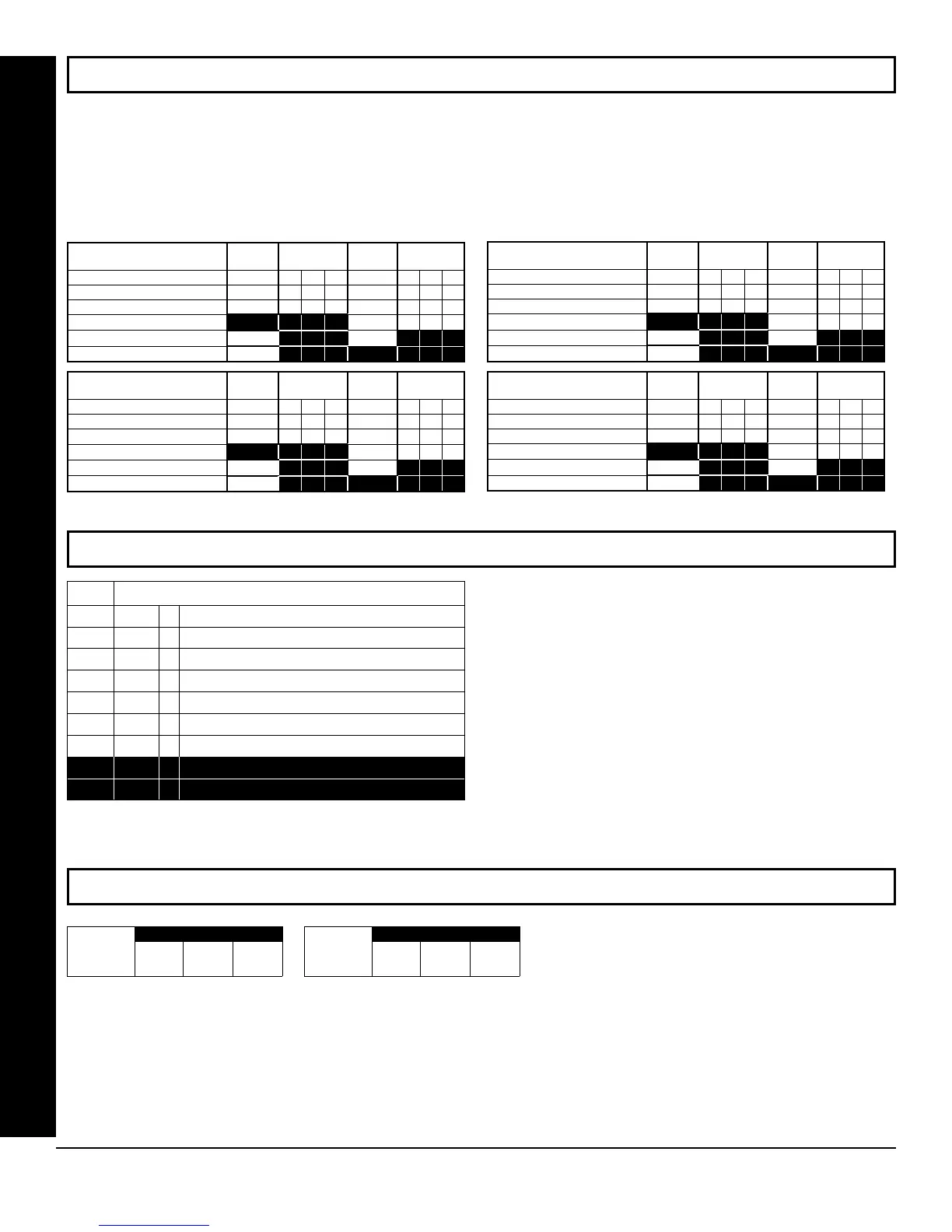
ACM ZONE OPTIONS (ADDRESS 2740-2779)
ACM GLOBAL FLAGS (ADDRESS 2780)
ACM TIMEOUTS (ADDRESS 2782-2783)
ACM ZONE OPTIONS:
Enter the Zone numbers (in decimal 1-255 format) for each option in the table below. Press U or D to save.
NOTE: Dark shaded data value box shows option not available. Note: The Area # for Door 1 is controlled by the ex-
isting Keypad Programming table (Address 2425 to 2439). The assigned area for Door #2 for each ACM must be en-
tered in the table below (addresses 2748, 2758, 2768 and 2778) and must not be left blank if Door 2 is to be used.
ACM1 Zone Options
Door 1
ADDR
Door 2
Door Contact
2740
2745
Forced Entry Zone
2741
2746
Door Ajar Zone
2742
2747
ADDR
Area # for Door 2
2748
Reserved
2743
2749
Reserved 2744
ACM2 Zone Options
Door 1
ADDR
Door 2
Door Contact
2750
2755
Forced Entry Zone
2751
2756
Door Ajar Zone
2752
2757
ADDR
Area # for Door 2
2758
Reserved
2753
2759
Reserved 2754
ACM3 Zone Options
Door 1
ADDR
Door 2
Door Contact
2760
2765
Forced Entry Zone
2761
2766
Door Ajar Zone
2762
2767
ADDR
Area # for Door 2
2768
Reserved
2763
2769
Reserved
2764
ACM4 Zone Options
Door 1
ADDR
Door 2
Door Contact
2770
2775
Forced Entry Zone
2771
2776
Door Ajar Zone
2772
2777
ADDR
Area # for Door 2
2778
Reserved
2773
2779
Reserved 2774
2780
ACM Global Flags
Default
Option
OFF
1
Enable Two-Swipe Arming
OFF
2
Enable NAPCO Proprietary Access Format
OFF
3
Enable Facility Code
OFF
4
Enable Access Logging into Burg Log
OFF
5
Enable Printing of Access Events
OFF
6
Enable Card Presentation Beep and Green LED Flash
OFF
7
RESERVED
OFF
8
RESERVED
ACM GLOBAL FLAGS:
1. Select the desired option entering the option number
(1-8) for each digit.
2. Enter corresponding option number in address loca-
tion.
NOTE: Dark shaded data value box shows option not
available. Press
U or D to save.
ADDRESS 2782
[Default = 030 = 3 seconds.]
Maximum
Two-Swipe
Arm Time
(x100ms)
ADDRESS 2783
[Default = 005 = 5 sec.]
Unlock Time
(sec.)
Enable ACM Access (address 2423) must be enabled.
Address 2782 determines the maximum time allowed for the double swipe (x100ms). Address 2783 determines the door unlock
time, in seconds, after a successful entry.
1. Select timeout (1-255).
2. Enter in corresponding address locations above and right. Press U or D to save.









 To Next Page