L NAPCO Security Systems
X GEM-X255 Programming Instructions
Page 47
WI1092E 10/05
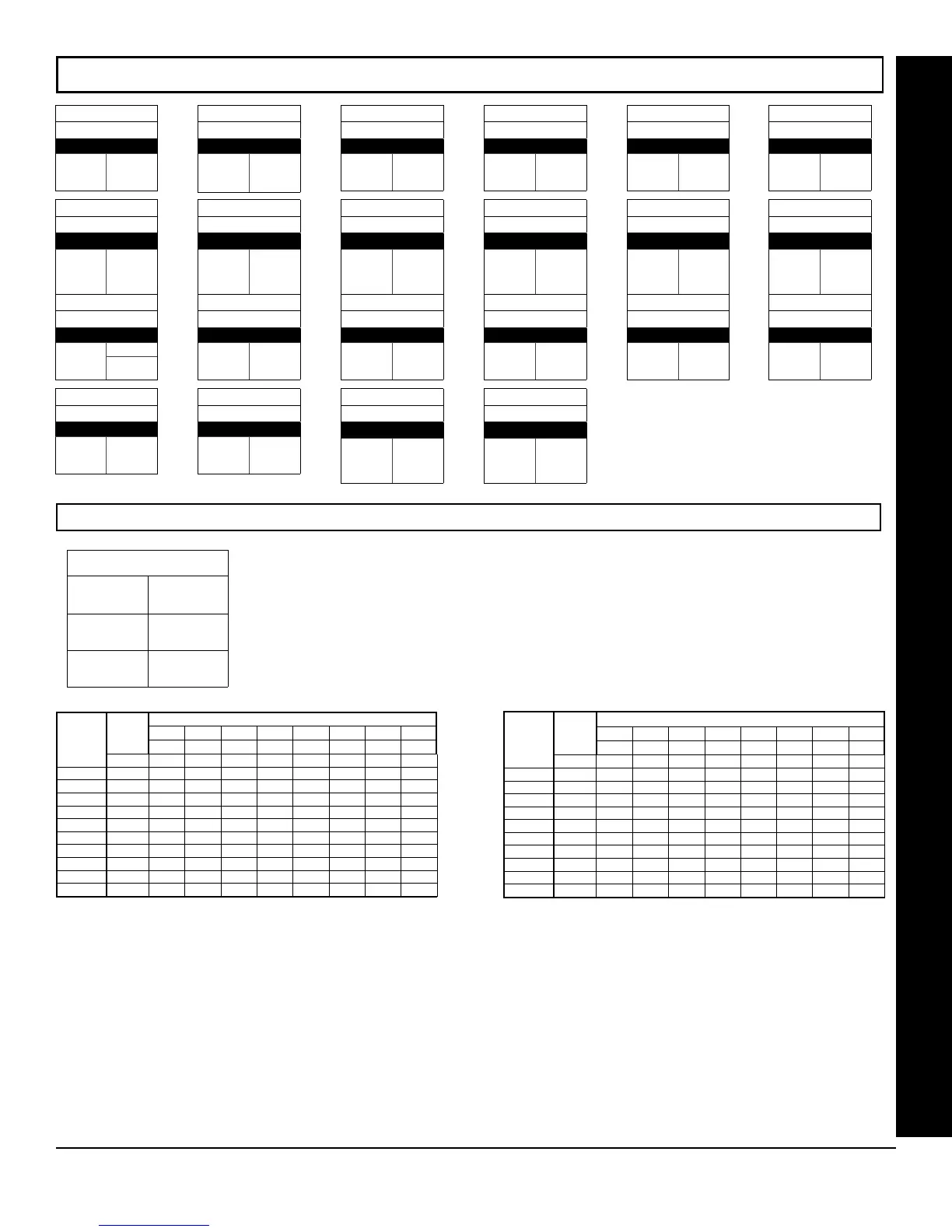
EZM GROUP OPTIONS (ADDRESS 2555-2576)
Default depends on Easy Menu Question
“# OF ZNS IN AREA1
and “# OF ZNS IN AREA2
. For example, If 96 zones are used, then all 22
groups will be automatically enabled. If only 8
zones are used, then groups 1-22 will be
automatically disabled.
ADDRESS 2555
EZM Group 1
ZONES 9-12
ADDRESS 2556
EZM Group 2
ZONES 13-16
ADDRESS 2557
EZM Group 3
ZONES 17-20
ADDRESS 2558
EZM Group 4
ZONES 21-24
ADDRESS 2559
EZM Group 5
ZONES 25-28
ADDRESS 2560
EZM Group 6
ZONES 29-32
NOTE: Zones 1-8 are included in the control panel and Zones 9-96 (Groups 1-22) are EZM Zones (either Wireless or Hardwired).
EZM TYPE
DATA
ENTRIES
RIGHT
OPTION
blank (•) Not used (No
EZM present)
1 4-Zone EZM
EZM GROUP OPTIONS: Up to 22 Groups of 4 Zones each may be programmed depending on the
number of zones used and which EZM modules are connected. Each group represents 4 zones.
1. Select EZM type from the table shown.
2. Enter either blank (•) or "1" in corresponding address locations above.
3. Press U or D to save
EZM PGM ARMED TERMINAL CONTROL: For each zone group select the area(s) which, when armed, will activate the PGM Lug
on the corresponding EZM modules. Each zone group corresponds to 4 zones. If 8-Zone EZMs are used each one is treated as
TWO zone groups. NOTE: Lug goes ACTIVE (low) when ANY selected area is armed. When activated, the PGM Lug goes
negative (to Ground).
1. Select the desired group number.
2. Enter the corresponding Area number in each the address location, in Binary (Bit) Format. NOTE: See Direct Address
Programming Example on page 15.
3. Press U or D to save.
ADDRESS 2561
EZM Group 7
ZONES 33-36
ADDRESS 2562
EZM Group 8
ZONES 37-40
ADDRESS 2563
EZM Group 9
ZONES 41-44
ADDRESS 2564
EZM Group 10
ZONES 45-48
ADDRESS 2565
EZM Group 11
ZONES 49-52
ADDRESS 2566
EZM Group 12
ZONES 53-56
ADDRESS 2567
EZM Group 13
ZONES 57-60
ADDRESS 2568
EZM Group 14
ZONES 61-64
ADDRESS 2569
EZM Group 15
ZONES 64-68
ADDRESS 2570
EZM Group 16
ZONES 69-72
ADDRESS 2571
EZM Group 17
ZONES 73-76
ADDRESS 2572
EZM Group 18
ZONES 77-80
ADDRESS 2573
EZM Group 19
ZONES 81-84
ADDRESS 2574
EZM Group 20
ZONES 85-88
ADDRESS 2575
EZM Group 21
ZONES 89-92
ADDRESS 2576
EZM Group 22
ZONES 93-96
EZM GROUP OPTIONS
GROUP
NUMBER
EZM PGM TERMINAL CONTROL
ADDR A1 A2 A3 A4 A5 A6 A7 A8
1 2 3 4 5 6 7 8
1 2577
2 2578
3 2579
4 2580
5 2581
6 2582
7 2583
8 2584
9 2585
10 2586
11 2587
[Default = blank (•) blank (•) from address 2577-2587]
GROUP
NUMBER
EZM PGM TERMINAL CONTROL
ADDR A1 A2 A3 A4 A5 A6 A7 A8
1 2 3 4 5 6 7 8
12 2588
13 2589
14 2590
15 2591
16 2592
17 2593
18 2594
19 2595
20 2596
21 2597
22 2598
[Default = blank (•) blank (•) from address 2588-2598]









 To Next Page