FS728TP Smart Switch Software User Manual
5-39 Configuring the Device Using Your Browser
v2.0, November 2006
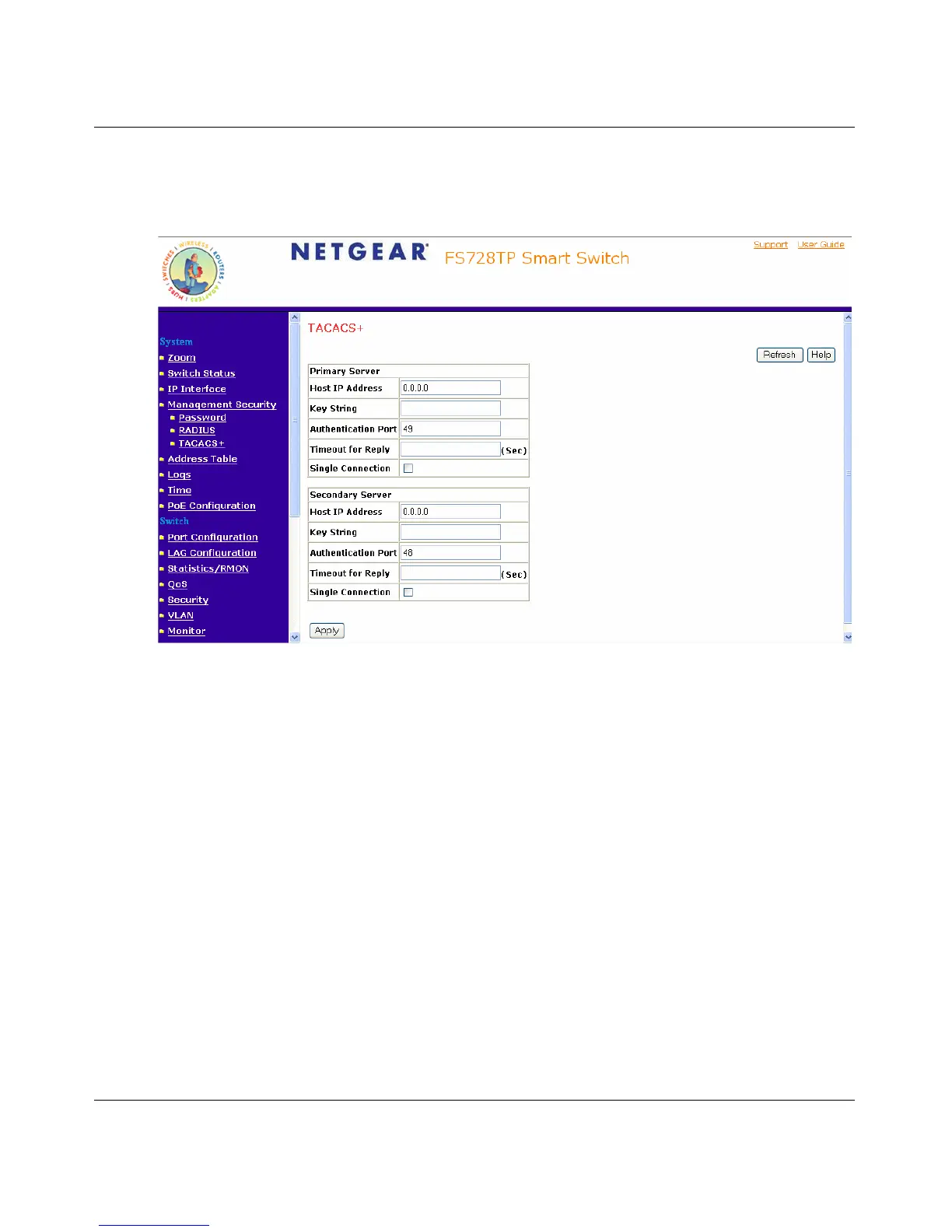
To define TACACS+ Settings:
1. Click System > Management Security > TACACS+. The TACACS+ Page opens:
Figure 5-31
The TACACS+ Page contains the following fields:
– Primary Server – Defines the RADIUS Primary Server authentication fields.
– Backup Server – Defines the RADIUS Backup Server authentication fields.
– Host IP Address – Defines the TACACS+ Server IP address.
– Key String – Defines the default authentication and encryption key for TACACS+
communication between the device and the TACACS+ server.
– Authentication Port (0-65535) – Defines the port number via which the TACACS+
session occurs. The default port is port 49.
– Timeout for Reply – Defines the default time that passes before the connection between
the device and the TACACS+ times out.
– Single Connection – Maintains a single open connection between the device and the
TACACS+ server. The possible field values are:
– Checked – Enables a single connection.






 To Next Page