NIBE FIGHTER 1250
External contacts
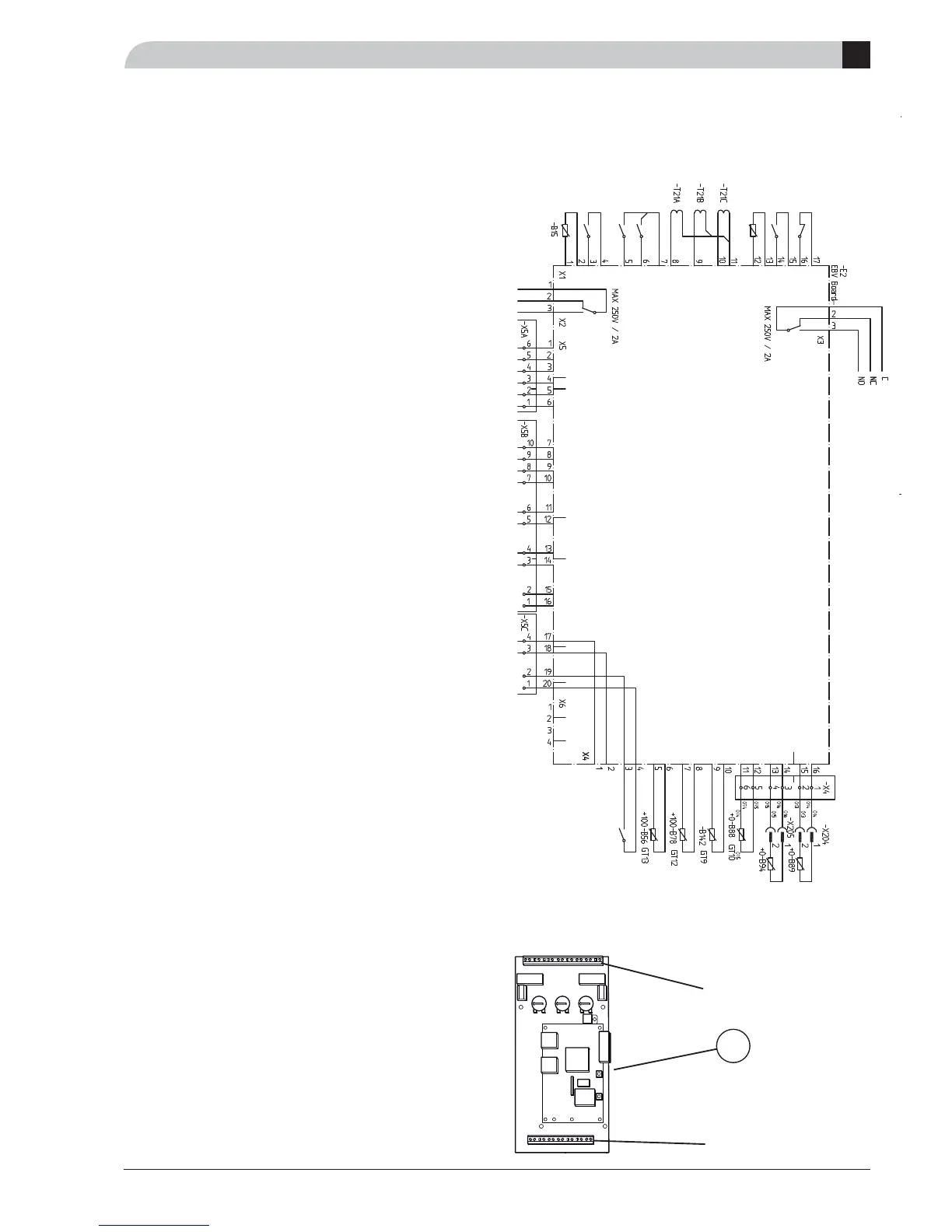
RG 10, sensor for changing the room temperature
An external sensor can be connected to FIGHTER 1250 to
change the fl ow temperature and with that set the room
temperature, for example, a room sensor (RG 10, acces-
sory). The sensor is connected on terminals X1:3, X1:4 and
X1:14 on the load monitor card (2).
Activated in menu 9.2.18
The difference between the room temperature and the set
room temperature affects the fl ow temperature. The re-
quired room temperature is set using the knob on RG10
and is shown in menu 6.0.
Contact for changing the room temperature
Heating system 1: An external contact function can be con-
nected to FIGHTER 1250 to change the fl ow temperature
and in doing so change the room temperature, for exam-
ple, a room thermostat (accessory) or a timer. The contactor
should be potential free and momentary and is connected
to terminals X1:3 and X1:4 on the load monitor card (2).
When the contact is made, the heating curve offset is
changed by the number of steps shown here. The value is
adjustable between -10 and +10. The value for the change
is set on menu 2.5, “Compensation external”.
Heating system 2: An external contact function can be con-
nected to FIGHTER 1250 to change the fl ow temperature
and in doing so change the room temperature, for exam-
ple, a room thermostat (accessory) or a timer. The contactor
should be potential free and momentary and is connected
to terminals X1:14 and X1:15 on the load monitor card (2).
When the contact is made, the heating curve offset is
changed by the number of steps shown here. The value is
adjustable between -10 and +10. The value for the change
is set on menu 3.5, “Compensation external 2”.
Contact for activation of “Extra hot water”
An external contact function can be connected to FIGHTER
1250 for activation of the “Temporary extra hot water”
function. The contactor should be potential free and mo-
mentary and is connected to terminals X4:3 and X4:4 on
the load monitor card (2).
When the contact makes for at least one second, the
“Temporary Extra hot water” function is activated. An au-
tomatic return to the previously set function occurs after 24
hours.
NV 10, pressure/level monitor brine
When a level monitor NV 10 (accessory) is required for the
brine installation, this can be connected to terminals X1:16
and X1:17. In order for this to be active you must change
menu 9.2.11, brine pressostat, to “On”.
The contact shall be made during normal operating condi-
tions.
Extra Hot Water
Hot water, jacket
Hot water, top
Return line sensor 1
Flow sensor 1
Flow sensor 2
Return line sensor 2
Pressure/level monitor
brine
External compensation 2
Pool temperature
Current transformer L3
Current transformer L2
Current transformer L1
External compensation 1
Outside sensor
Tariff B
Tariff A
2
X1
X4
B
Electrical connections



 To Next Page