EN
English – 7
TABLE5-Level1functions(ON-OFFfunctions)
Led Function Description
L1
AutomaticClosing This function causes the door to close automatically after the programmed time has lapsed.The factory set Pause
Time is 30 seconds, but can be changed to 5, 15, 30, 45, 60, 80, 120 or 180 seconds. If the function is inactive, func-
tioning will be “semi-automatic”.
L2
CloseAfterPhoto This function enables the gate to be kept open for the necessary transit time only.In fact the “Photo” always causes an
automatic closure with a pause time of 5s (regardless of the programmed value).
The action changes depending on whether the “Automatic closing” function is active or not.
When “AutomaticClosing”isinactive: The gate always arrives to the totally open position (even if the Photo disen-
gages rst). On release of Photo, automatic closure is activated with a pause of 5s.
When “AutomaticClosing”isactive: the opening manoeuvre stops immediately after the photocells have disen-
gaged. After 5 seconds, the gate will begin to close automatically.
The “Close after photo” function is always disabled in manoeuvres interrupted by a Stop command.
If the “Close after photo” function is inactive the pause time is that which has been programmed or there is no auto-
matic closing if the function is inactive.
L3
AlwaysClose The “Always Close” function will trigger, and the gate will close if an open gate is detected when the power supply
returns. For safety reasons, the manoeuvre is preceded by 5s of ashing. If the function is inactive when the power
supply returns, the gate will remain still.
L4
Standby It is particularly useful in cases when the buffer battery is being used. If this function is active, the control unit will
switch the BLUEBUS output (and consequently the devices) and all the LEDs off one minute after the end of the
manoeuvre.The only LED which will remain on is the BLUEBUS LED which will simply ash more slowly. When a com-
mand arrives, the control unit will reset to complete functioning. If this function is inactive, there will be no reduction in
the consumption.
L5
Peak If this function is activated, the gradual acceleration at the beginning of each manoeuvre will be disconnected. It ena-
bles the peak thrust and is useful whenever static friction is high, e.g. if snow or ice are blocking the leaf. If the thrust is
inactive, the manoeuvre will start with a gradual acceleration.
L6
Pre-ashing With the pre-ashing function, a 3 second pause is added between the ashing light switching on and the beginning of
the manoeuvre in order to warn the user, in advance, of a potentially dangerous situation. If pre-ashing is inactive, the
ashing light will switch on when the manoeuvre starts.
L7
“Close”becomes
“Openpartially”
By activating this function all “close” commands (“CLOSE” input or radio command “close”) activate a partial opening
manoeuvre (see LED L6 on table 7).
L8
“Slave”mode
By activating this function SLIGHT becomes “Slave”: in this way it is possible to synchronise the functioning of two
motors on opposite leaves where one motor functions as Master and the other as Slave; for further information see
“9.1.5 SLIGHT in “Slave” mode.
8.1- Presetfunctions
The SLIGHT control unit has a number of programmable functions.These func-
tions are pre-set by the manufacturer to a conguration which should satisfy
most automations.
8.2- Programmingkeys
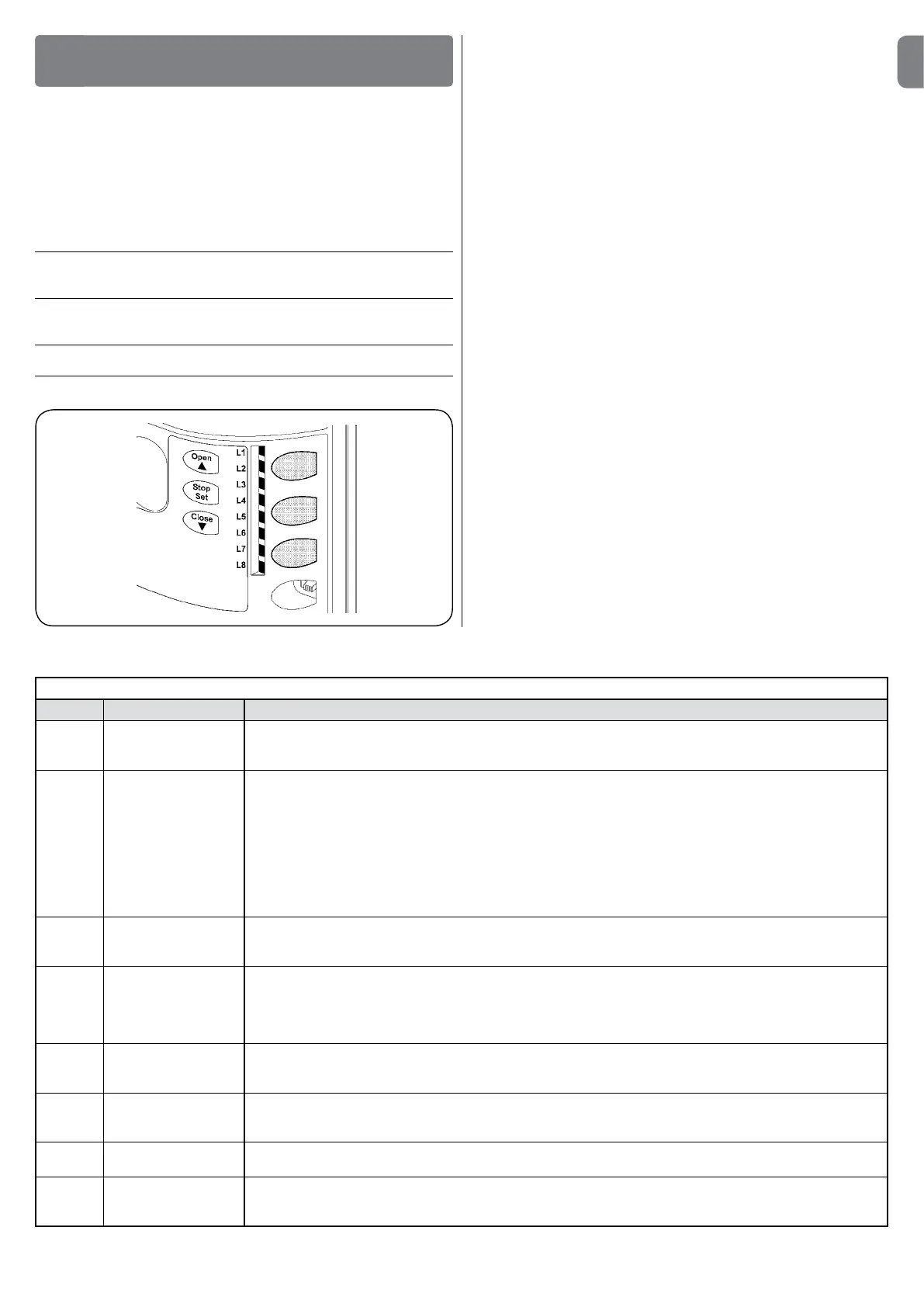
The SLIGHT control unit features three keys that can be used to command the
control unit during tests and programming:
Open The “OPEN” key enables the user to command the opening of the
gate
s or to move the programming point upwards.
Stop The “STOP” key enables the user to stop the manoeuvre, if pressed
Set for if pressed for more than 5 seconds, it enables users to enter
programming
Close The “CLOSE” key enables the user to control the closing of the gate
t or move the programming point downwards
PROGRAMMING
8
8.3- Programming
On the SLIGHT control unit, a number of programmable functions are available.
The functions are adjusted using 3 keys on the control unit: [s] [Set] [t] and
are used by means of 8 LEDs: L1….L8.
The programmable functions on SLIGHT are available on two levels:
Levelone: the functions can be adjusted in ONOFF (active or inactive) modes.
In this case, each of the LEDs L1….L8 indicates one function; if it is lit the func-
tion is active, if it is OFF, the function is not active; see Table 5.
Leveltwo: the parameters can be adjusted on a scale of values (from 1 to 8).In
this case, each of the LEDs L1….L8 indicates the set value (there are 8 pos-
sible settings). Please refer to Table 7.
During the normal functioning of SLIGHT the LEDs L1….L8 will either be on or off depending on the state of the function they represent. For example L1 will
be on if “Automatic Closing” is active.


 To Next Page