EN
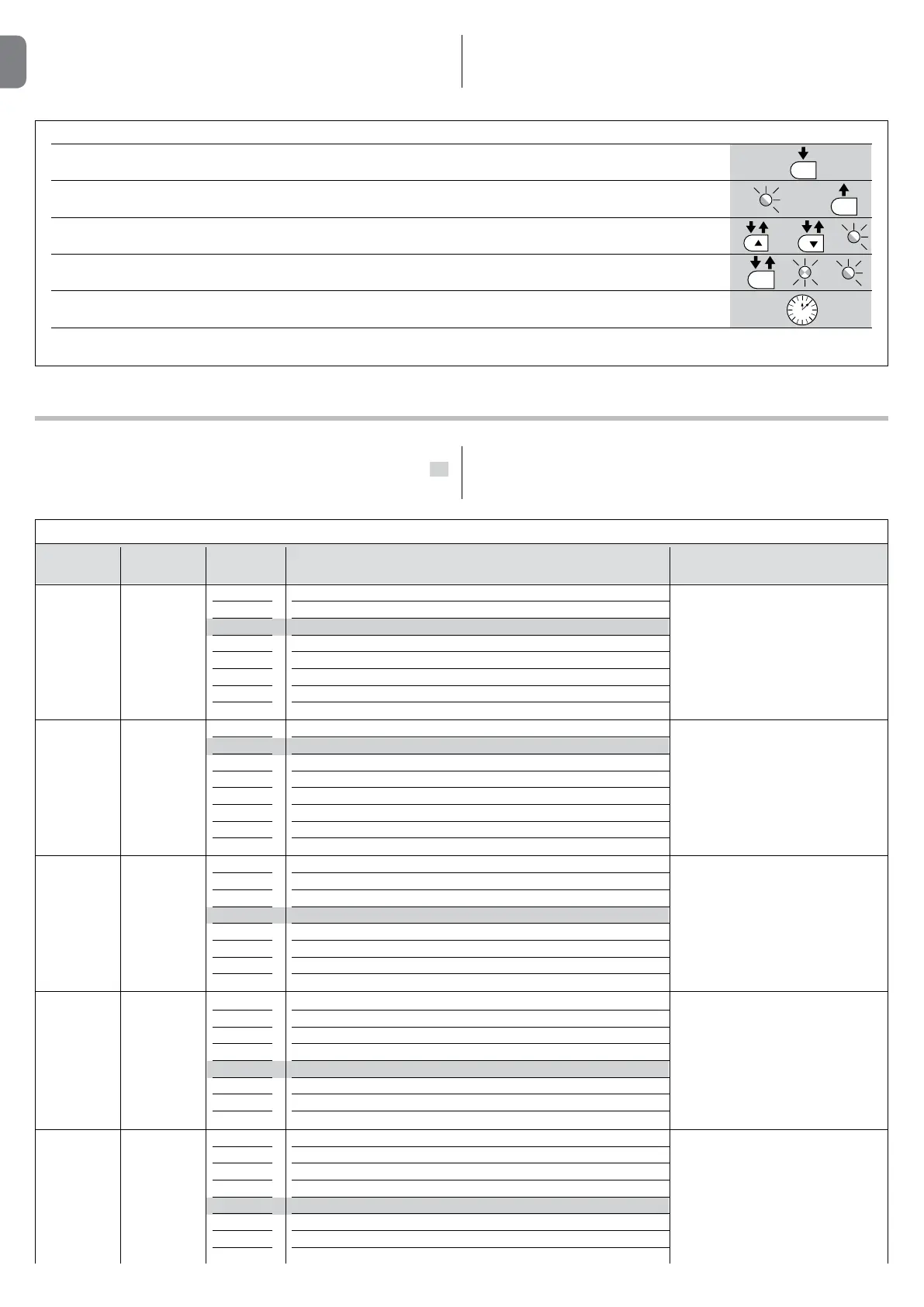
TABLE7-Level2functions(adjustableparameters)
InputLED Parameter LED Value Description
(level)
L2 L1
L2
L3
L4
L5
L6
L7
L8
Open – stop – close – stop
Open – stop – close – open
Open – close – open – close
Apartment block
Apartment block 2 (more than 2” generates stop)
Step-by-Step 2 (less than 2” causes partial opening)
Hold-to-run
“Semi-automatic” opening, “Man present “ closing
Manages the sequence of controls
associated to the Step-by-Step input
or to the 1st radio command.
Function
STEPBY
STEP
L1 L1
L2
L3
L4
L5
L6
L7
L8
5 seconds
15 seconds
30 seconds
45 seconds
60 seconds
80 seconds
120 seconds
180 seconds
Adjusts the pause time, namely the
time which lapses before automatic
closure. Is effective only if automatic
closure is enabled.
Pause
Time
L3 L1
L2
L3
L4
L5
L6
L7
L8
Very slow
Slow
Medium
Fast
Very fast
Extremely Fast
Opens “Fast”; closes “slow”
Opens “Extremely Fast” Closes “Fast”
Adjusts the speed of the motor during
normal travel.
Speed
ofmotor
L4 L1
L2
L3
L4
L5
L6
L7
L8
Open Gate Indicator Function
On if leaf closed
On if leaf open
Active with 2nd radio output
Active with 3rd radio output
Active with 4th radio output
Maintenance indicator
Electric lock
Adjusts the function associated with
S.C.A. output. (whatever the associ-
ated function may be, the output
supplies a voltage of 24V –30 +50%
with a maximum power of 4W when
active).
Output
S.C.A.
L5 L1
L2
L3
L4
L5
L6
L7
L8
Super light gate
“Very light” gate
“Light” gate
“Average” gate
“Averageheavy” gate
“Heavy” gate
“Very heavy” gate
“Super heavy” gate
Adjusts the system which controls
the motor force in order to adapt it
to the weight of the gate. The force
control system also measures the
ambient temperature, automatically
increasing the force in the event of
particularly low temperatures.
Force
ofmotor
TABLE6 - ChangingON-OFFFunctions
01. Press and hold the “Set” key for about 3 seconds;
02. Release the “Set” key when the “L1” LED start to ash;
03. Press keys “s” or “t” to move the ashing LED onto the LED representing the function which is to be changed;
04. Press the “Set” key to change the status of the function: (short ashing = OFF; long ashing = ON);
05. Wait 10s to exit the programming mode automatically after the maximum time interval.
Note – Points 3 and 4 can be repeated during the same programming phases in order to set other functions to ON or OFF.
SET
SET
SET
L1
or
3 s
10 s
8.4- Level1programming(ON-OFFfunctions)
By default, level 1 functions are all set to OFF, but can be modied at any time
as described in Table 6. Take care during modication procedures, as there is a
maximum time interval of 10 seconds between pressing one key and another;
otherwise the system exits the procedure automatically memorising the chang-
es made up to that time.
8.5- Level2programming(adjustableparameters)
The adjustable parameters are factory set as shown in the Table 7 with: “ ”
but can be modied at any time as shown in Table 8. Take care during modi-
cation procedures, as there is a maximum time interval of 10 seconds between
pressing one key and another; otherwise the system exits the procedure auto-
matically memorising the changes made up to that time.
8 – English


 To Next Page