EN
English – 13
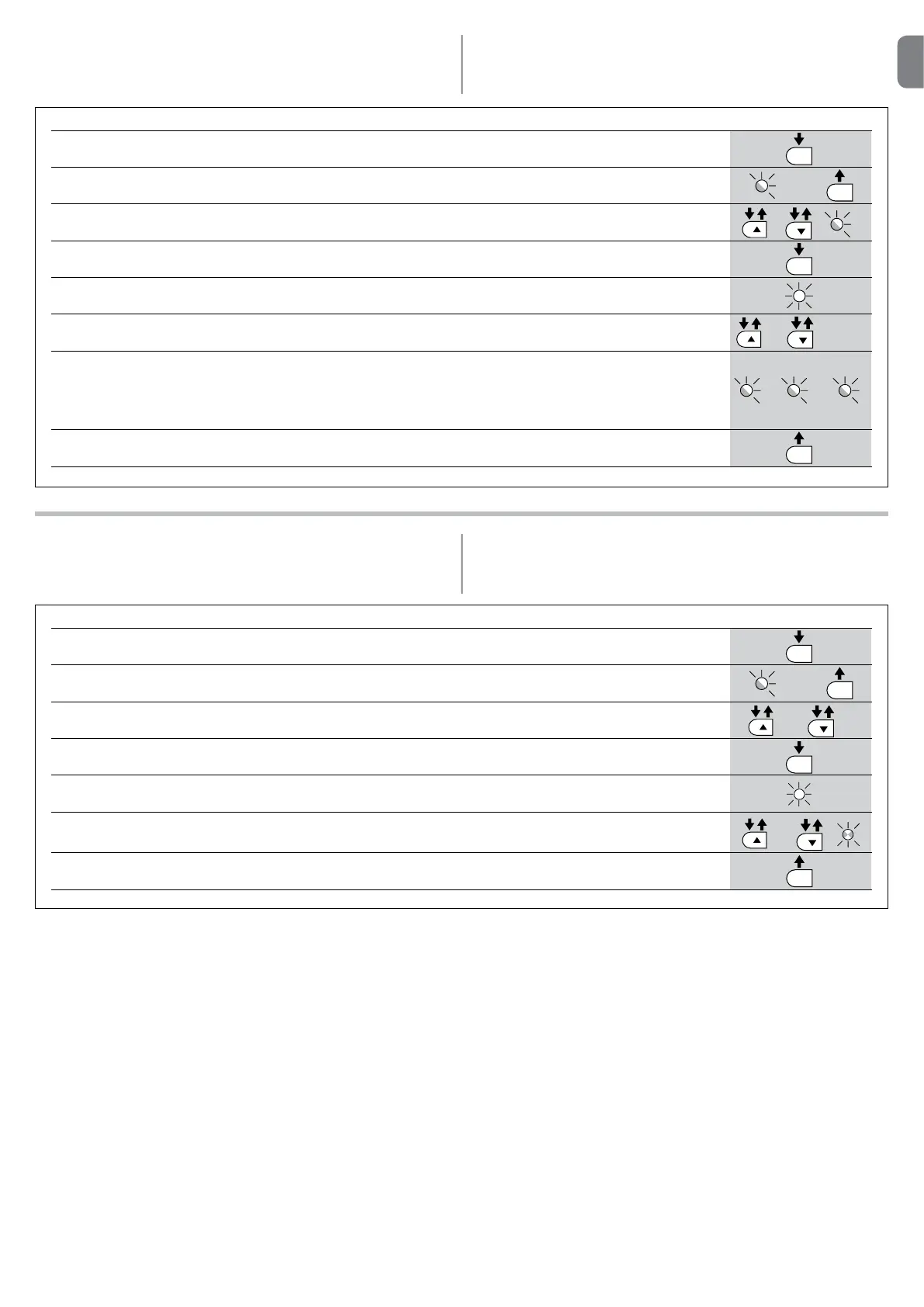
TABLE14 - Controlofthenumberofmanoeuvresperformed
01. Press and hold the “Set” key for about 3 seconds;
02. Release the “Set” key when the “L1” LED start to ash;
03. Press the “
s” or “t” key to move the ashing LED onto L7, i.e. the “input LED” for the parameter
“Maintenance notication”;
04. Press and hold the “Set” key; the [Set] key must be kept pressed in continuation during steps 5, 6 and 7;
05. Wait approx. 3s after which the led associated with the current level of the parameter “Maintenance notication” will
light up;
06. Press and immediately release the “
s” and “t” keys;
07. The led corresponding to the selected level ashes a few times. The number of ashes indicates the percentage of
manoeuvres performed (in multiples of 10%) with respect to the set limit. For example: with the maintenance warning
set on L6 being 10000, 10% is equal to 1000 manoeuvres; if the LED ashes 4 times, this means that 40% of the
manoeuvres have been reached (being between 4000 and 4999 manoeuvres). The LED will not ash if 10% of the
manoeuvres hasn’t been reached;
08. Release the “Set” key.
SET
SET
SET
L1
or
and
3s
3s
L7
TABLE15 - Manoeuvrecounterreset
01. Press and hold the “Set” key for about 3 seconds;
02. Release the “Set” key when the “L1” LED start to ash;
03. Press the “s” or “t” key to move the ashing LED onto L7, i.e. the “input LED” for the parameter
“Maintenance notication”;
04. Press and hold the “Set” key; the “Set” key must be kept pressed during steps 5 and 6;
05. Wait approx. 3s after which the led associated with the current level of the parameter “Maintenance notication” will
light up;
06. Press and hold keys “s” and “t” for at least 5 seconds, then release them. The LED that corresponds to the selected
level ashes rapidly indicating that the; manoeuvre counter has been reset;
07. Release the “Set” key.
SET
SET
SET
SET
L1
L7
or
and
3s
3s
9.2.5-Manoeuvrecounterreset
After the maintenance of the system has been performed the manoeuvre coun-
ter must be reset.
Follow the instructions in Table 15 for this control.
9.2.4-Controlofthenumberofmanoeuvresperformed
The number of manoeuvres performed as a percentage on the set limit can be
veried by means of the “Maintenance warning” function. Follow the indications
in Table 14 for this control.
.... n=?


 To Next Page