222
t
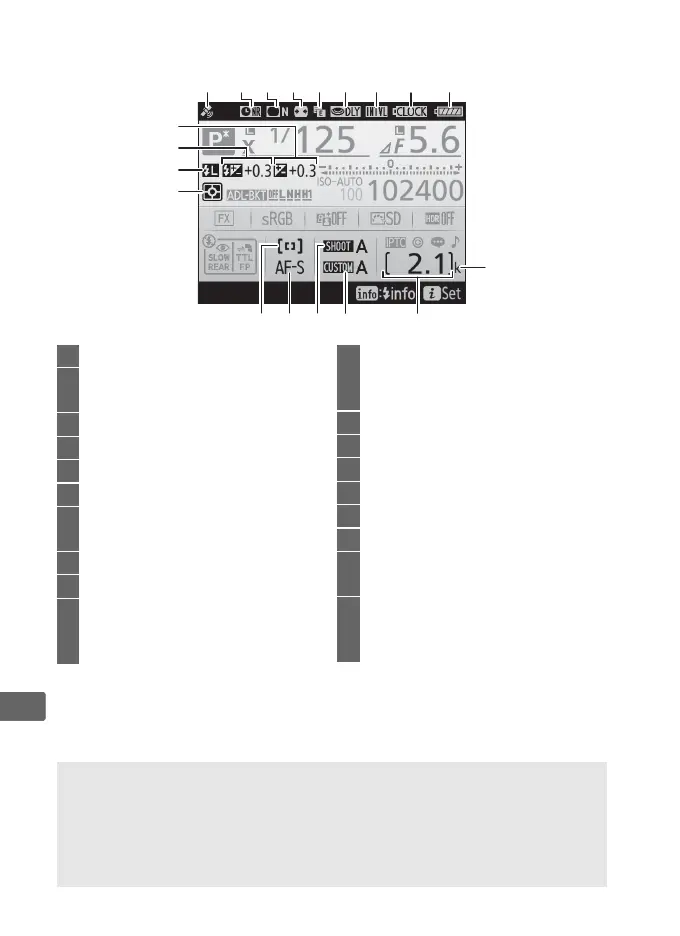
The Information Display (Continued)
Note: Display shown with all indicators lit for illustrative purposes.
32
39
23
36 35
37 34 33
24 2625
27 28 29 30 31
38
40
41
23 Satellite signal indicator .............244
24 Long exposure noise reduction
indicator .........................................313
25 Vignette control indicator..........314
26 Auto distortion control ...............315
27
Electronic front-curtain shutter
...338
28 Exposure delay mode..................337
29 Interval timer indicator...............237
Time-lapse indicator...................... 79
30 Clock battery indicator ........ 29, 439
31 Battery indicator............................. 37
32 “k” (appears when memory
remains for over 1000
exposures)........................................ 38
33 Number of exposures
remaining ............................... 38, 473
Manual lens number ...................242
34 Custom settings bank .................323
35 Photo shooting menu bank.......308
36 Autofocus mode ...........................101
37 AF-area mode.......................104, 106
38 Metering.........................................129
39 FV lock indicator ...........................203
40 Flash compensation indicator...200
Flash compensation value .........200
41 Exposure compensation
indicator .........................................143
Exposure compensation value..143
A See Also
For information on choosing how long the monitor stays on, see
Custom Setting c4 (Monitor off delay, 0 335).
The color of the
lettering in the information display can be changed using the
Information display option in the setup menu (0 370).



 To Next Page