33
s
Format the Memory Card
Memory cards must be formatted before first use or after being
used or formatted in other devices.
1 Turn the camera on.
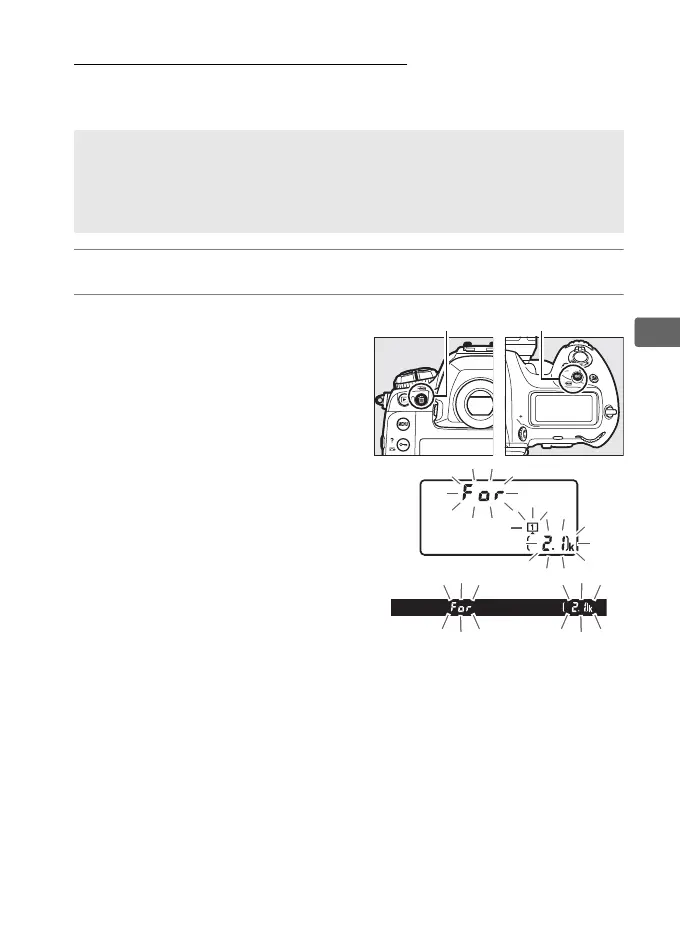
2 Press the O (Q) and
S (Q) buttons.
Hold the O (Q) and S (Q)
buttons down simultaneously
until a flashing C appears in
the shutter-speed displays in
the top control panel and
viewfinder.
If two memory
cards are inserted, the card to
be formatted is shown by a
flashing icon.
By default, Slot 1
(0 97) will be selected; you
can choose Slot 2 by rotating
the main command dial.
To
exit without formatting the
memory card, wait until C stops flashing (about six
seconds) or press any button other than the O (Q) and
S (Q) buttons.
D Formatting Memory Cards
Formatting memory cards permanently deletes any data they may contain.
Be sure to copy any photographs and other data you wish to keep to a
computer before proceeding (0 276).
O (Q) button S (Q) button



 To Next Page