265
I
Rating Pictures
Rate pictures or mark them as candidates for later deletion.
Ratings can also be viewed in ViewNX-i and Capture NX-D.
Rating
is not available with protected images.
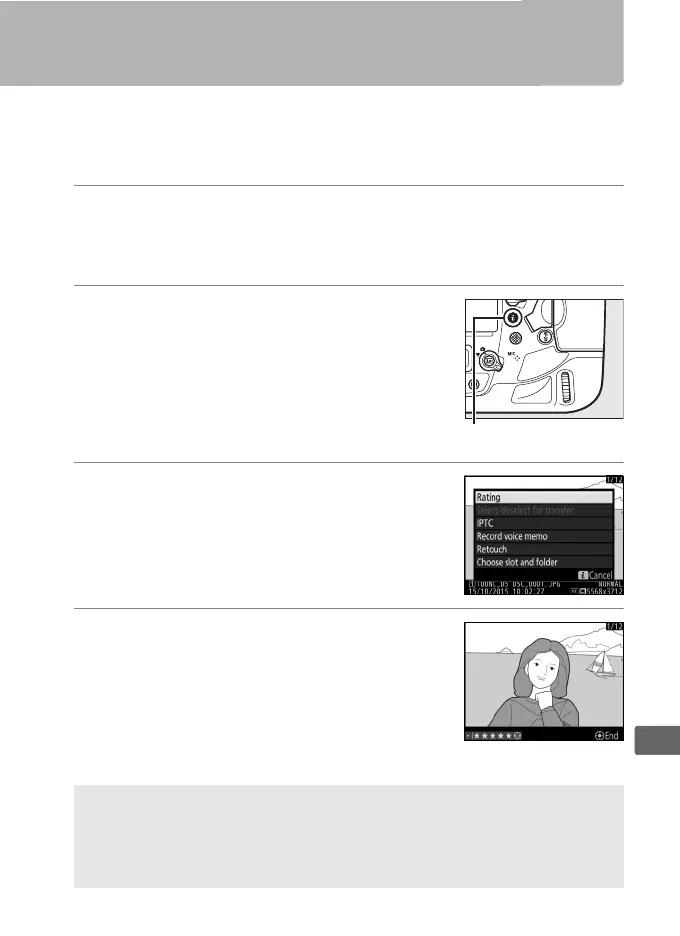
1 Select an image.
Display the image or highlight it in the thumbnail list in
thumbnail playback.
2 Display playback options.
Press the i button to display playback
options.
3 Select Rating.
Highlight Rating and press 2.
4 Choose a rating.
Press 4 or 2 to choose a rating of from
zero to five stars, or select d to mark the
picture as a candidate for later deletion.
Press J to complete the operation.
A Rating Pictures with the Fn3 Button
If Rating is selected for Custom Setting f1 (Custom control
assignment) > Fn3 button, pictures can be rated by keeping the Fn3
button pressed and pressing 4 or 2 (0 344, 349).



 To Next Page