344
U
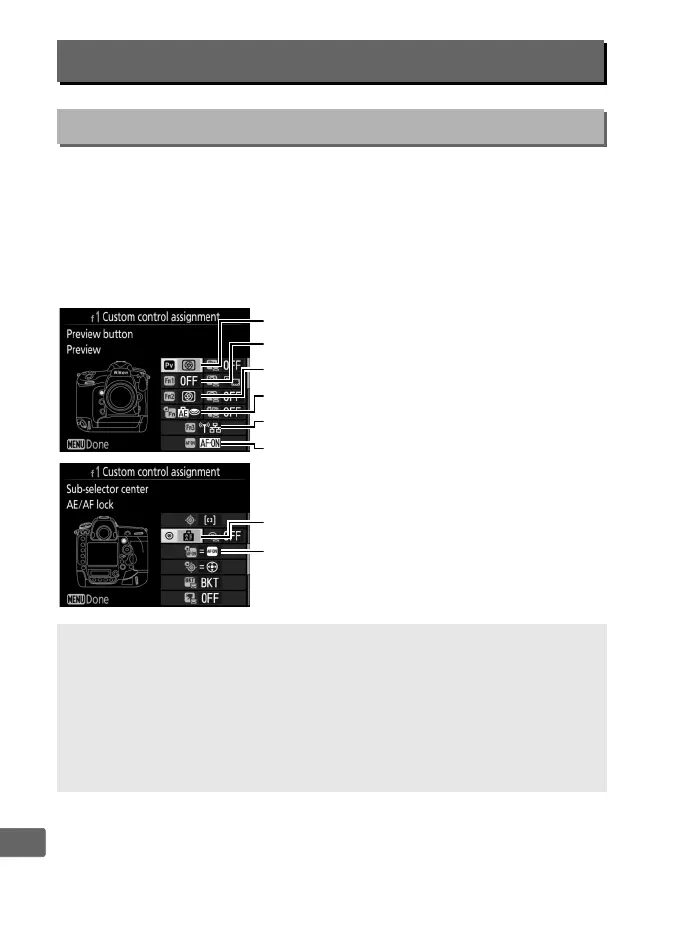
Choose the functions assigned to camera controls, whether used
individually or in combination with the command dials.
❚❚ Press
Choose the roles played by the following controls, highlight the
desired option and press the center of the multi selector:
f: Controls
f1: Custom Control Assignment
G button ➜ A Custom Settings menu
A “Press” and “Press + Command Dials”
Certain roles can not be assigned simultaneously to both the “press”
and “press + command” functions for some controls.
Assigning such a
role to “press” when it is already assigned to “press + command dial”
sets the “press + command dial” option None, while assigning such a
role to “press + command dials” when it is already assigned to “press”
sets the “press” option None.
0
Pv button
V
AF-ON button
z
Fn3 button
s
Fn button for vertical shooting
x
Fn2 button
v
Fn1 button
8
Center of sub-selector
l
AF-ON button for vertical shooting



 To Next Page