162
r
Fine-Tuning White Balance
At settings other than K (Choose color temp.), white balance can
be “fine-tuned” to compensate for variations in the color of the
light source or to introduce a deliberate color cast into an image.
❚❚ The White Balance Menu
To fine-tune white balance from the photo shooting menu, select
White balance and follow the steps below.
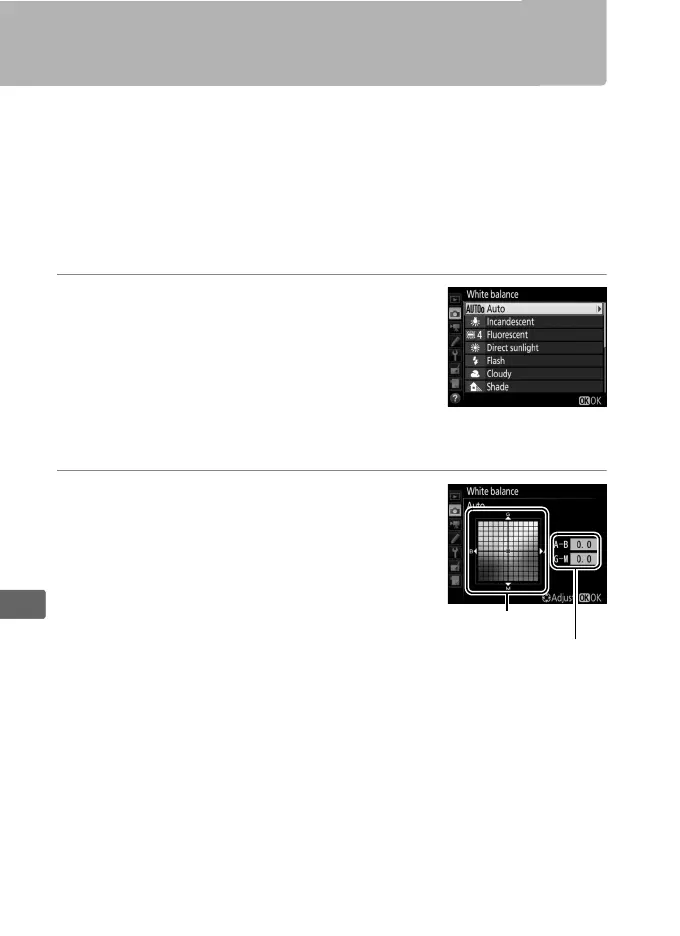
1 Display fine-tuning options.
Highlight a white balance option and
press 2 (if a sub-menu is displayed, select
the desired option and press 2 again to
display fine-tuning options; for
information on fine-tuning preset manual
white balance, see page 178).
2 Fine-tune white balance.
Use the multi selector to fine-tune white
balance.
White balance can be fine-
tuned on the amber (A)–blue (B) axis in
steps of 0.5 and the green (G)–magenta
(M) axis in steps of 0.25.
The horizontal
(amber-blue) axis corresponds to color
temperature, while the vertical (green-
magenta) axis has the similar effects to the corresponding
color compensation (CC) filters.
The horizontal axis is ruled in
increments equivalent to about 5 mired, the vertical axis in
increments of about 0.05 diffuse density units.



 To Next Page