23
s
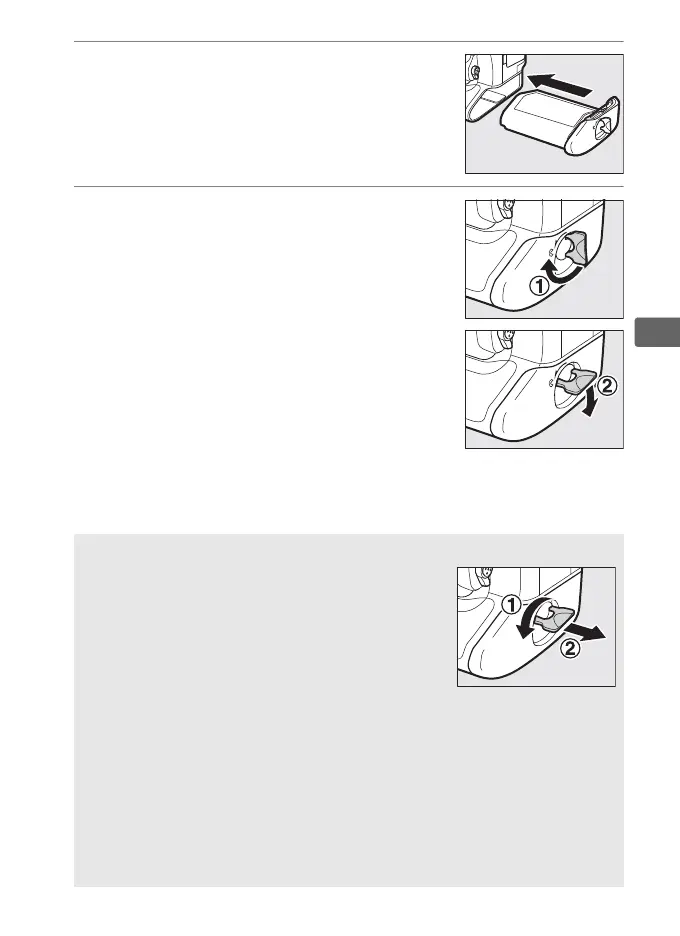
4 Insert the battery.
Insert the battery as shown at right.
5 Latch the cover.
To prevent the battery from becoming
dislodged during operation, rotate the
latch to the closed position and fold it
down as shown at right.
Be sure the
cover is securely latched.
A Removing the Battery
Before removing the battery, turn the camera off,
lift the battery-chamber cover latch, and turn it
to the open (A) position.
Note that the battery
may be hot after use; observe due caution when
removing the battery.
To prevent short-circuits,
replace the terminal cover when the battery is
not in use.
A EN-EL18a Rechargeable Li-ion Batteries
The supplied EN-EL18a shares information with compatible devices,
enabling the camera to show battery charge state in six levels (0 37).
The Battery info option in the setup menu details battery charge,
battery life, and the number of pictures taken since the battery was last
charged (0 386).
The battery can be recalibrated as necessary to
ensure that battery level continues to be reported accurately (0 468).



 To Next Page