PROPlus / PRO Series Automated Dispensing Systems
136 www.nordsonefd.com info@nordsonefd.com +1-401-431-7000 Sales and service of Nordson EFD dispensing systems are available worldwide.
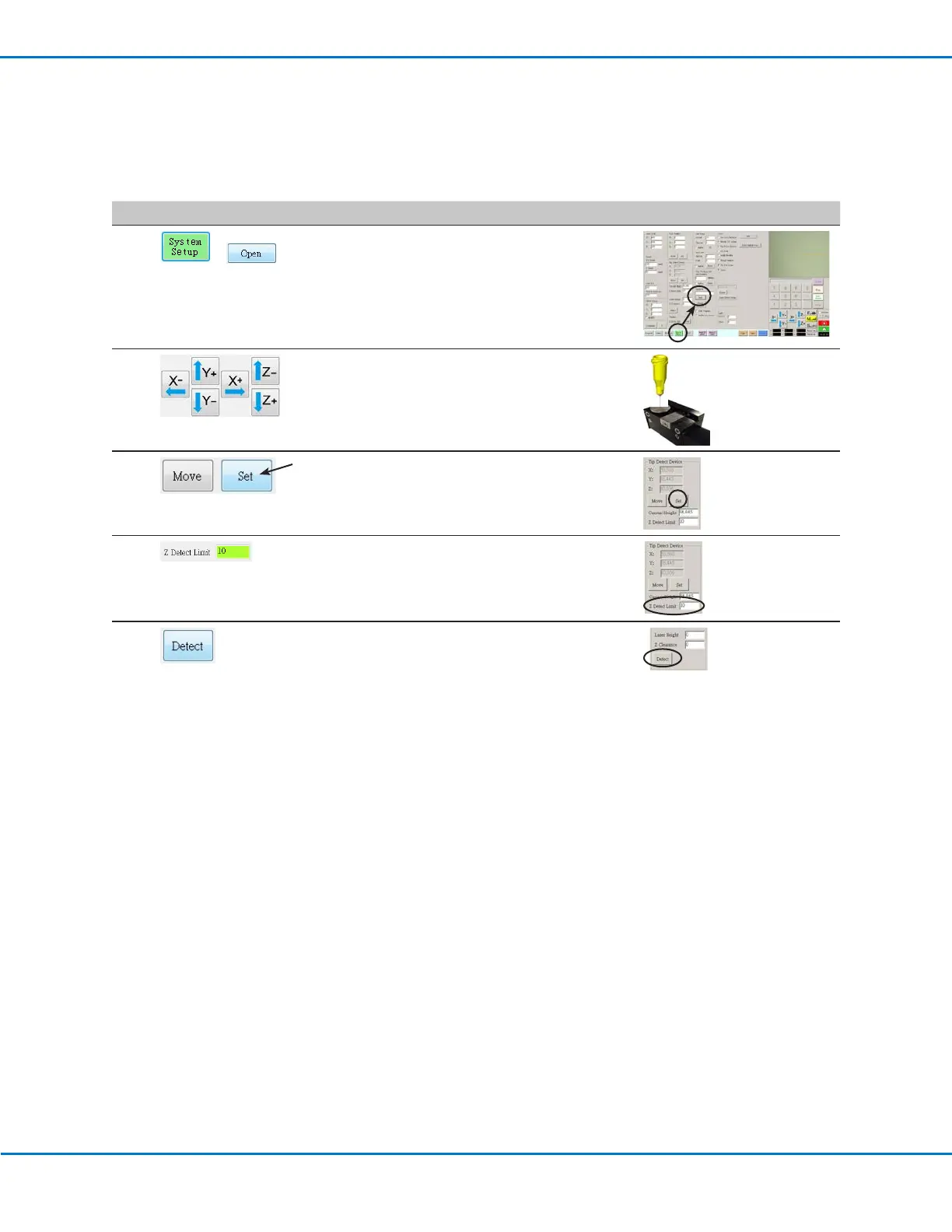
(Non-Laser Systems Only) Setting Up the Tip Detector
#
Click Step Reference Image
1
>
• Click SYSTEM SETUP > OPEN.
2
• Jog the tip until it is positioned about 2 mm
above the sensor on the tip detector.
3
• Under Tip Detect Device, click SET (next to
Move).
• Click YES/OK when prompted for
confirmations.
4
• Under Tip Detect Device, enter a value of
10(mm) Z Detect Limit.
• Click YES/OK when prompted for
confirmations.
5
• Under Tip Detect Device, click DETECT.
• Click YES/OK when prompted for
confirmations.
The robot raises the tip to Z = 0, then lowers
the tip onto the sensor to detect the tip
offset.
Appendix B, Non-Wizard Setup Procedures
(continued)



 To Next Page