PROPlus / PRO Series Automated Dispensing Systems
36 www.nordsonefd.com info@nordsonefd.com +1-401-431-7000 Sales and service of Nordson EFD dispensing systems are available worldwide.
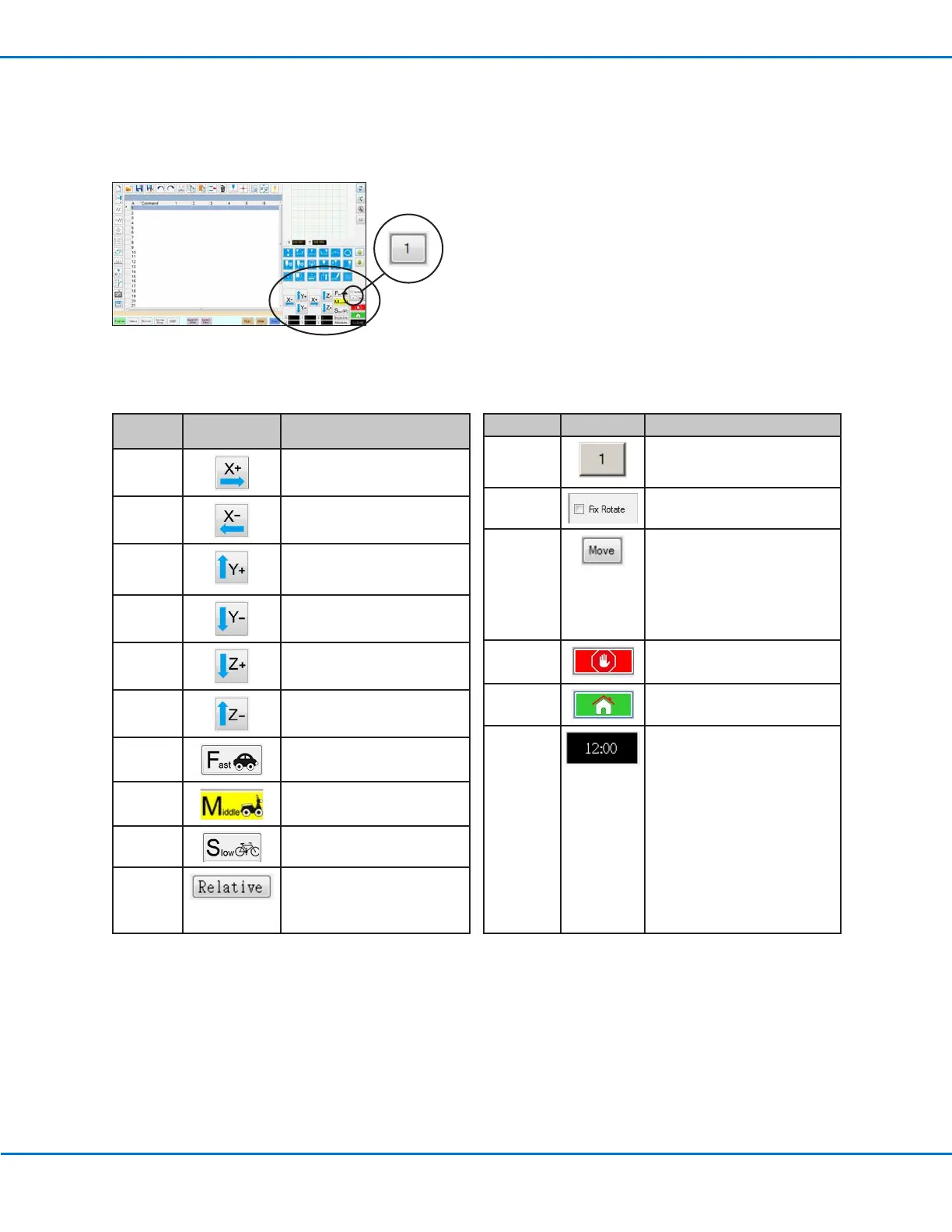
Navigation and Jogging Window
Use the icons on the navigation and jogging window to move the dispensing tip. Click the 1 button to change the
window to an alternate view that allows you to change the jog speed values. These windows also include an actual
time / cycle time display, a dispense actuation counter, and coordinate value displays.
Icon
Name
Icon Function
X+
Jogs the X axis to the right
X- Jogs the X axis to the left
Y+
Jogs the Y axis backward
(moves the fixture plate
forward)
Y-
Jogs the Y axis forward (moves
the fixture plate backward)
Z+
Jogs the Zaxis down
Z- Jogs the Zaxis up
Fast
Fastest jogging speed
Middle Medium jogging speed
Slow Slowest jogging speed
Relative Sets the origin relative to the
coordinates of the workpiece.
Coordinates are displayed next
to the button.
Both Views
Icon Name Icon Function
Jog button
toggle
Toggles the navigation and
jogging window between view1
and view 2
Fix rotate
Not applicable
Move
Opens the Move to Position
window, which allows you
to move the tip to specific
coordinates. Refer to “How
to Move the Tip to a Specific
Location” on page37 for
details.
Stop
Stops the robot
Home Sends the robot to the home
position (0, 0, 0)
Clock /
stopwatch
(Click the box to toggle the
display) Shows the time for
the time zone selected in the
DispenseMotion controller’s
operating system OR acts as a
stopwatch to time how long a
program runs.
When toggled to the stopwatch,
the time resets to 0:0:0. When
you select Run, the stopwatch
starts counting and then stops
counting when the program
finishes.
View 1 of the navigation and jogging window
View 1



 To Next Page