PROPlus / PRO Series Automated Dispensing Systems
145www.nordsonefd.com info@nordsonefd.com +1-401-431-7000 Sales and service of Nordson EFD dispensing systems are available worldwide.
AppendixD, QR Code Scanning Setup
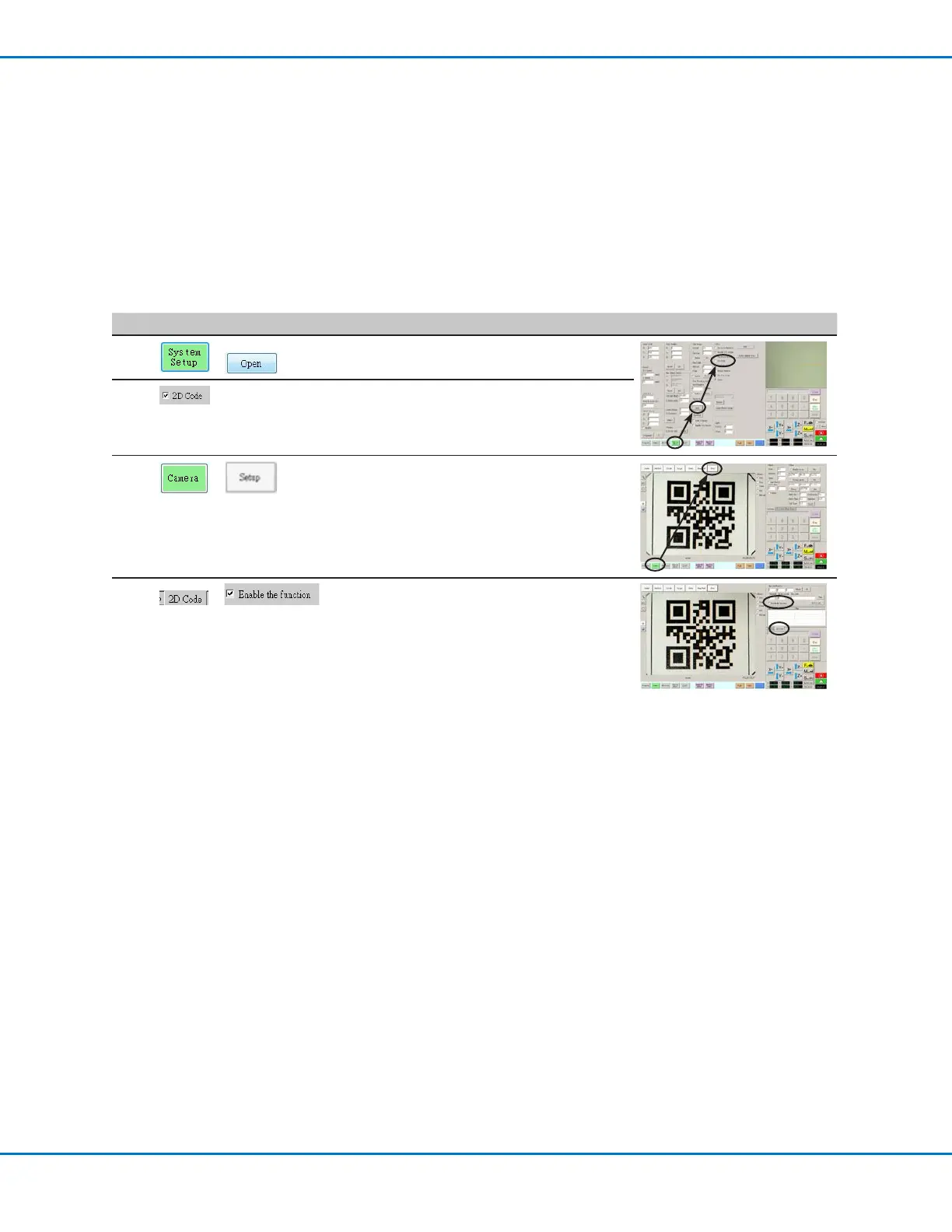
Programs can be executed using a QR code scan. For the system to execute a program using a QR code, the
following must occur:
• A QR code for the workpiece must be present on the robot fixture plate surface (for example, on the workpiece
itself or on the workpiece fixture).
• QR code scanning must be enabled and each QR code must be associated with a program. Refer to the
procedure below.
NOTE: Bar codes are not supported.
To Enable QR Code Scanning
# Click Step Reference Image
1
>
• Click the SYSTEM SETUP tab, then click
OPEN.
2
• Check 2D CODE to enable QR code
scanning.
3
>
• Click the CAMERA tab and then click SETUP
at the top of the Camera screen.
The camera setup fields appear.
4
>
• Click the 2D CODE tab to open the code
setup fields, then check ENABLE THE
FUNCTION.



 To Next Page